Cet article est aussi disponible en 🇫🇷 Français : Symfony sur Clever Cloud #7 : l’observabilité, ce que fournit la plateforme et ce qu’on ajoute.
Transparency. I am a Clever Cloud ambassador. I write this series independently, nobody on their side proofreads this series, and I allow myself the same criticism here as on any other platform.
Since the previous article, the demo application runs on several instances, with its workers and its Schedule. We know how to deploy it, but once in production, there is no way to tell which requests are slow or why a message fails.
Let’s see what Clever Cloud provides without any configuration, then what we need to add to the application: Prometheus metrics, which the platform can collect on its own, and OpenTelemetry traces, sent to an OpenObserve instance that is also hosted on Clever Cloud.
A link shortener to observe
Until now, the application had no visible feature, so there was not much to observe. Let’s add a link shortener: you paste a URL on the home page, the application replaces it with a six-character code, and /{code} redirects to the original page while counting the clicks.
#[Route('/', name: 'link_index', methods: ['GET', 'POST'])]
public function index(Request $request, LinkRepository $links, EntityManagerInterface $entityManager, MessageBusInterface $bus): Response
{
    $form = $this->createForm(ShortenLinkType::class);
    $form->handleRequest($request);

    if ($form->isSubmitted() && $form->isValid()) {
        $link = new Link(ByteString::fromRandom(6)->toString(), $form->get('url')->getData());
        $entityManager->persist($link);
        $entityManager->flush();

        $bus->dispatch(new FetchLinkTitle($link->getId()));

        return $this->redirectToRoute('link_index');
    }

    return $this->render('link/index.html.twig', [
        'form' => $form,
        'links' => $links->findLatest(),
    ]);
}

#[Route('/{code}', name: 'link_redirect', requirements: ['code' => '[a-zA-Z0-9]{6}'], methods: ['GET'])]
public function redirectToTarget(#[MapEntity(mapping: ['code' => 'code'])] Link $link, LinkRepository $links): RedirectResponse
{
    $links->countClick($link);

    return $this->redirect($link->getUrl());
}
To show a title rather than a raw URL in the list of links, the application fetches the target page. That site may be slow, or even unreachable, so this work goes to the async queue, and the Messenger worker already in place takes care of it:
#[AsMessageHandler]
final readonly class FetchLinkTitleHandler
{
    // Constructor: LinkRepository, EntityManagerInterface, HttpClientInterface, LoggerInterface

    public function __invoke(FetchLinkTitle $message): void
    {
        $link = $this->links->find($message->linkId);

        if (null === $link) {
            return;
        }

        $context = [
            'code' => $link->getCode(),
            'host' => parse_url($link->getUrl(), \PHP_URL_HOST),
        ];

        try {
            $html = $this->httpClient->request('GET', $link->getUrl(), ['timeout' => 5])->getContent();
        } catch (\Throwable $e) {
            $this->logger->warning('Impossible de récupérer la page cible.', $context + ['error' => $e->getMessage()]);

            throw $e;
        }

        $title = \Dom\HTMLDocument::createFromString($html, \LIBXML_NOERROR)->title;
        $link->setTitle('' !== $title ? mb_substr($title, 0, 255) : null);
        $this->entityManager->flush();

        $this->logger->info('Titre récupéré.', $context + ['title' => $link->getTitle()]);
    }
}\Dom\HTMLDocument, introduced in PHP 8.4, reads the title without any extra dependency. If the target site does not answer, the exception bubbles up, Messenger retries the message three times, if needed, then moves it to the failed transport. This behaviour comes from Messenger’s default configuration, all you need is the line that routes FetchLinkTitle to async.
With that, a single user action involves the controller, the database, the message queue, the worker and an external site: there is finally something to observe 😅
The tooling to install in the application
Before installing anything, let’s set the vocabulary.
A metric is a number measured at regular intervals: CPU usage, the number of links created, the average duration of requests. Put end to end, these measurements draw a curve, which shows a trend over time.
A trace tells the journey of a single request, or a single message, through the application. It is broken down into spans, and each span is a step of that journey (the HTTP request, a SQL query, the call to an external site), with its start, its duration and its error, if any. Spans are nested: the SQL query is the child of the HTTP request that triggered it.
On the code side, two building blocks are needed. For the metrics, the artprima/prometheus-metrics-bundle bundle exposes a route in the Prometheus format. For the traces, the traceway/opentelemetry-symfony bundle instruments Symfony in pure PHP: HTTP requests, Messenger, HttpClient, Doctrine, Twig… It relies on the OpenTelemetry for PHP SDK, to which you add the OTLP exporter.
composer require artprima/prometheus-metrics-bundle
composer require traceway/opentelemetry-symfony open-telemetry/exporter-otlp
The Flex recipes of both bundles come from the “contrib” repository: Composer asks whether it should apply them, answer yes. Among other things, they add the /metrics/prometheus route and a config/packages/open_telemetry.yaml file.
Note: OpenTelemetry also provides an official instrumentation. It relies on a PHP extension written in C, and its Doctrine instrumentation also traces the worker polling the queue, several queries per second, enough to drown everything else. The bundle from Traceway, an APM vendor, works with any OpenTelemetry-compatible tool, needs no extension, and only traces a SQL query when it belongs to an HTTP request or to the handling of a message.
The logs
Let’s start with what requires nothing. Everything the application writes to its standard output or error output ends up in the Clever Cloud logs, from the web server as well as from the workers. You read them in the console, or with the CLI:
clever logs -a symfony-clever-demo --since 1h --search "Impossible de récupérer"Let’s create a link to a site that does not exist. On each attempt, the worker writes:
WARNING [app] Impossible de récupérer la page cible. ["code" => "dJ5Dhe","host" => "ce-site-n-existe-pas.invalid","error" => "Could not resolve host: ce-site-n-existe-pas.invalid for \"https://ce-site-n-existe-pas.invalid/\"."]The array passed as the logger’s second argument, the context, is what makes this line useful. The link’s code and the failing domain are there, without having been slipped into the message, and a --search on the domain finds every attempt.
Note that the info level Titre récupéré. does not show up in production. The Monolog configuration set up by the recipe keeps the logs in memory and only writes them when an error occurs, along with everything that came before it. In the workers, its console handler also writes warnings as they come, and that is the handler that prints the line above.
These logs are kept for 7 days. To keep them longer, you need to send them elsewhere with a drain.
The metrics provided by the platform
On the metrics side, Clever Cloud collects out of the box the system metrics of every instance: CPU, memory, disk and network. The “Server metrics” card of the application’s overview sums up the last 24 hours, and the Metrics tab details them instance by instance. An icon on that card also opens preconfigured Grafana dashboards.
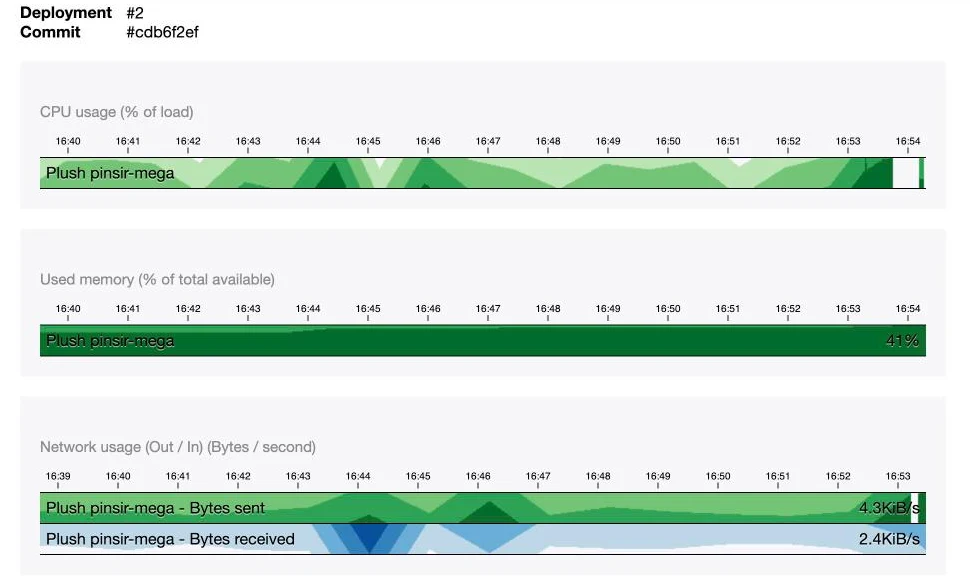
A Telegraf agent, present on every instance, collects most of these metrics and stores them in Warp 10, a time series database. The Metrics tab gives a read token valid for 5 days, and a link to Quantum, Warp 10’s online editor, with a first query already written. Its language, WarpScript, puts the arguments before the operation (1 2 + instead of 1 + 2), which is a bit puzzling at first 🤯. Don’t worry, a single line will be enough for what follows.
Business metrics with Prometheus
An instance’s CPU obviously does not tell you how many links were created today. For that, the application has to publish its own metrics, and Clever Cloud can collect them in the Prometheus format: its agent queries a URL of the instance every minute, and stores what it finds in Warp 10.
The bundle installed above already counts HTTP requests per route, per response code family, and their duration. Let’s add three business counters, in a small service:
final readonly class LinkMetrics
{
    public function __construct(
        private CollectorRegistry $registry,
    ) {
    }

    public function linkCreated(): void
    {
        $this->registry->getOrRegisterCounter('app', 'links_created_total', 'Liens créés')->inc();
    }

    public function linkVisited(): void
    {
        $this->registry->getOrRegisterCounter('app', 'link_redirects_total', 'Redirections servies')->inc();
    }

    public function titleFetchFailed(): void
    {
        $this->registry->getOrRegisterCounter('app', 'link_title_failures_total', 'Échecs de récupération du titre')->inc();
    }
}
The controller calls linkCreated() after the dispatch() and linkVisited() on every redirection, the handler calls titleFetchFailed() in its catch. The bundle does not make its registry injectable by type, one line in config/services.yaml takes care of that:
services:
    Prometheus\CollectorRegistry: '@prometheus_metrics_bundle.collector_registry'
These counters need a shared storage, because PHP forgets everything at the end of each request, and the worker does not run in the same process as the web server. The application already has a Redis add-on for its sessions, and the bundle accepts its URL:
artprima_prometheus_metrics:
    namespace: app
    storage: '%env(REDIS_URL)%'
Locally, a Redis container joins the compose.yaml, and the Symfony CLI exposes its URL in REDIS_URL.
The /metrics/prometheus route has no business being publicly accessible. Let’s protect it with a dedicated firewall, using HTTP Basic, and an in-memory user (good enough for the test):
security:
    password_hashers:
        Symfony\Component\Security\Core\User\InMemoryUser: 'plaintext'
        # ...
    providers:
        metrics_scraper:
            memory:
                users:
                    prometheus: { password: '%env(CC_METRICS_PROMETHEUS_PASSWORD)%', roles: [ROLE_METRICS] }
    firewalls:
        metrics:
            pattern: ^/metrics/
            stateless: true
            provider: metrics_scraper
            http_basic: ~
        # ...
    access_control:
        - { path: ^/metrics/, roles: ROLE_METRICS }
The password comes from CC_METRICS_PROMETHEUS_PASSWORD, the platform variable its agent authenticates with: a single value serves both sides. All that’s left is to tell the agent where to look, with four Clever variables:
clever env set -a symfony-clever-demo CC_METRICS_PROMETHEUS_PORT 8080
clever env set -a symfony-clever-demo CC_METRICS_PROMETHEUS_PATH /metrics/prometheus
clever env set -a symfony-clever-demo CC_METRICS_PROMETHEUS_USER prometheus
clever env set -a symfony-clever-demo CC_METRICS_PROMETHEUS_PASSWORD "$(openssl rand -hex 16)"
By default, the agent expects the metrics on port 9100, whereas the application answers on the instance’s port 8080. A minute after the deployment, the counters reach Warp 10, prefixed with prometheus.. In Quantum, replace the prefilled query with this one, keeping the token:
[ '<TOKEN>' '~prometheus.app_link.*' { 'app_id' 'app_xxxxxxxx-xxxx-xxxx-xxxx-xxxxxxxxxxxx' } NOW 1 h ] FETCH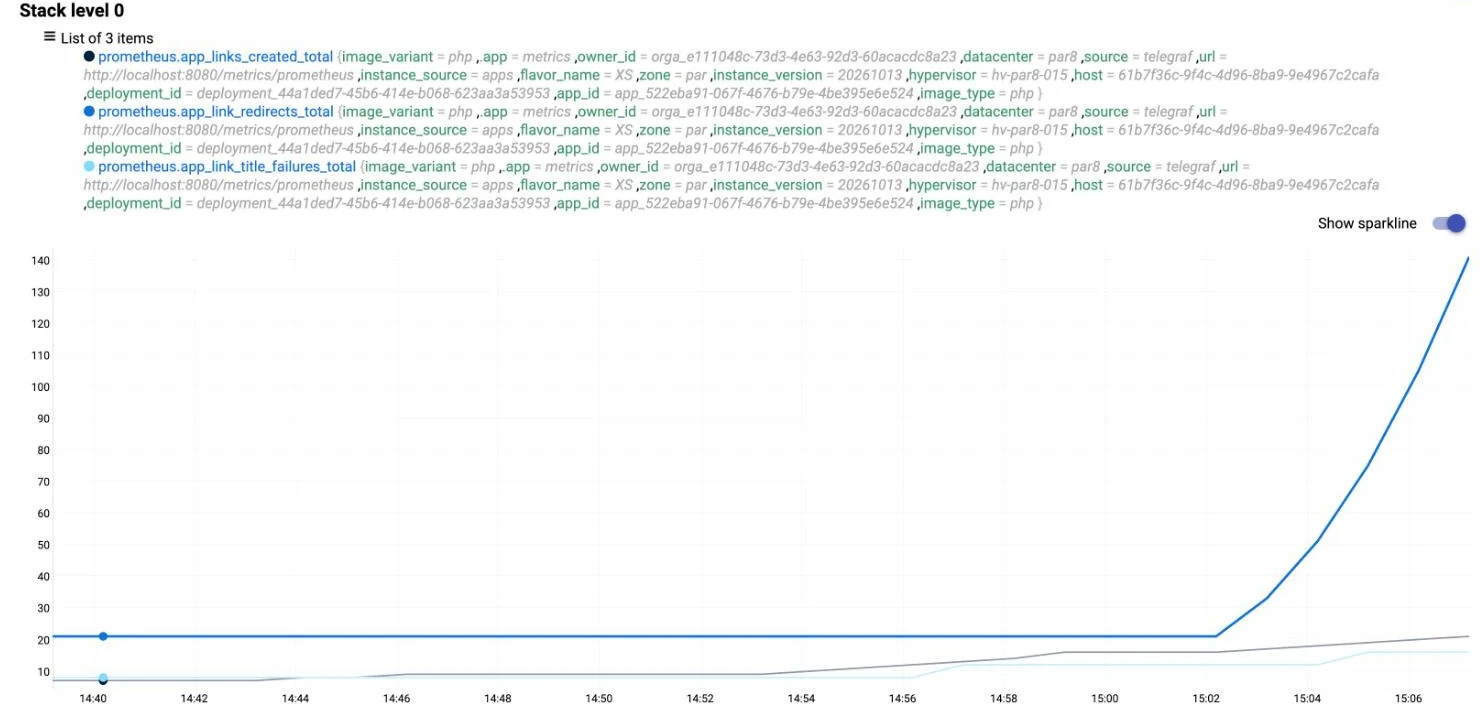
Keep two things in mind. The counters live in Redis, so every instance returns the same values: with two scalers, Warp 10 receives two identical series, and adding them up would count everything twice. And these metrics are only kept for 7 days, unlike the system metrics.
Following a request with OpenTelemetry
With the counters and the logs, we know that fetching the title fails, and on which site. To find out where the time of a slow operation goes, it has to be broken down into steps, and that is what traces do.
Clever Cloud does not store traces, so you need a tool to receive them. For this example, I picked OpenObserve, open source, which receives traces in the OpenTelemetry format and serves its interface on the same HTTP port. It can be hosted on Clever Cloud as a Docker application, built from a one-line Dockerfile, stored in clevercloud/openobserve.Dockerfile:
FROM openobserve/openobserve:v1.0.4O2_TOKEN="$(openssl rand -hex 16)"
clever create --type docker symfony-clever-o2 -a symfony-clever-o2
clever scale -a symfony-clever-o2 --flavor XS
clever env set -a symfony-clever-o2 CC_DOCKERFILE clevercloud/openobserve.Dockerfile
clever env set -a symfony-clever-o2 ZO_HTTP_PORT 8080
clever env set -a symfony-clever-o2 ZO_ROOT_USER_EMAIL you@example.com
clever env set -a symfony-clever-o2 ZO_ROOT_USER_PASSWORD 'A-Real-Password-42!'
clever env set -a symfony-clever-o2 ZO_ROOT_USER_TOKEN "$O2_TOKEN"
clever deploy -a symfony-clever-o2CC_DOCKERFILE points to that Dockerfile, and ZO_HTTP_PORT aligns OpenObserve with the 8080 port Clever Cloud expects. OpenObserve refuses to start if the password does not mix lowercase and uppercase letters, digits and special characters. The deployment takes about thirty seconds.
⚠ A Docker application has no access to FS Buckets: OpenObserve’s data is lost on every redeployment, ingestion token included. That’s why we pin it with ZO_ROOT_USER_TOKEN. For this example, losing the history is no big deal. For real use, OpenObserve can store its data in an S3 bucket, such as Cellar.
Now the application, with the standard OpenTelemetry variables:
# Same shell: O2_TOKEN is the one generated above
clever env set -a symfony-clever-demo OTEL_PHP_AUTOLOAD_ENABLED true
clever env set -a symfony-clever-demo OTEL_SERVICE_NAME symfony-clever-demo
clever env set -a symfony-clever-demo OTEL_EXPORTER_OTLP_PROTOCOL http/json
clever env set -a symfony-clever-demo OTEL_EXPORTER_OTLP_ENDPOINT https://<openobserve-domain>/api/default
clever env set -a symfony-clever-demo OTEL_EXPORTER_OTLP_HEADERS \
  "Authorization=Basic $(printf 'you@example.com:%s' "$O2_TOKEN" | openssl base64 -A)"
OTEL_PHP_AUTOLOAD_ENABLED starts the SDK, OTEL_SERVICE_NAME names the application in OpenObserve, and http/json saves us from installing Protobuf. The header encodes the e-mail address and the token set on OpenObserve.
One detail remains, specific to workers. The SDK does not send each span as soon as it ends, it accumulates them, and sends them when the process stops or when a later span ends. A web request stops quickly, but a worker runs for an hour: in my tests, the trace of an isolated message still had not arrived after several minutes. A listener on the worker events forces the export after each message:
#[AsEventListener(event: WorkerMessageHandledEvent::class)]
#[AsEventListener(event: WorkerMessageFailedEvent::class)]
final class FlushTracesListener
{
    public function __invoke(): void
    {
        $tracerProvider = Globals::tracerProvider();

        if ($tracerProvider instanceof TracerProviderInterface) {
            $tracerProvider->forceFlush();
        }
    }
}
TracerProviderInterface is the SDK’s one, OpenTelemetry\SDK\Trace\TracerProviderInterface. When the SDK is not started, Globals returns an empty implementation, and the listener does nothing.
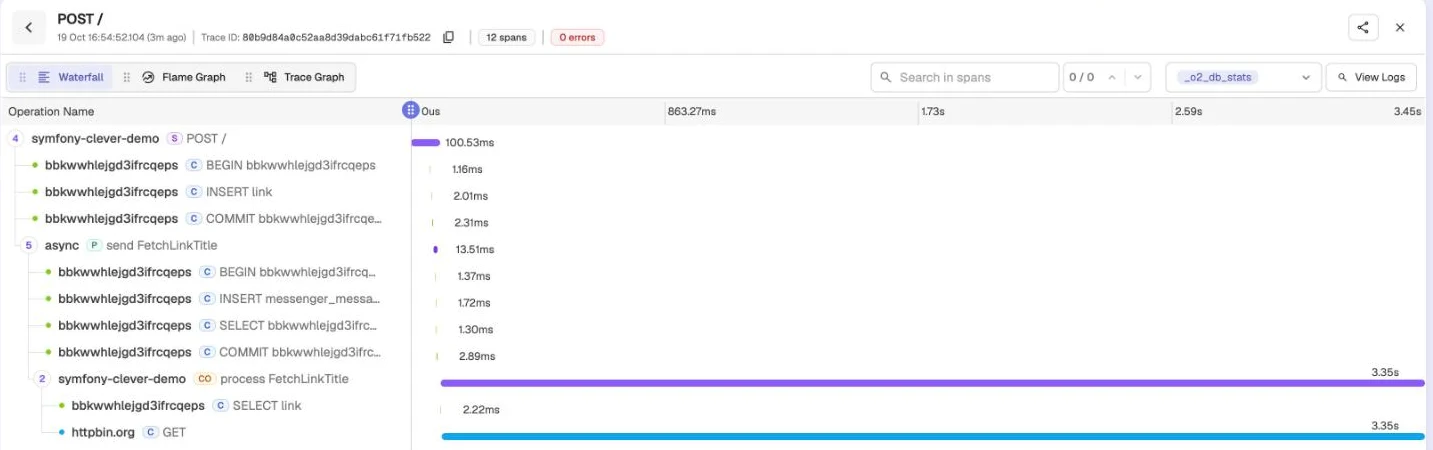
Let’s deploy, create a few links, and open OpenObserve’s Traces page. Each web request has its own trace, with the route, the response code, the duration and its SQL queries. Creating a link goes further: the bundle carries the trace context along with the message, and its handling by the worker joins the same trace. You can read the link’s INSERT, the message being sent, then, on the worker side, the call to the target site and, if the page has a title, the UPDATE that stores it. For a page that takes 3 seconds to answer (httpbin.org/delay/3), that call weighs 3.349 s out of the handling’s 3.352 s.
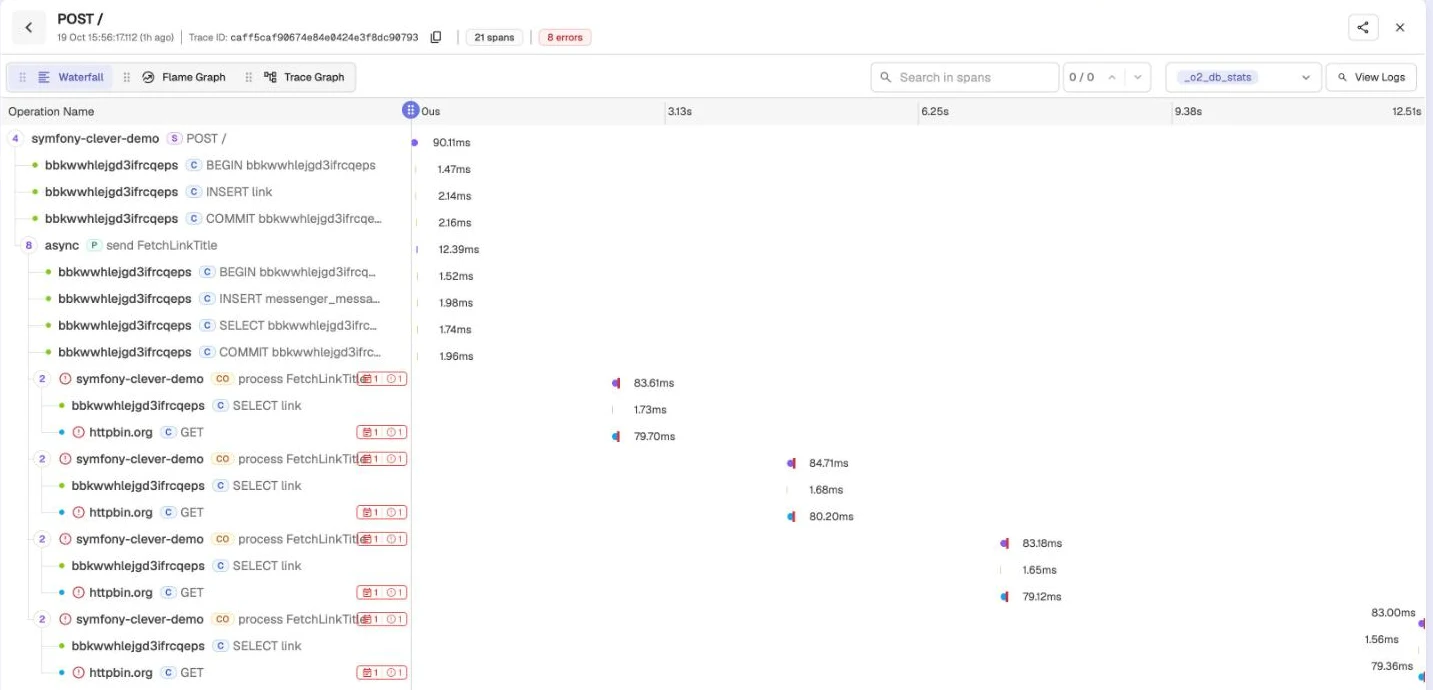
Failures stand out in red, with the exception message, and the retries join the trace as well.
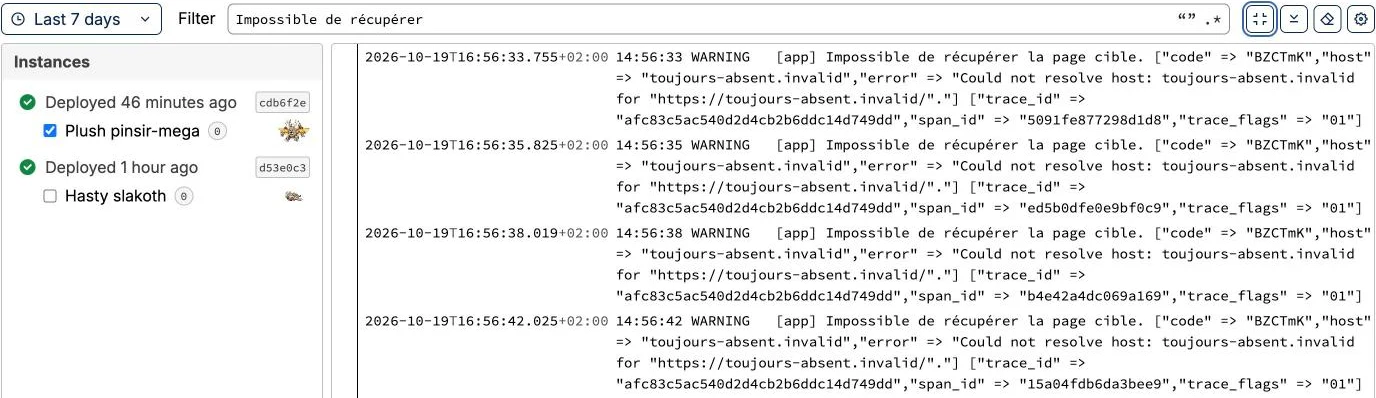
The logs benefit from it too. The bundle adds the current trace’s identifier to every line, and the warning seen earlier becomes:
WARNING [app] Impossible de récupérer la page cible. ["code" => "GfRCHE","host" => "toujours-absent.invalid","error" => "…"] ["trace_id" => "3a0122646a1e41c0c27c0da4bca45197","span_id" => "4b709fdcef432225","trace_flags" => "01"]Searching for that trace_id in OpenObserve brings back the link’s creation, the message being sent and every attempt. In the console’s Logs tab, the four attempts of the same message do carry the same trace_id.
Finally, every minute and on every instance, you will see the Telegraf agent’s request on /. The one it makes on /metrics/prometheus brings nothing, and the bundle’s configuration keeps it out of the traces, along with the healthcheck:
open_telemetry:
    traces:
        excluded_paths: ['/_profiler', '/_wdt', '/cc-health', '/metrics/']
Getting notified when things break
For deployments, Clever Cloud already warns you: its notifications send an e-mail by default on every successful or failed deployment, and can also call a webhook.
For the application itself, OpenObserve can trigger alerts on its own data. In its Reliability menu, first create a destination: Slack, Discord, Microsoft Teams or PagerDuty each have a ready-made template, and for Slack, the URL of an incoming webhook is enough. Then create an alert on the default traces stream, in SQL mode:
SELECT trace_id, operation_name FROM "default" WHERE span_status = 'ERROR'Checked every minute over the last five minutes, with a threshold of 1, it fires as soon as a span is in error. In my tests, the notification arrived less than a minute after the failure. Like the rest of OpenObserve’s data, destinations and alerts are lost on every redeployment of its application: write their configuration down somewhere.
Wrapping up
The link shortener now publishes its counters to Warp 10 and its traces to OpenObserve, and a link to an unreachable site triggers an alert in less than a minute.
Source code. The
07-observabilitybranch of the series repository holds the link shortener, its counters and the OpenTelemetry instrumentation. Locally,docker compose up -dalso starts Redis and an OpenObserve instance on http://localhost:5080. The commands to create the OpenObserve application and the variables to set on the web application are in the branch’sREADME.