# welcomattic, contenu intégral
> Blog de Mathieu Santostefano (welcomattic), Tech Expert chez SensioLabs,
> membre de la Symfony Core Team. Dump markdown des articles et talks.
---
# PHP2Shell : où trouver la version corrigée de PHP selon votre installation
URL: https://blog.welcomattic.com/blog/2026-10-22-php2shell-ou-trouver-la-version-corrigee-de-php/
Date: 2026-10-22
_This blog post is also available in 🇬🇧 English: [PHP2Shell: where to get the patched PHP for your setup](/blog/2026-10-22-php2shell-where-to-get-the-patched-php/)._
> - **EDIT du 23 octobre 2026, 10 h 19** :
> - Dépôts d'Ondřej Surý : correctif complet de PHP 5.6 à 7.1 sur packages.sury.org en amd64.
> - Rocky Linux 8 : PHP 8.2 corrigé.
> - Fedora 43 : PHP 8.4 corrigé.
> - Alpine 3.23 : PHP 8.3 à 8.5 corrigés.
> - Alpine 3.22 : PHP 8.2 à 8.4 corrigés.
> - Alpine 3.21 : PHP 8.2 et 8.3 corrigés.
> - SLES 16.0 : PHP 8.4 corrigé.
> - Docker Hardened Images : tag `dhi.io/php:8.5` corrigé.
> - thecodingmachine/php : PHP 7.4 à 8.1 corrigés en amd64.
> - Aikido : PHP 8.2, 8.4 et 8.5 corrigés. PHP 8.3 corrigé en apache et cli.
> - static-php-cli : binaires `bulk`, `gnu-bulk`, Windows `spc-min` et Windows `spc-max` corrigés, PHP 8.2 à 8.5.
> **TL;DR : l'essentiel, sans tout lire** (état au 23 octobre 2026, 10 h 19, heure de Paris)
>
> **Installez PHP 8.5.12, 8.4.27, 8.3.36 ou 8.2.35.** Ces versions corrigent les 2 failles.
>
> PHP 8.1 et les versions plus anciennes n'ont pas de nouvelle version officielle. Certaines distributions publient quand même un correctif grâce aux backports source fournis par l'équipe de PHP.
>
> | Plateforme | ✅ Corrigé | ⏳ Correctif en attente | ❌ Aucun correctif |
> |---|---|---|---|
> | **Sources officielles** | | | |
> | php.net, sources | PHP 8.2 à 8.5 | | |
> | php.net, Windows | PHP 8.2 à 8.5 | | |
> | **Linux** | | | |
> | Debian | Debian 13 : PHP 8.4 Debian 12 : PHP 8.2 Debian 9 à 11 : PHP 7.0 à 7.4, avec Debian ELTS | Debian testing : PHP 8.4 | |
> | Ubuntu | Ubuntu 22.04 à 26.10 : PHP 8.1 à 8.5 Ubuntu 14.04 à 20.04 : PHP 5.5 à 7.4, avec Ubuntu Pro | | |
> | Dépôts d'Ondřej Surý | PPA Ubuntu : PHP 5.6 à 8.5 packages.sury.org en amd64 : PHP 5.6 à 8.5 | packages.sury.org en arm64 | |
> | RHEL | RHEL 10 : PHP 8.3 et 8.4 RHEL 9 : PHP 8.0, 8.2 et 8.3 RHEL 8 : PHP 7.4 et 8.2 | RHEL 9 : PHP 8.4 | RHEL 9 : PHP 8.1 RHEL 8 : PHP 7.2, 7.3 et 8.0 |
> | AlmaLinux | Tous les flux : PHP 7.2 à 8.4 | | |
> | Rocky Linux | Les mêmes versions que RHEL | | |
> | Dépôt de Remi | PHP 7.4 à 8.5 | | PHP 5.6 à 7.3 |
> | Fedora | Fedora 44 : PHP 8.5 Fedora 43 : PHP 8.4 | | |
> | Amazon Linux | Amazon Linux 2023 : PHP 8.2 à 8.5 Amazon Linux 2, dépôt extra : PHP 8.2 | | Amazon Linux 2023 : PHP 8.1 Amazon Linux 2, dépôt principal : paquet `php` |
> | Alpine | Alpine 3.23, 3.24 et edge : PHP 8.3 à 8.5 Alpine 3.22 : PHP 8.2 à 8.4 Alpine 3.21 : PHP 8.2 et 8.3 | | Alpine 3.21 : PHP 8.4 |
> | Arch Linux | Paquet `php` : PHP 8.5 Paquet `php-legacy` : PHP 8.3 | | |
> | SUSE | SLES 16.0 : PHP 8.4 SLES 15 SP7 : PHP 8.3 openSUSE Tumbleweed : PHP 8.5 | | openSUSE Leap : toutes les versions |
> | **macOS** | | | |
> | Homebrew | PHP 8.2 à 8.5 | | PHP 8.1 |
> | Tap shivammathur/php | PHP 7.4, et PHP 8.1 à 8.5 | | |
> | MacPorts | PHP 8.2 à 8.5 | | PHP 7.4 et 8.1 |
> | **Docker** | | | |
> | Image officielle `php` | PHP 8.2 à 8.5 Variantes cli, apache, fpm et zts Debian trixie, Debian bookworm, Alpine 3.23 et Alpine 3.24 | | PHP 7.4, 8.0 et 8.1 |
> | serversideup/php | PHP 8.2 à 8.5, versions v5.0.2 et v4.5.3 | | |
> | Chainguard | PHP 8.2 à 8.5 | | |
> | Docker Hardened Images | PHP 8.2 à 8.5 | | |
> | webdevops/php | PHP 8.2 à 8.5 | | PHP 8.1 |
> | thecodingmachine/php | amd64 : PHP 7.4 à 8.5 | arm64 : PHP 7.4 à 8.5 | |
> | Bitnami | PHP 8.5, tag `bitnami/php-fpm:latest` | | PHP 8.2 à 8.4 : aucune image gratuite |
> | ubuntu/php | Ubuntu 24.04 : PHP 8.3 Ubuntu 26.04 : PHP 8.5 | | |
> | Red Hat UBI | PHP 7.4, 8.0, 8.2, 8.3 et 8.4 | | PHP 8.1 |
> | Aikido | PHP 8.2, 8.4 et 8.5 PHP 8.3 : tags `8.3.36-apache` et `8.3.36-cli` | | PHP 8.3 : tag fpm |
> | **FrankenPHP** | | | |
> | FrankenPHP 1.13.2 | Binaires statiques : PHP 8.5 Images Docker : PHP 8.2 à 8.5 Paquets deb, rpm et apk : PHP 8.2 à 8.5 | | |
> | **PaaS et serverless** | | | |
> | Clever Cloud | PHP 7.4 à 8.5 **Rien à faire.** | FrankenPHP 1.13.2. En attendant, FrankenPHP 1.13.1 tourne avec le PHP corrigé. | |
> | Upsun | PHP 7.4 à 8.5 **Rien à faire.** | | |
> | Heroku | PHP 8.2 à 8.5 PHP 8.1 sur la stack heroku-22 **Redéployez votre application.** | | |
> | Laravel Cloud | PHP 8.2 à 8.5 **Rien à faire.** | | |
> | Laravel Forge | **Cliquez sur « Update PHP » sur chaque serveur.** | | Serveurs Ubuntu 20.04 et plus anciens |
> | Laravel Vapor | PHP 8.2 à 8.5 **Redéployez votre application.** | | |
> | Bref | PHP 8.2 à 8.5 **Lancez `composer update bref/bref -W`, puis redéployez.** | | |
> | Google App Engine | **Rien à faire.** | | |
> | Google Cloud Run | **Redéployez les services déployés depuis les sources.** | | |
> | Azure App Service (Linux) | Canaux Latest et Standard : PHP 8.2 à 8.5 **Rien à faire.** | | |
> | **Outils de développement** | | | |
> | Symfony CLI | Symfony CLI utilise le PHP de votre machine. **Mettez à jour ce PHP.** | | |
> | Laravel Herd | | Mise à jour de PHP | |
> | Laravel Sail | amd64 : **lancez `sail build --no-cache`.** | arm64, par exemple un Mac avec puce Apple | |
> | DDEV | amd64 : contournement dans le billet de DDEV | arm64 | |
> | WampServer | PHP 8.2 à 8.5 | | |
> | static-php-cli | PHP 8.2 à 8.5 | | |
> | XAMPP | | | Les installeurs utilisent encore PHP 8.2.12. |
> | Lando | | | Les images `devwithlando/php` ne sont pas reconstruites. |
>
> **Avec Docker** : reconstruisez vos images avec `docker compose build --pull`.
>
> **Après la mise à jour** : redémarrez PHP-FPM, Apache et les workers.
>
> ⚠ **Sur Debian, Ubuntu et RHEL, `php -v` affiche l'ancien numéro, même avec le correctif.** Vérifiez la version du paquet. [Voir comment faire](#vérifier-ce-qui-tourne-vraiment).
Le 21 octobre, l'équipe de PHP a publié en urgence **PHP 8.5.12, 8.4.27, 8.3.36 et 8.2.35**. Ces versions corrigent deux failles baptisées PHP2Shell, [CVE-2026-109618](https://github.com/php/php-src/security/advisories/GHSA-w8hw-w9fx-j79w) et [CVE-2026-109619](https://github.com/php/php-src/security/advisories/GHSA-6wmf-4rv5-p3rp). Elles sont de type RCE (Remote Code Execution), et permettent d'exécuter du code à distance sans authentification (score CVSS v4.0 de 9.2).
D'après l'[avis de sécurité publié sur php.net](https://www.php.net/archive/2026.php#2026-10-21-5), **toute installation de PHP qui sert des requêtes web est exposée** : PHP-FPM, Apache avec mod_php, php-cgi, FrankenPHP ou LiteSpeed. Le risque est le plus élevé avec mod_php.
Chaque distribution, chaque image Docker et chaque plateforme publie le correctif à son rythme. J'ai rassemblé ici, cas par cas, où trouver la version corrigée.
**Dernière vérification : 23 octobre 2026, vers 10 h 19 (heure de Paris).** Dans les tableaux :
- ✅ le correctif est publié ;
- ⏳ le correctif est en attente ;
- ❌ aucun correctif n'est disponible à ce jour.
## Les versions à viser
| Branche | Version corrigée | Correctifs de sécurité jusqu'au |
|---|---|---|
| 8.5 | **8.5.12** | 31/12/2029 |
| 8.4 | **8.4.27** | 31/12/2028 |
| 8.3 | **8.3.36** | 31/12/2027 |
| 8.2 | **8.2.35** | 31/12/2026 |
| 8.1, 8.0, 7.4 | ❌ aucune nouvelle version | fin de vie |
**L'équipe de PHP ne publie plus de version pour 8.1 et les branches plus anciennes.** Elle a quand même publié des backports pour [7.4](https://github.com/php/php-src/tree/PHP-7.4-CVE-2026-109618-109619), [8.0](https://github.com/php/php-src/tree/PHP-8.0-CVE-2026-109618-109619) et [8.1](https://github.com/php/php-src/tree/PHP-8.1-CVE-2026-109618-109619). Ce sont des branches Git, sans tag ni archive à télécharger. Pour obtenir un paquet ou une image corrigée en 7.4, 8.0 ou 8.1, cherchez votre distribution ou votre image dans la suite de l'article.
> **Si vous êtes encore sur une version de PHP inférieure à 8.2, la meilleure manière de sécuriser vos installations est de mettre PHP à jour vers une version activement maintenue : 8.3 (fixes de sécurité uniquement), 8.4 ou 8.5.**
>
> ⚠ PHP 8.2 arrive en fin de vie le 31 décembre 2026.
> ⚠ **Sur Debian, Ubuntu, RHEL et leurs dérivés, `php -v` affiche toujours l'ancien numéro, même avec le correctif installé.** Ces distributions backportent le correctif dans leur propre version de PHP. Par exemple, sur Ubuntu 24.04, le paquet corrigé affiche PHP 8.3.6. Pour savoir si vous êtes à jour, comparez la version du paquet installé avec la colonne « Version corrigée » de la section [Linux](#linux). Les commandes qui affichent cette version sont dans la section [Vérifier ce qui tourne vraiment](#vérifier-ce-qui-tourne-vraiment).
## Si vous ne pouvez pas mettre à jour tout de suite
L'[avis de php.net](https://www.php.net/archive/2026.php#2026-10-21-5) liste des mesures d'atténuation. **Elles réduisent l'exposition, mais elles ne remplacent pas la mise à jour.** Voici les principales.
Contre CVE-2026-109619 :
- Mettez `session.upload_progress.enabled=0` dans le `php.ini`, le pool FPM ou la configuration du serveur. `ini_set()` et le fichier `.user.ini` de FPM ne suffisent pas.
- Sur PHP 8.5 uniquement, mettez aussi `fatal_error_backtraces=0`.
- **Redémarrez ensuite tous les workers PHP.**
Contre CVE-2026-109618 :
- Mettez `memory_limit=-1`, de façon que l'application ne puisse pas le modifier : avec `php_admin_value` dans le pool FPM ou dans la configuration Apache.
- Mettez un `post_max_size` bas : `8M`, ou `32M` si l'application reçoit des fichiers.
- N'utilisez pas `RLIMIT_AS` ni `RLIMIT_DATA` pour limiter la mémoire : ils peuvent déclencher la faille.
- Réduisez `max_input_nesting_level` (64 par défaut), par exemple à `16`, et `max_input_vars` (1000 par défaut), par exemple à `500`. Posez-les dans le `php.ini` ou le pool FPM : `ini_set()` ne peut pas les modifier. Vérifiez d'abord vos plus gros formulaires : au-delà de `max_input_vars`, PHP ignore les champs en trop.
**Ces deux limites restent utiles après la mise à jour** : d'après l'[avis GHSA-w8hw-w9fx-j79w](https://github.com/php/php-src/security/advisories/GHSA-w8hw-w9fx-j79w), elles réduisent le risque de saturation de la mémoire et de déni de service.
L'[avis de php.net](https://www.php.net/archive/2026.php#2026-10-21-5) recommande aussi des limites à poser au niveau du serveur web ou du proxy : taille des requêtes, nombre de champs, nombre de parties multipart et nombre d'en-têtes.
## Les sources officielles
Les archives sont sur la [page de téléchargement de php.net](https://www.php.net/downloads.php?source=Y). Chaque archive a son SHA256 et sa signature GPG (un fichier `.asc` à côté de l'archive). Les clés des release managers sont sur la [page des clés GPG](https://www.php.net/gpg-keys.php).
| Version | Archive | Tag GitHub |
|---|---|---|
| 8.5.12 | [php-8.5.12.tar.xz](https://www.php.net/distributions/php-8.5.12.tar.xz) | [php-8.5.12](https://github.com/php/php-src/releases/tag/php-8.5.12) |
| 8.4.27 | [php-8.4.27.tar.xz](https://www.php.net/distributions/php-8.4.27.tar.xz) | [php-8.4.27](https://github.com/php/php-src/releases/tag/php-8.4.27) |
| 8.3.36 | [php-8.3.36.tar.xz](https://www.php.net/distributions/php-8.3.36.tar.xz) | [php-8.3.36](https://github.com/php/php-src/releases/tag/php-8.3.36) |
| 8.2.35 | [php-8.2.35.tar.xz](https://www.php.net/distributions/php-8.2.35.tar.xz) | [php-8.2.35](https://github.com/php/php-src/releases/tag/php-8.2.35) |
Les archives existent aussi en `.tar.gz` et en `.tar.bz2` : il suffit de changer l'extension dans l'URL.
## Windows
Les builds Windows sont sur la [page de téléchargement Windows de php.net](https://www.php.net/downloads.php?os=windows). L'ancienne adresse windows.php.net redirige vers cette page.
Chaque version existe en Thread Safe et en Non Thread Safe, en x64 et en x86. Les SHA256 sont dans le fichier [sha256sum.txt](https://downloads.php.net/~windows/releases/sha256sum.txt). **Ces fichiers n'ont pas de signature GPG.**
| Version | Compilateur | Archive x64 Non Thread Safe |
|---|---|---|
| 8.5.12 | VS17 | [php-8.5.12-nts-Win32-vs17-x64.zip](https://downloads.php.net/~windows/releases/archives/php-8.5.12-nts-Win32-vs17-x64.zip) |
| 8.4.27 | VS17 | [php-8.4.27-nts-Win32-vs17-x64.zip](https://downloads.php.net/~windows/releases/archives/php-8.4.27-nts-Win32-vs17-x64.zip) |
| 8.3.36 | VS16 | [php-8.3.36-nts-Win32-vs16-x64.zip](https://downloads.php.net/~windows/releases/archives/php-8.3.36-nts-Win32-vs16-x64.zip) |
| 8.2.35 | VS16 | [php-8.2.35-nts-Win32-vs16-x64.zip](https://downloads.php.net/~windows/releases/archives/php-8.2.35-nts-Win32-vs16-x64.zip) |
Pour la version Thread Safe, retirez `-nts` du nom du fichier. Pour le 32 bits, remplacez `x64` par `x86`.
## Linux
Sur un serveur, passez par le gestionnaire de paquets de votre distribution. Les tableaux ci-dessous donnent la version du paquet corrigé, telle que `apt`, `dnf` ou `apk` l'affiche.
### Debian et Ubuntu
| Distribution | Paquet | Version corrigée | État |
|---|---|---|---|
| Debian 13 trixie | php8.4 | **8.4.27-1~deb13u1** | ✅ [DSA-6574-1](https://security-tracker.debian.org/tracker/DSA-6574-1) |
| Debian 12 bookworm | php8.2 | **8.2.35-1~deb12u1** | ✅ [DLA-4848-1](https://security-tracker.debian.org/tracker/DLA-4848-1) |
| Debian testing (forky) | php8.4 | 8.4.27-1 | ⏳ en attente de migration depuis sid ([suivi](https://tracker.debian.org/pkg/php8.4)) |
| Debian 11 bullseye | php7.4 | **7.4.33-1+deb11u14** | ✅ avec Debian ELTS, [ELA-1853-1](https://deb.freexian.com/extended-lts/tracker/ELA-1853-1) |
| Debian 10 buster | php7.3 | **7.3.31-1~deb10u16** | ✅ avec Debian ELTS, [ELA-1854-1](https://deb.freexian.com/extended-lts/tracker/ELA-1854-1) |
| Debian 9 stretch | php7.0 | **7.0.33-0+deb9u26** | ✅ avec Debian ELTS, [ELA-1855-1](https://deb.freexian.com/extended-lts/tracker/ELA-1855-1) |
| Ubuntu 26.10 | php8.5 | **8.5.9-0ubuntu2.1** | ✅ [USN-8948-1](https://ubuntu.com/security/notices/USN-8948-1) |
| Ubuntu 26.04 LTS | php8.5 | **8.5.4-0ubuntu1.5** | ✅ [USN-8948-1](https://ubuntu.com/security/notices/USN-8948-1) |
| Ubuntu 24.04 LTS | php8.3 | **8.3.6-0ubuntu0.24.04.13** | ✅ [USN-8948-1](https://ubuntu.com/security/notices/USN-8948-1) |
| Ubuntu 22.04 LTS | php8.1 | **8.1.2-1ubuntu2.28** | ✅ [USN-8948-1](https://ubuntu.com/security/notices/USN-8948-1) |
| Ubuntu 20.04 | php7.4 | **7.4.3-4ubuntu2.29+esm5** | ✅ avec Ubuntu Pro, [USN-8948-2](https://ubuntu.com/security/notices/USN-8948-2) |
| Ubuntu 18.04 | php7.2 | **7.2.24-0ubuntu0.18.04.17+esm14** | ✅ avec Ubuntu Pro, [USN-8948-2](https://ubuntu.com/security/notices/USN-8948-2) |
| Ubuntu 16.04 | php7.0 | **7.0.33-0ubuntu0.16.04.16+esm22** | ✅ avec Ubuntu Pro, [USN-8948-2](https://ubuntu.com/security/notices/USN-8948-2) |
| Ubuntu 14.04 | php5 | **5.5.9+dfsg-1ubuntu4.29+esm18** | ✅ avec Ubuntu Pro, [USN-8948-2](https://ubuntu.com/security/notices/USN-8948-2) |
Le suivi complet est sur le [security tracker de Debian](https://security-tracker.debian.org/tracker/CVE-2026-109618) et sur la [page CVE d'Ubuntu](https://ubuntu.com/security/CVE-2026-109618).
**Dépôts d'Ondřej Surý** ([packages.sury.org](https://packages.sury.org/php/) pour Debian, [ppa:ondrej/php](https://launchpad.net/~ondrej/+archive/ubuntu/php) pour Ubuntu) :
- ✅ toutes les branches de 5.6 à 8.5 ont été reconstruites le 21 octobre, y compris 7.4, 8.0 et 8.1 (par exemple 8.1.34-9 pour 8.1) ;
- ✅ le PPA Ubuntu est à jour sur toutes les architectures ;
- ✅ packages.sury.org est à jour en amd64 ;
- ⏳ packages.sury.org est encore en attente en arm64, pour la plupart des branches ;
- ✅ pour 5.6 à 7.1, un [ticket](https://codeberg.org/oerdnj/deb.sury.org/issues/146) signalait un correctif incomplet. Les builds complètes sont publiées sur packages.sury.org en amd64 : **5.6.40-105**, **7.0.33-93** et **7.1.33-81** ;
- ⚠ sur le PPA Ubuntu, seule la 5.6 a sa build complète (**5.6.40-105**). Les builds complètes de 7.0 et 7.1 ne sont pas encore publiées.
### Red Hat et ses dérivés
| Distribution | Flux | Version corrigée | État |
|---|---|---|---|
| RHEL 10 | php (8.3) | **php-8.3.36-1.el10_2** | ✅ [RHSA-2026:87070](https://access.redhat.com/errata/RHSA-2026:87070) |
| RHEL 10 | php8.4 | **php8.4-8.4.27-1.el10_2** | ✅ [RHSA-2026:87071](https://access.redhat.com/errata/RHSA-2026:87071) |
| RHEL 9 | php (8.0) | **php-8.0.30-8.el9_8.1** | ✅ [RHSA-2026:87151](https://access.redhat.com/errata/RHSA-2026:87151) |
| RHEL 9 | php:8.2 | **php-8.2.35-1** | ✅ [RHSA-2026:87072](https://access.redhat.com/errata/RHSA-2026:87072) |
| RHEL 9 | php:8.3 | **php-8.3.36-1** | ✅ [RHSA-2026:87079](https://access.redhat.com/errata/RHSA-2026:87079) |
| RHEL 9 | php:8.4 | | ⏳ en attente ([page CVE](https://access.redhat.com/security/cve/CVE-2026-109618)) |
| RHEL 9 | php:8.1 | | ❌ fin de vie, pas de correctif ([page CVE](https://access.redhat.com/security/cve/CVE-2026-109618)) |
| RHEL 8 | php:7.4 | **php-7.4.33-8** | ✅ [RHSA-2026:87080](https://access.redhat.com/errata/RHSA-2026:87080) |
| RHEL 8 | php:8.2 | **php-8.2.35-1** | ✅ [RHSA-2026:87073](https://access.redhat.com/errata/RHSA-2026:87073) |
| RHEL 8 | php:7.2, php:7.3, php:8.0 | | ❌ fin de vie, pas de correctif ([page CVE](https://access.redhat.com/security/cve/CVE-2026-109618)) |
- **Rocky Linux** : ✅ mêmes correctifs que RHEL, publiés le 22 octobre. Les avis portent les mêmes numéros, avec le préfixe RLSA au lieu de RHSA (par exemple [RLSA-2026:87071](https://errata.rockylinux.org/RLSA-2026:87071) pour php8.4 sur Rocky 10). ✅ php:8.2 sur Rocky 8 est corrigé en **php-8.2.35-1**, [RLSA-2026:87073](https://errata.rockylinux.org/RLSA-2026:87073).
- **AlmaLinux** : ✅ [tous les flux sont corrigés](https://almalinux.org/blog/2026-10-21-php2shell-cve-2026-109618-cve-2026-109619/), y compris ceux en fin de vie (7.2, 7.3, 8.0 et 8.1).
**Dépôt de Remi** ([rpms.remirepo.net](https://rpms.remirepo.net/)) :
- ✅ les dépôts EL8, EL9 et EL10 contiennent des paquets corrigés depuis le 21 octobre : 7.4.33-31, 8.0.30-21, 8.1.34-6, 8.2.35-1, 8.3.36-1, 8.4.27-1 et 8.5.12-1. Leur [changelog](https://git.remirepo.net/cgit/rpms/scl-php81/php.git/log/) cite les deux CVE ;
- ❌ les branches 5.6 à 7.3 ne sont pas corrigées ;
- ℹ l'avis de php.net annonçait que ce dépôt ne serait pas mis à jour le 21 octobre. Remi a publié un [billet](https://blog.remirepo.net/post/2026/10/22/PHP-version-8.2.35-8.3.36-8.4.27-8.5.12) le 22 octobre.
### Fedora, Amazon Linux, Alpine, Arch et SUSE
| Distribution | Paquet | Version corrigée | État |
|---|---|---|---|
| Fedora 44 | php | **8.5.12-1.fc44** | ✅ [FEDORA-2026-a9eba4bbc3](https://bodhi.fedoraproject.org/updates/FEDORA-2026-a9eba4bbc3) |
| Fedora 43 | php | **8.4.27-2.fc43** | ✅ [FEDORA-2026-d5f8446449](https://bodhi.fedoraproject.org/updates/FEDORA-2026-d5f8446449) |
| Amazon Linux 2023 | php8.2 | **8.2.35-1.amzn2023.0.1** | ✅ [ALAS2023-2026-3301](https://alas.aws.amazon.com/AL2023/ALAS2023-2026-3301.html) |
| Amazon Linux 2023 | php8.3 | **8.3.36-1.amzn2023.0.1** | ✅ [ALAS2023-2026-3302](https://alas.aws.amazon.com/AL2023/ALAS2023-2026-3302.html) |
| Amazon Linux 2023 | php8.4 | **8.4.27-1.amzn2023.0.1** | ✅ [ALAS2023-2026-3303](https://alas.aws.amazon.com/AL2023/ALAS2023-2026-3303.html) |
| Amazon Linux 2023 | php8.5 | **8.5.12-1.amzn2023.0.1** | ✅ [ALAS2023-2026-3304](https://alas.aws.amazon.com/AL2023/ALAS2023-2026-3304.html) |
| Amazon Linux 2023 | php8.1 | | ❌ pas de correctif prévu ([page CVE](https://explore.alas.aws.amazon.com/CVE-2026-109618.html)) |
| Amazon Linux 2 | php (extra php8.2) | **8.2.35-1.amzn2.0.1** | ✅ [ALAS2PHP8.2-2026-015](https://alas.aws.amazon.com/AL2/ALAS2PHP8.2-2026-015.html) |
| Amazon Linux 2 | php (dépôt principal) | | ❌ pas de correctif prévu ([page CVE](https://explore.alas.aws.amazon.com/CVE-2026-109618.html)) |
| Alpine edge et 3.24 | php83, php84, php85 | **8.3.36-r0, 8.4.27-r0, 8.5.12-r0** | ✅ [paquets 3.24](https://pkgs.alpinelinux.org/packages?name=php8*&branch=v3.24&repo=community&arch=x86_64), [paquets edge](https://pkgs.alpinelinux.org/packages?name=php8*&branch=edge&repo=community&arch=x86_64) |
| Alpine 3.23 | php83, php84, php85 | **8.3.36-r0, 8.4.27-r0, 8.5.12-r0** | ✅ [paquets 3.23](https://pkgs.alpinelinux.org/packages?name=php8*&branch=v3.23&repo=community&arch=x86_64) |
| Alpine 3.22 | php83, php84 | **8.3.36-r0, 8.4.27-r0** | ✅ [paquets 3.22](https://pkgs.alpinelinux.org/packages?name=php8*&branch=v3.22&repo=community&arch=x86_64) |
| Alpine 3.22 | php82 | **8.2.35-r0** | ✅ [paquets 3.22](https://pkgs.alpinelinux.org/packages?name=php82&branch=v3.22&repo=community&arch=x86_64) |
| Alpine 3.21 | php82 | **8.2.35-r0** | ✅ [paquets 3.21](https://pkgs.alpinelinux.org/packages?name=php82&branch=v3.21&repo=community&arch=x86_64) |
| Alpine 3.21 | php83 | **8.3.36-r0** | ✅ [paquets 3.21](https://pkgs.alpinelinux.org/packages?name=php83&branch=v3.21&repo=community&arch=x86_64) |
| Alpine 3.21 | php84 | | ❌ aucun correctif à ce jour |
| Arch Linux | php | **8.5.12-1** | ✅ [ASA-202610-1](https://security.archlinux.org/ASA-202610-1) |
| Arch Linux | php-legacy | **8.3.36-1** | ✅ [ASA-202610-2](https://security.archlinux.org/ASA-202610-2) |
| SLES 15 SP7 | php8 | **8.3.36** | ✅ [page CVE SUSE](https://www.suse.com/security/cve/CVE-2026-109618.html) |
| SLES 16.0 | php8 | **8.4.27** | ✅ [page CVE SUSE](https://www.suse.com/security/cve/CVE-2026-109618.html) |
| openSUSE Tumbleweed | php8 | **8.5.12** | ✅ [dépôt de mises à jour](https://download.opensuse.org/update/tumbleweed/x86_64/) |
| openSUSE Leap | php8, php7 | | ❌ aucun correctif à ce jour ([page CVE SUSE](https://www.suse.com/security/cve/CVE-2026-109618.html)) |
**Sur Amazon Linux 2023, un `dnf update` simple ne suffit pas** : la version du dépôt est figée. Les avis ALAS (par exemple [ALAS2023-2026-3303](https://alas.aws.amazon.com/AL2023/ALAS2023-2026-3303.html)) donnent la commande, ici pour le paquet php8.4 :
```bash
dnf update php8.4 --releasever 2023.12.20261021
```
Les images Docker officielles `php:*-alpine` n'utilisent pas les paquets Alpine : elles compilent PHP elles-mêmes. Elles sont déjà corrigées, voir la section [Les images Docker](#les-images-docker).
## macOS
| Gestionnaire | Paquet | Version corrigée | État |
|---|---|---|---|
| Homebrew | [php](https://formulae.brew.sh/formula/php) | **8.5.12** | ✅ |
| Homebrew | [php@8.4](https://formulae.brew.sh/formula/php@8.4) | **8.4.27** | ✅ |
| Homebrew | [php@8.3](https://formulae.brew.sh/formula/php@8.3) | **8.3.36** | ✅ |
| Homebrew | [php@8.2](https://formulae.brew.sh/formula/php@8.2) | **8.2.35** | ✅ |
| Homebrew | [php@8.1](https://formulae.brew.sh/formula/php@8.1) | | ❌ formule dépréciée, pas de correctif |
| Tap [shivammathur/php](https://github.com/shivammathur/homebrew-php) | php, php@8.4, php@8.3, php@8.2 | **8.5.12, 8.4.27, 8.3.36, 8.2.35** | ✅ |
| Tap [shivammathur/php](https://github.com/shivammathur/homebrew-php) | [php@8.1](https://github.com/shivammathur/homebrew-php/blob/main/Formula/php@8.1.rb), [php@7.4](https://github.com/shivammathur/homebrew-php/blob/main/Formula/php@7.4.rb) | **8.1.34_4, 7.4.33_16** (backport) | ✅ |
| MacPorts | [php85](https://ports.macports.org/port/php85/), [php84](https://ports.macports.org/port/php84/), [php83](https://ports.macports.org/port/php83/), [php82](https://ports.macports.org/port/php82/) | **8.5.12, 8.4.27, 8.3.36, 8.2.35** | ✅ |
| MacPorts | [php81](https://ports.macports.org/port/php81/), [php74](https://ports.macports.org/port/php74/) | | ❌ aucun correctif à ce jour |
Avec Homebrew, mettez à jour la formule que vous utilisez, par exemple `brew upgrade php@8.4`.
## Les images Docker
### L'image officielle php
L'[image officielle `php`](https://hub.docker.com/_/php) est ✅ reconstruite dans toutes ses variantes ([commit de mise à jour](https://github.com/docker-library/php/commit/f6048b5f6e3c2202ee082665a4ccc0d90de291a3)) :
- cli, apache, fpm et zts ;
- sur Debian trixie (la base par défaut) et sur Debian bookworm ;
- sur Alpine 3.23 et 3.24, sans la variante apache.
| Branche | Exemples de tags flottants | Exemples de tags précis |
|---|---|---|
| 8.5 | `8.5`, `8.5-fpm`, `8.5-apache`, `latest`, `fpm-alpine` | `8.5.12-fpm`, `8.5.12-zts-bookworm` |
| 8.4 | `8.4`, `8.4-fpm`, `8.4-fpm-alpine`, `8.4-zts` | `8.4.27-fpm`, `8.4.27-fpm-alpine3.24` |
| 8.3 | `8.3`, `8.3-fpm`, `8.3-fpm-alpine`, `8.3-apache` | `8.3.36-cli`, `8.3.36-apache-trixie` |
| 8.2 | `8.2`, `8.2-fpm`, `8.2-fpm-alpine`, `8.2-apache` | `8.2.35-fpm`, `8.2.35-cli-alpine3.23` |
**Votre tag pointe déjà sur la version corrigée, mais Docker utilise l'image qu'il a en cache.** Sur une machine ou un runner de CI qui a déjà téléchargé `php:8.4-fpm`, un `FROM php:8.4-fpm` reconstruit sur l'ancienne 8.4.26. Ajoutez `--pull` au build pour forcer le téléchargement de la nouvelle image :
```bash
docker compose build --pull
docker compose up -d
```
Si votre `compose.yaml` utilise l'image telle quelle, sans étape de build, lancez `docker compose pull` avant `docker compose up -d`.
D'autres cas gardent l'ancienne version :
- **Kubernetes** : avec `imagePullPolicy: IfNotPresent` et un tag flottant, chaque nœud garde l'image qu'il a en cache.
- **Image épinglée par digest** (`php:8.4-fpm@sha256:…`) : elle reste vulnérable. Remplacez le digest.
- **Image épinglée par version** (`php:8.4.26-fpm`) : elle reste vulnérable. Passez à `php:8.4.27-fpm`.
- **PHP 8.1, 8.0 et 7.4** : ❌ les tags `8.1`, `8.0` et `7.4` de l'image officielle ne sont plus reconstruits. Il n'existe pas d'image officielle corrigée pour ces versions.
### Les autres images
| Image | Tags | Source |
|---|---|---|
| [serversideup/php](https://hub.docker.com/r/serversideup/php) | ✅ v5.0.2 (`8.4-fpm-nginx`, `8.4.27-fpm-nginx-alpine`, etc.) et v4.5.3 (tags `*-v4.5.3`), de 8.2 à 8.5 | [release v5.0.2](https://github.com/serversideup/docker-php/releases/tag/v5.0.2), [release v4.5.3](https://github.com/serversideup/docker-php/releases/tag/v4.5.3) |
| Chainguard `cgr.dev/chainguard/php` | ✅ `latest` (8.5.12), `8.4.27`, `8.3.36`, `8.2.35`, avec leurs variantes `-fpm` et `-dev` | [fiche de l'image](https://images.chainguard.dev/directory/image/php/overview) |
| Docker Hardened Images `dhi.io/php` | ✅ `8.5.12`, `8.4.27`, `8.3.36`, `8.2.35` (Debian 13 et Alpine), y compris le tag `8.5` | [journal des tags](https://github.com/docker-hardened-images/log/tree/main/dhi/php) |
| [webdevops/php](https://hub.docker.com/r/webdevops/php), `php-nginx`, `php-apache` | ✅ `8.2` à `8.5` et leurs variantes `-alpine` ; ❌ `8.1` | [tags](https://hub.docker.com/r/webdevops/php/tags) |
| [thecodingmachine/php](https://hub.docker.com/r/thecodingmachine/php) | ✅ `7.4-v5-*` à `8.5-v5-*` en amd64, avec le backport pour 7.4, 8.0 et 8.1 ; ⏳ arm64 : aucune image corrigée à ce jour | [tags](https://hub.docker.com/r/thecodingmachine/php/tags), [page php2shell](https://github.com/thecodingmachine/docker-images-php/blob/v5/docs/security-php2shell.md) |
| [bitnami/php-fpm](https://hub.docker.com/r/bitnami/php-fpm) | ✅ `latest` (8.5.12) uniquement ; ❌ aucun tag gratuit pour 8.4, 8.3 et 8.2 | [Dockerfile](https://github.com/bitnami/containers/tree/main/bitnami/php-fpm) |
| [ubuntu/php](https://hub.docker.com/r/ubuntu/php) | ✅ `8.3-24.04` (paquet backporté 8.3.6-0ubuntu0.24.04.13) et `8.5-26.04_edge` | [USN-8948-1](https://ubuntu.com/security/notices/USN-8948-1) |
| Red Hat UBI | ✅ `ubi10/php-84`, `ubi10/php-83`, `ubi9/php-83`, `ubi9/php-82`, `ubi9/php-80`, `ubi8/php-82`, `ubi8/php-74` ; ❌ `ubi9/php-81` | [catalogue Red Hat](https://catalog.redhat.com/software/containers/search?q=php) |
| Aikido `aikido-dev/php` | ✅ `8.5.12`, `8.4.27` et `8.2.35`, avec leurs variantes cli, fpm, apache et alpine ; `8.3.36-apache` et `8.3.36-cli` pour 8.3 ; ❌ aucun tag 8.3.36 en fpm | [catalogue Aikido](https://images.aikido.dev/images/php) |
**Pour PHP 8.0 et 7.4**, j'ai trouvé deux sources d'images corrigées. Red Hat : `ubi9/php-80` et `ubi8/php-74`, avec les backports de RHEL. thecodingmachine : `8.0-v5-*` et `7.4-v5-*`, en amd64 uniquement.
## FrankenPHP
**Passez à [FrankenPHP 1.13.2](https://github.com/php/frankenphp/releases/tag/v1.13.2), sortie le 21 octobre.** Elle embarque les versions corrigées de PHP. Elle corrige aussi quatre failles propres à FrankenPHP.
⚠ Le tag Docker `1.13.1` a été reconstruit avec PHP 8.5.12. PHP y est corrigé, mais pas les quatre failles propres à FrankenPHP.
| Installation | Où la trouver | PHP embarqué |
|---|---|---|
| Binaire statique (Linux x86_64 et aarch64, macOS arm64, Windows) | assets de la [release v1.13.2](https://github.com/php/frankenphp/releases/tag/v1.13.2) | **8.5.12** uniquement |
| Image Docker | [dunglas/frankenphp](https://hub.docker.com/r/dunglas/frankenphp) : `1.13.2`, `php8.5`, `php8.4`, `php8.3`, `php8.2`, avec ou sans suffixe `-alpine` ou `-bookworm` | **8.5.12, 8.4.27, 8.3.36, 8.2.35** |
| Paquets [deb](https://frankenphp.dev/docs/#deb-packages), [rpm](https://frankenphp.dev/docs/#rpm-packages) et [apk](https://frankenphp.dev/docs/#apk-packages) | paquet `frankenphp` 1.13.2, un par branche de PHP | **8.2 à 8.5** |
| [Homebrew](https://frankenphp.dev/docs/#homebrew) | formule `dunglas/frankenphp` 1.13.2 | **8.5.12** |
- **Les binaires statiques n'existent qu'avec PHP 8.5.** Pour rester en 8.2, 8.3 ou 8.4 hors Docker, utilisez les paquets deb, rpm ou apk.
- **Mac Intel** : la release ne fournit plus de binaire. Il faut le [compiler](https://frankenphp.dev/docs/static/) avec `build-static.sh`.
Pour vérifier un binaire, lancez `frankenphp version`. La sortie doit indiquer FrankenPHP v1.13.2 et une version corrigée de PHP :
```console
$ frankenphp version
FrankenPHP v1.13.2 PHP 8.5.12 Caddy v2.11.7 …
```
## Les outils de développement
| Outil | Comment récupérer le PHP corrigé | État |
|---|---|---|
| [Symfony CLI](https://symfony.com/doc/current/setup/symfony_cli.html) | il utilise le PHP installé sur la machine : mettez à jour ce PHP | |
| [Laravel Herd](https://herd.laravel.com/docs/macos/getting-started/updates) | `herd php:update 8.5` (remplacez 8.5 par votre branche). La doc prévient que les versions de correctif peuvent arriver avec quelques jours de retard | ⏳ rien d'annoncé |
| [Laravel Sail](https://laravel.com/docs/12.x/sail) | `sail build --no-cache` (image Ubuntu 24.04 avec les dépôts d'Ondřej Surý) | ✅ amd64 ; ⏳ arm64 (Mac Apple Silicon) |
| [DDEV](https://ddev.com/blog/php2shell-what-ddev-users-need-to-know/) | contournement pour amd64 décrit dans le billet ; correctif complet attendu dans la v1.25.5 | ✅ amd64 avec le contournement ; ⏳ arm64 |
| Lando | images [devwithlando/php](https://hub.docker.com/r/devwithlando/php) non reconstruites, encore en 8.5.7 et 8.4.22 | ❌ |
| [WampServer](https://wampserver.aviatechno.net/) | addons PHP 8.2.35, 8.3.36, 8.4.27 et 8.5.12 | ✅ |
| [XAMPP](https://www.apachefriends.org/download.html) | installeurs encore en PHP 8.2.12 | ❌ |
| [static-php-cli](https://dl.static-php.dev/v3/php-bin/) | binaires `common`, `minimal` et `bulk` en 8.2.35, 8.3.36, 8.4.27 et 8.5.12, pour Linux et macOS ; binaires `gnu-bulk` en 8.2.35, 8.3.36, 8.4.27 et 8.5.12, pour Linux ; binaires Windows `spc-min` et `spc-max` en 8.2.35, 8.3.36, 8.4.27 et 8.5.12 | ✅ |
**RoadRunner, Swoole et OpenSwoole n'embarquent pas PHP.** Ils utilisent le PHP de la machine ou de l'image de base : c'est lui qu'il faut mettre à jour.
- ✅ l'image [phpswoole/swoole](https://hub.docker.com/r/phpswoole/swoole) a été reconstruite le 22 octobre ;
- ❌ l'image [openswoole/swoole](https://hub.docker.com/r/openswoole/swoole) n'a pas été reconstruite.
## Les plateformes PaaS et serverless
| Plateforme | Ce qu'il faut faire | Source |
|---|---|---|
| Clever Cloud | ✅ **Rien à faire** : redéploiement automatique en 8.2.35, 8.3.36, 8.4.27 et 8.5.12, et builds corrigés de 7.4.33, 8.0.30 et 8.1.34. FrankenPHP est en 1.13.1 avec PHP corrigé ; la 1.13.2 arrivera avec la prochaine mise à jour de l'image Clever Cloud | [changelog](https://www.clever.cloud/developers/changelog/2026/10-21-php-security-vulnerabilities/), [versions en fin de vie](https://www.clever.cloud/developers/changelog/2026/10-21-php-eol-security-backport/) |
| Upsun | ✅ **Rien à faire** : redéploiement automatique, y compris en 7.4, 8.0 et 8.1. Vérifiez avec `upsun ssh -- php -v` | [billet](https://developer.upsun.com/posts/releases/critical-php-security-patches-upsun-rollout-and-what-to-check) |
| Heroku | ✅ **Redéployez** l'application. Buildpack v298 : 8.2.35 à 8.5.12, et 8.1.34 backporté sur la stack heroku-22 | [changelog](https://devcenter.heroku.com/changelog-items/3845) |
| Laravel Cloud | ✅ **Rien à faire** : corrigé sans redéploiement | [billet](https://laravel.com/blog/php-critical-vulnerability-response-updates) |
| Laravel Forge | ✅ **Bouton « Update PHP »** sur chaque serveur, ou mise à jour en SSH ; ❌ Ubuntu 20.04 et versions antérieures ne peuvent pas être mis à jour | [billet](https://laravel.com/blog/php-critical-vulnerability-response-updates) |
| Laravel Vapor | ✅ **Redéployez** | [billet](https://laravel.com/blog/php-critical-vulnerability-response-updates) |
| Bref | ✅ **`composer update bref/bref -W`, puis redéployez.** Avec des images Docker : `docker build --pull`, puis redéployez | [billet](https://bref.sh/news/06-php-security-release-october-2026) |
| Google App Engine standard | ✅ **Rien à faire** : corrigé automatiquement | [release notes](https://cloud.google.com/appengine/docs/standard/php-gen2/release-notes) |
| Google Cloud Run | ✅ **Redéployez** les services déployés depuis les sources | [release notes](https://cloud.google.com/run/docs/release-notes) |
| Azure App Service (Linux) | ✅ **Rien à faire** sur les canaux Latest et Standard. Avec un conteneur personnalisé, mettez à jour votre image | [billet](https://azure.github.io/AppService/2026/10/21/php-critical-security-release-app-service-linux.html) |
## Vérifier ce qui tourne vraiment
**PHP installé depuis les sources, l'image Docker officielle, Homebrew, ou les dépôts d'Ondřej Surý ou de Remi** : `php -v` affiche directement le bon numéro. Comparez-le à la section [Les versions à viser](#les-versions-à-viser).
**PHP installé avec les paquets de Debian, Ubuntu, RHEL ou de leurs dérivés** : `php -v` affiche l'ancien numéro. Vérifiez plutôt la version du paquet installé. Elle doit être égale ou supérieure à la colonne « Version corrigée » de la section [Linux](#linux).
Sur Debian et Ubuntu :
```bash
dpkg-query -W 'php*-cli'
```
Sur RHEL, AlmaLinux, Rocky Linux et Fedora :
```bash
rpm -qa 'php*-cli*'
```
Sur Alpine :
```bash
apk info -v | grep php
```
**Dans un conteneur**, interrogez le PHP du conteneur en cours d'exécution, après avoir reconstruit l'image avec `--pull` (voir la section [Les images Docker](#les-images-docker)). Remplacez `php` par le nom de votre service Compose :
```bash
docker compose exec php php -v
```
**Enfin, redémarrez tout ce qui exécute PHP.** Un processus déjà lancé garde l'ancienne version en mémoire, même après la mise à jour du paquet :
- PHP-FPM et Apache, si votre gestionnaire de paquets ne l'a pas fait ;
- les workers Messenger et les autres commandes qui tournent en continu ;
- FrankenPHP en mode worker et RoadRunner.
## Pour aller plus loin
- Le [billet de la PHP Foundation](https://thephp.foundation/blog/2026/10/21/todays-php-security-release-and-how-were-strengthening-php-security/) raconte la fuite des détails des failles et la sortie avancée d'un jour.
- Les deux avis de sécurité, [GHSA-w8hw-w9fx-j79w](https://github.com/php/php-src/security/advisories/GHSA-w8hw-w9fx-j79w) et [GHSA-6wmf-4rv5-p3rp](https://github.com/php/php-src/security/advisories/GHSA-6wmf-4rv5-p3rp), donnent tous les détails techniques.
- Le CERT-FR a publié une [alerte en français](https://cert.cyber.gouv.fr/alerte/CERTFR-2026-ALE-014/).
---
# PHP2Shell: where to get the patched PHP for your setup
URL: https://blog.welcomattic.com/blog/2026-10-22-php2shell-where-to-get-the-patched-php/
Date: 2026-10-22
_Cet article est aussi disponible en 🇫🇷 Français : [PHP2Shell : où trouver la version corrigée de PHP selon votre installation](/blog/2026-10-22-php2shell-ou-trouver-la-version-corrigee-de-php/)._
> - **EDIT, October 23, 2026, 10:19**:
> - Ondřej Surý's repositories: complete fix for PHP 5.6 to 7.1 on packages.sury.org, on amd64.
> - Rocky Linux 8: PHP 8.2 fixed.
> - Fedora 43: PHP 8.4 fixed.
> - Alpine 3.23: PHP 8.3 to 8.5 fixed.
> - Alpine 3.22: PHP 8.2 to 8.4 fixed.
> - Alpine 3.21: PHP 8.2 and 8.3 fixed.
> - SLES 16.0: PHP 8.4 fixed.
> - Docker Hardened Images: `dhi.io/php:8.5` tag fixed.
> - thecodingmachine/php: PHP 7.4 to 8.1 fixed on amd64.
> - Aikido: PHP 8.2, 8.4 and 8.5 fixed. PHP 8.3 fixed for apache and cli.
> - static-php-cli: `bulk`, `gnu-bulk`, Windows `spc-min` and Windows `spc-max` binaries fixed, PHP 8.2 to 8.5.
> **TL;DR: the essentials** (status on October 23, 2026, 10:19, Paris time)
>
> **Install PHP 8.5.12, 8.4.27, 8.3.36 or 8.2.35.** These versions fix the 2 vulnerabilities.
>
> PHP 8.1 and older versions do not get a new official release. Some distributions publish a fix for them using source backports from PHP team.
>
> | Platform | ✅ Fixed | ⏳ Fix pending | ❌ No fix |
> |---|---|---|---|
> | **Official sources** | | | |
> | php.net, sources | PHP 8.2 to 8.5 | | |
> | php.net, Windows | PHP 8.2 to 8.5 | | |
> | **Linux** | | | |
> | Debian | Debian 13: PHP 8.4 Debian 12: PHP 8.2 Debian 9 to 11: PHP 7.0 to 7.4, with Debian ELTS | Debian testing: PHP 8.4 | |
> | Ubuntu | Ubuntu 22.04 to 26.10: PHP 8.1 to 8.5 Ubuntu 14.04 to 20.04: PHP 5.5 to 7.4, with Ubuntu Pro | | |
> | Ondřej Surý's repositories | Ubuntu PPA: PHP 5.6 to 8.5 packages.sury.org on amd64: PHP 5.6 to 8.5 | packages.sury.org on arm64 | |
> | RHEL | RHEL 10: PHP 8.3 and 8.4 RHEL 9: PHP 8.0, 8.2 and 8.3 RHEL 8: PHP 7.4 and 8.2 | RHEL 9: PHP 8.4 | RHEL 9: PHP 8.1 RHEL 8: PHP 7.2, 7.3 and 8.0 |
> | AlmaLinux | All streams: PHP 7.2 to 8.4 | | |
> | Rocky Linux | The same versions as RHEL | | |
> | Remi's repository | PHP 7.4 to 8.5 | | PHP 5.6 to 7.3 |
> | Fedora | Fedora 44: PHP 8.5 Fedora 43: PHP 8.4 | | |
> | Amazon Linux | Amazon Linux 2023: PHP 8.2 to 8.5 Amazon Linux 2, extra repository: PHP 8.2 | | Amazon Linux 2023: PHP 8.1 Amazon Linux 2, core repository: `php` package |
> | Alpine | Alpine 3.23, 3.24 and edge: PHP 8.3 to 8.5 Alpine 3.22: PHP 8.2 to 8.4 Alpine 3.21: PHP 8.2 and 8.3 | | Alpine 3.21: PHP 8.4 |
> | Arch Linux | `php` package: PHP 8.5 `php-legacy` package: PHP 8.3 | | |
> | SUSE | SLES 16.0: PHP 8.4 SLES 15 SP7: PHP 8.3 openSUSE Tumbleweed: PHP 8.5 | | openSUSE Leap: all versions |
> | **macOS** | | | |
> | Homebrew | PHP 8.2 to 8.5 | | PHP 8.1 |
> | shivammathur/php tap | PHP 7.4, and PHP 8.1 to 8.5 | | |
> | MacPorts | PHP 8.2 to 8.5 | | PHP 7.4 and 8.1 |
> | **Docker** | | | |
> | Official `php` image | PHP 8.2 to 8.5 cli, apache, fpm and zts variants Debian trixie, Debian bookworm, Alpine 3.23 and Alpine 3.24 | | PHP 7.4, 8.0 and 8.1 |
> | serversideup/php | PHP 8.2 to 8.5, versions v5.0.2 and v4.5.3 | | |
> | Chainguard | PHP 8.2 to 8.5 | | |
> | Docker Hardened Images | PHP 8.2 to 8.5 | | |
> | webdevops/php | PHP 8.2 to 8.5 | | PHP 8.1 |
> | thecodingmachine/php | amd64: PHP 7.4 to 8.5 | arm64: PHP 7.4 to 8.5 | |
> | Bitnami | PHP 8.5, `bitnami/php-fpm:latest` tag | | PHP 8.2 to 8.4: no free image |
> | ubuntu/php | Ubuntu 24.04: PHP 8.3 Ubuntu 26.04: PHP 8.5 | | |
> | Red Hat UBI | PHP 7.4, 8.0, 8.2, 8.3 and 8.4 | | PHP 8.1 |
> | Aikido | PHP 8.2, 8.4 and 8.5 PHP 8.3: `8.3.36-apache` and `8.3.36-cli` tags | | PHP 8.3: fpm tag |
> | **FrankenPHP** | | | |
> | FrankenPHP 1.13.2 | Static binaries: PHP 8.5 Docker images: PHP 8.2 to 8.5 deb, rpm and apk packages: PHP 8.2 to 8.5 | | |
> | **PaaS and serverless** | | | |
> | Clever Cloud | PHP 7.4 to 8.5 **No action necessary.** | FrankenPHP 1.13.2. Until then, FrankenPHP 1.13.1 runs with the fixed PHP. | |
> | Upsun | PHP 7.4 to 8.5 **No action necessary.** | | |
> | Heroku | PHP 8.2 to 8.5 PHP 8.1 on the heroku-22 stack **Redeploy your application.** | | |
> | Laravel Cloud | PHP 8.2 to 8.5 **No action necessary.** | | |
> | Laravel Forge | **Click "Update PHP" on each server.** | | Servers with Ubuntu 20.04 and older |
> | Laravel Vapor | PHP 8.2 to 8.5 **Redeploy your application.** | | |
> | Bref | PHP 8.2 to 8.5 **Run `composer update bref/bref -W`, then redeploy.** | | |
> | Google App Engine | **No action necessary.** | | |
> | Google Cloud Run | **Redeploy the services that you deployed from source.** | | |
> | Azure App Service (Linux) | Latest and Standard channels: PHP 8.2 to 8.5 **No action necessary.** | | |
> | **Development tools** | | | |
> | Symfony CLI | Symfony CLI uses the PHP of your machine. **Update this PHP.** | | |
> | Laravel Herd | | PHP update | |
> | Laravel Sail | amd64: **run `sail build --no-cache`.** | arm64, for example a Mac with an Apple chip | |
> | DDEV | amd64: workaround in the DDEV post | arm64 | |
> | WampServer | PHP 8.2 to 8.5 | | |
> | static-php-cli | PHP 8.2 to 8.5 | | |
> | XAMPP | | | The installers still use PHP 8.2.12. |
> | Lando | | | The `devwithlando/php` images are not rebuilt. |
>
> **With Docker**: rebuild your images with `docker compose build --pull`.
>
> **After the update**: restart PHP-FPM, Apache and the workers.
>
> ⚠ **On Debian, Ubuntu and RHEL, `php -v` shows the old number, also with the fix.** Check the package version. [See how](#check-what-is-really-running).
On October 21, the PHP team shipped emergency releases: **PHP 8.5.12, 8.4.27, 8.3.36 and 8.2.35**. They fix two vulnerabilities nicknamed PHP2Shell, [CVE-2026-109618](https://github.com/php/php-src/security/advisories/GHSA-w8hw-w9fx-j79w) and [CVE-2026-109619](https://github.com/php/php-src/security/advisories/GHSA-6wmf-4rv5-p3rp). They are RCE (Remote Code Execution) vulnerabilities, which allow running code remotely without authentication (CVSS v4.0 score of 9.2).
According to the [security advisory published on php.net](https://www.php.net/archive/2026.php#2026-10-21-5), **every PHP installation serving web requests is exposed**: PHP-FPM, Apache with mod_php, php-cgi, FrankenPHP or LiteSpeed. The risk is highest with mod_php.
Every distribution, Docker image and platform ships the fix at its own pace. I gathered here, case by case, where to find the patched version.
**Last checked: October 23, 2026, around 10:19 (Paris time).** In the tables:
- ✅ the fix is published;
- ⏳ the fix is pending;
- ❌ no fix is available so far.
## The versions to target
| Branch | Patched version | Security fixes until |
|---|---|---|
| 8.5 | **8.5.12** | 2029-12-31 |
| 8.4 | **8.4.27** | 2028-12-31 |
| 8.3 | **8.3.36** | 2027-12-31 |
| 8.2 | **8.2.35** | 2026-12-31 |
| 8.1, 8.0, 7.4 | ❌ no new release | end of life |
**The PHP team no longer ships releases for 8.1 and older branches.** It still published backports for [7.4](https://github.com/php/php-src/tree/PHP-7.4-CVE-2026-109618-109619), [8.0](https://github.com/php/php-src/tree/PHP-8.0-CVE-2026-109618-109619) and [8.1](https://github.com/php/php-src/tree/PHP-8.1-CVE-2026-109618-109619). These are Git branches, with no tag and no tarball to download. To get a patched package or image for 7.4, 8.0 or 8.1, look for your distribution or your image in the rest of the article.
> **If you are still on a PHP version lower than 8.2, the best way to secure your installations is to upgrade PHP to an actively maintained version: 8.3 (security fixes only), 8.4 or 8.5.**
>
> ⚠ PHP 8.2 reaches its end of life on December 31, 2026.
> ⚠ **On Debian, Ubuntu, RHEL and their derivatives, `php -v` still prints the old number, even with the fix installed.** These distributions backport the fix into their own PHP version. For instance, on Ubuntu 24.04, the patched package prints PHP 8.3.6. To know whether you are up to date, compare the installed package version with the "Patched version" column of the [Linux](#linux) section. The commands that print this version are in the [Check what is really running](#check-what-is-really-running) section.
## If you can't update right away
The [php.net advisory](https://www.php.net/archive/2026.php#2026-10-21-5) lists mitigations. **They reduce exposure, but they don't replace the update.** Here are the main ones.
Against CVE-2026-109619:
- Set `session.upload_progress.enabled=0` in `php.ini`, the FPM pool or the server configuration. `ini_set()` and FPM's `.user.ini` file are not enough.
- On PHP 8.5 only, also set `fatal_error_backtraces=0`.
- **Then restart every PHP worker.**
Against CVE-2026-109618:
- Set `memory_limit=-1`, in a way the application can't change: with `php_admin_value` in the FPM pool or in the Apache configuration.
- Set a low `post_max_size`: `8M`, or `32M` if the application receives file uploads.
- Don't use `RLIMIT_AS` or `RLIMIT_DATA` to limit memory: they can trigger the vulnerability.
- Lower `max_input_nesting_level` (64 by default), for instance to `16`, and `max_input_vars` (1000 by default), for instance to `500`. Set them in `php.ini` or the FPM pool: `ini_set()` can't change them. Check your largest forms first: beyond `max_input_vars`, PHP drops the extra fields.
**These two limits stay useful after the update**: according to the [GHSA-w8hw-w9fx-j79w advisory](https://github.com/php/php-src/security/advisories/GHSA-w8hw-w9fx-j79w), they reduce the risk of memory exhaustion and denial of service.
The [php.net advisory](https://www.php.net/archive/2026.php#2026-10-21-5) also recommends limits at the web server or proxy level: request size, number of fields, number of multipart parts and number of headers.
## The official sources
The tarballs are on [php.net's downloads page](https://www.php.net/downloads.php?source=Y). Each tarball has its SHA256 and its GPG signature (a `.asc` file next to the tarball). The release managers' keys are on the [GPG keys page](https://www.php.net/gpg-keys.php).
| Version | Tarball | GitHub tag |
|---|---|---|
| 8.5.12 | [php-8.5.12.tar.xz](https://www.php.net/distributions/php-8.5.12.tar.xz) | [php-8.5.12](https://github.com/php/php-src/releases/tag/php-8.5.12) |
| 8.4.27 | [php-8.4.27.tar.xz](https://www.php.net/distributions/php-8.4.27.tar.xz) | [php-8.4.27](https://github.com/php/php-src/releases/tag/php-8.4.27) |
| 8.3.36 | [php-8.3.36.tar.xz](https://www.php.net/distributions/php-8.3.36.tar.xz) | [php-8.3.36](https://github.com/php/php-src/releases/tag/php-8.3.36) |
| 8.2.35 | [php-8.2.35.tar.xz](https://www.php.net/distributions/php-8.2.35.tar.xz) | [php-8.2.35](https://github.com/php/php-src/releases/tag/php-8.2.35) |
The tarballs also exist as `.tar.gz` and `.tar.bz2`: just change the extension in the URL.
## Windows
Windows builds are on [php.net's Windows downloads page](https://www.php.net/downloads.php?os=windows). The old windows.php.net address redirects to this page.
Each version comes in Thread Safe and Non Thread Safe, x64 and x86. SHA256 sums are in the [sha256sum.txt](https://downloads.php.net/~windows/releases/sha256sum.txt) file. **These files have no GPG signature.**
| Version | Compiler | x64 Non Thread Safe archive |
|---|---|---|
| 8.5.12 | VS17 | [php-8.5.12-nts-Win32-vs17-x64.zip](https://downloads.php.net/~windows/releases/archives/php-8.5.12-nts-Win32-vs17-x64.zip) |
| 8.4.27 | VS17 | [php-8.4.27-nts-Win32-vs17-x64.zip](https://downloads.php.net/~windows/releases/archives/php-8.4.27-nts-Win32-vs17-x64.zip) |
| 8.3.36 | VS16 | [php-8.3.36-nts-Win32-vs16-x64.zip](https://downloads.php.net/~windows/releases/archives/php-8.3.36-nts-Win32-vs16-x64.zip) |
| 8.2.35 | VS16 | [php-8.2.35-nts-Win32-vs16-x64.zip](https://downloads.php.net/~windows/releases/archives/php-8.2.35-nts-Win32-vs16-x64.zip) |
For the Thread Safe build, remove `-nts` from the file name. For 32 bits, replace `x64` with `x86`.
## Linux
On a server, go through your distribution's package manager. The tables below give the version of the patched package, as `apt`, `dnf` or `apk` prints it.
### Debian and Ubuntu
| Distribution | Package | Patched version | Status |
|---|---|---|---|
| Debian 13 trixie | php8.4 | **8.4.27-1~deb13u1** | ✅ [DSA-6574-1](https://security-tracker.debian.org/tracker/DSA-6574-1) |
| Debian 12 bookworm | php8.2 | **8.2.35-1~deb12u1** | ✅ [DLA-4848-1](https://security-tracker.debian.org/tracker/DLA-4848-1) |
| Debian testing (forky) | php8.4 | 8.4.27-1 | ⏳ waiting for migration from sid ([tracker](https://tracker.debian.org/pkg/php8.4)) |
| Debian 11 bullseye | php7.4 | **7.4.33-1+deb11u14** | ✅ with Debian ELTS, [ELA-1853-1](https://deb.freexian.com/extended-lts/tracker/ELA-1853-1) |
| Debian 10 buster | php7.3 | **7.3.31-1~deb10u16** | ✅ with Debian ELTS, [ELA-1854-1](https://deb.freexian.com/extended-lts/tracker/ELA-1854-1) |
| Debian 9 stretch | php7.0 | **7.0.33-0+deb9u26** | ✅ with Debian ELTS, [ELA-1855-1](https://deb.freexian.com/extended-lts/tracker/ELA-1855-1) |
| Ubuntu 26.10 | php8.5 | **8.5.9-0ubuntu2.1** | ✅ [USN-8948-1](https://ubuntu.com/security/notices/USN-8948-1) |
| Ubuntu 26.04 LTS | php8.5 | **8.5.4-0ubuntu1.5** | ✅ [USN-8948-1](https://ubuntu.com/security/notices/USN-8948-1) |
| Ubuntu 24.04 LTS | php8.3 | **8.3.6-0ubuntu0.24.04.13** | ✅ [USN-8948-1](https://ubuntu.com/security/notices/USN-8948-1) |
| Ubuntu 22.04 LTS | php8.1 | **8.1.2-1ubuntu2.28** | ✅ [USN-8948-1](https://ubuntu.com/security/notices/USN-8948-1) |
| Ubuntu 20.04 | php7.4 | **7.4.3-4ubuntu2.29+esm5** | ✅ with Ubuntu Pro, [USN-8948-2](https://ubuntu.com/security/notices/USN-8948-2) |
| Ubuntu 18.04 | php7.2 | **7.2.24-0ubuntu0.18.04.17+esm14** | ✅ with Ubuntu Pro, [USN-8948-2](https://ubuntu.com/security/notices/USN-8948-2) |
| Ubuntu 16.04 | php7.0 | **7.0.33-0ubuntu0.16.04.16+esm22** | ✅ with Ubuntu Pro, [USN-8948-2](https://ubuntu.com/security/notices/USN-8948-2) |
| Ubuntu 14.04 | php5 | **5.5.9+dfsg-1ubuntu4.29+esm18** | ✅ with Ubuntu Pro, [USN-8948-2](https://ubuntu.com/security/notices/USN-8948-2) |
The full tracking is on [Debian's security tracker](https://security-tracker.debian.org/tracker/CVE-2026-109618) and [Ubuntu's CVE page](https://ubuntu.com/security/CVE-2026-109618).
**Ondřej Surý's repositories** ([packages.sury.org](https://packages.sury.org/php/) for Debian, [ppa:ondrej/php](https://launchpad.net/~ondrej/+archive/ubuntu/php) for Ubuntu):
- ✅ every branch from 5.6 to 8.5 was rebuilt on October 21, including 7.4, 8.0 and 8.1 (for instance 8.1.34-9 for 8.1);
- ✅ the Ubuntu PPA is up to date on every architecture;
- ✅ packages.sury.org is up to date on amd64;
- ⏳ packages.sury.org is still pending on arm64, for most branches;
- ✅ for 5.6 to 7.1, an [issue](https://codeberg.org/oerdnj/deb.sury.org/issues/146) reported an incomplete fix. The complete builds are published on packages.sury.org, on amd64: **5.6.40-105**, **7.0.33-93** and **7.1.33-81**;
- ⚠ on the Ubuntu PPA, only 5.6 has its complete build (**5.6.40-105**). The complete builds for 7.0 and 7.1 are not published yet.
### Red Hat and its derivatives
| Distribution | Stream | Patched version | Status |
|---|---|---|---|
| RHEL 10 | php (8.3) | **php-8.3.36-1.el10_2** | ✅ [RHSA-2026:87070](https://access.redhat.com/errata/RHSA-2026:87070) |
| RHEL 10 | php8.4 | **php8.4-8.4.27-1.el10_2** | ✅ [RHSA-2026:87071](https://access.redhat.com/errata/RHSA-2026:87071) |
| RHEL 9 | php (8.0) | **php-8.0.30-8.el9_8.1** | ✅ [RHSA-2026:87151](https://access.redhat.com/errata/RHSA-2026:87151) |
| RHEL 9 | php:8.2 | **php-8.2.35-1** | ✅ [RHSA-2026:87072](https://access.redhat.com/errata/RHSA-2026:87072) |
| RHEL 9 | php:8.3 | **php-8.3.36-1** | ✅ [RHSA-2026:87079](https://access.redhat.com/errata/RHSA-2026:87079) |
| RHEL 9 | php:8.4 | | ⏳ pending ([CVE page](https://access.redhat.com/security/cve/CVE-2026-109618)) |
| RHEL 9 | php:8.1 | | ❌ end of life, no fix ([CVE page](https://access.redhat.com/security/cve/CVE-2026-109618)) |
| RHEL 8 | php:7.4 | **php-7.4.33-8** | ✅ [RHSA-2026:87080](https://access.redhat.com/errata/RHSA-2026:87080) |
| RHEL 8 | php:8.2 | **php-8.2.35-1** | ✅ [RHSA-2026:87073](https://access.redhat.com/errata/RHSA-2026:87073) |
| RHEL 8 | php:7.2, php:7.3, php:8.0 | | ❌ end of life, no fix ([CVE page](https://access.redhat.com/security/cve/CVE-2026-109618)) |
- **Rocky Linux**: ✅ same fixes as RHEL, published on October 22. The advisories have the same numbers, with the RLSA prefix instead of RHSA (for instance [RLSA-2026:87071](https://errata.rockylinux.org/RLSA-2026:87071) for php8.4 on Rocky 10). ✅ php:8.2 on Rocky 8 is patched in **php-8.2.35-1**, [RLSA-2026:87073](https://errata.rockylinux.org/RLSA-2026:87073).
- **AlmaLinux**: ✅ [all streams are patched](https://almalinux.org/blog/2026-10-21-php2shell-cve-2026-109618-cve-2026-109619/), including end-of-life ones (7.2, 7.3, 8.0 and 8.1).
**Remi's repository** ([rpms.remirepo.net](https://rpms.remirepo.net/)):
- ✅ the EL8, EL9 and EL10 repositories have contained patched packages since October 21: 7.4.33-31, 8.0.30-21, 8.1.34-6, 8.2.35-1, 8.3.36-1, 8.4.27-1 and 8.5.12-1. Their [changelog](https://git.remirepo.net/cgit/rpms/scl-php81/php.git/log/) mentions both CVEs;
- ❌ branches 5.6 to 7.3 are not patched;
- ℹ the php.net advisory said this repository would not be updated on October 21. Remi published a [post](https://blog.remirepo.net/post/2026/10/22/PHP-version-8.2.35-8.3.36-8.4.27-8.5.12) on October 22.
### Fedora, Amazon Linux, Alpine, Arch and SUSE
| Distribution | Package | Patched version | Status |
|---|---|---|---|
| Fedora 44 | php | **8.5.12-1.fc44** | ✅ [FEDORA-2026-a9eba4bbc3](https://bodhi.fedoraproject.org/updates/FEDORA-2026-a9eba4bbc3) |
| Fedora 43 | php | **8.4.27-2.fc43** | ✅ [FEDORA-2026-d5f8446449](https://bodhi.fedoraproject.org/updates/FEDORA-2026-d5f8446449) |
| Amazon Linux 2023 | php8.2 | **8.2.35-1.amzn2023.0.1** | ✅ [ALAS2023-2026-3301](https://alas.aws.amazon.com/AL2023/ALAS2023-2026-3301.html) |
| Amazon Linux 2023 | php8.3 | **8.3.36-1.amzn2023.0.1** | ✅ [ALAS2023-2026-3302](https://alas.aws.amazon.com/AL2023/ALAS2023-2026-3302.html) |
| Amazon Linux 2023 | php8.4 | **8.4.27-1.amzn2023.0.1** | ✅ [ALAS2023-2026-3303](https://alas.aws.amazon.com/AL2023/ALAS2023-2026-3303.html) |
| Amazon Linux 2023 | php8.5 | **8.5.12-1.amzn2023.0.1** | ✅ [ALAS2023-2026-3304](https://alas.aws.amazon.com/AL2023/ALAS2023-2026-3304.html) |
| Amazon Linux 2023 | php8.1 | | ❌ no fix planned ([CVE page](https://explore.alas.aws.amazon.com/CVE-2026-109618.html)) |
| Amazon Linux 2 | php (extra php8.2) | **8.2.35-1.amzn2.0.1** | ✅ [ALAS2PHP8.2-2026-015](https://alas.aws.amazon.com/AL2/ALAS2PHP8.2-2026-015.html) |
| Amazon Linux 2 | php (core repository) | | ❌ no fix planned ([CVE page](https://explore.alas.aws.amazon.com/CVE-2026-109618.html)) |
| Alpine edge and 3.24 | php83, php84, php85 | **8.3.36-r0, 8.4.27-r0, 8.5.12-r0** | ✅ [3.24 packages](https://pkgs.alpinelinux.org/packages?name=php8*&branch=v3.24&repo=community&arch=x86_64), [edge packages](https://pkgs.alpinelinux.org/packages?name=php8*&branch=edge&repo=community&arch=x86_64) |
| Alpine 3.23 | php83, php84, php85 | **8.3.36-r0, 8.4.27-r0, 8.5.12-r0** | ✅ [3.23 packages](https://pkgs.alpinelinux.org/packages?name=php8*&branch=v3.23&repo=community&arch=x86_64) |
| Alpine 3.22 | php83, php84 | **8.3.36-r0, 8.4.27-r0** | ✅ [3.22 packages](https://pkgs.alpinelinux.org/packages?name=php8*&branch=v3.22&repo=community&arch=x86_64) |
| Alpine 3.22 | php82 | **8.2.35-r0** | ✅ [3.22 packages](https://pkgs.alpinelinux.org/packages?name=php82&branch=v3.22&repo=community&arch=x86_64) |
| Alpine 3.21 | php82 | **8.2.35-r0** | ✅ [3.21 packages](https://pkgs.alpinelinux.org/packages?name=php82&branch=v3.21&repo=community&arch=x86_64) |
| Alpine 3.21 | php83 | **8.3.36-r0** | ✅ [3.21 packages](https://pkgs.alpinelinux.org/packages?name=php83&branch=v3.21&repo=community&arch=x86_64) |
| Alpine 3.21 | php84 | | ❌ no fix so far |
| Arch Linux | php | **8.5.12-1** | ✅ [ASA-202610-1](https://security.archlinux.org/ASA-202610-1) |
| Arch Linux | php-legacy | **8.3.36-1** | ✅ [ASA-202610-2](https://security.archlinux.org/ASA-202610-2) |
| SLES 15 SP7 | php8 | **8.3.36** | ✅ [SUSE CVE page](https://www.suse.com/security/cve/CVE-2026-109618.html) |
| SLES 16.0 | php8 | **8.4.27** | ✅ [SUSE CVE page](https://www.suse.com/security/cve/CVE-2026-109618.html) |
| openSUSE Tumbleweed | php8 | **8.5.12** | ✅ [update repository](https://download.opensuse.org/update/tumbleweed/x86_64/) |
| openSUSE Leap | php8, php7 | | ❌ no fix so far ([SUSE CVE page](https://www.suse.com/security/cve/CVE-2026-109618.html)) |
**On Amazon Linux 2023, a plain `dnf update` is not enough**: the repository version is locked. The ALAS advisories (for instance [ALAS2023-2026-3303](https://alas.aws.amazon.com/AL2023/ALAS2023-2026-3303.html)) give the command, here for the php8.4 package:
```bash
dnf update php8.4 --releasever 2023.12.20261021
```
The official `php:*-alpine` Docker images don't use Alpine packages: they compile PHP themselves. They are already patched, see the [Docker images](#docker-images) section.
## macOS
| Package manager | Package | Patched version | Status |
|---|---|---|---|
| Homebrew | [php](https://formulae.brew.sh/formula/php) | **8.5.12** | ✅ |
| Homebrew | [php@8.4](https://formulae.brew.sh/formula/php@8.4) | **8.4.27** | ✅ |
| Homebrew | [php@8.3](https://formulae.brew.sh/formula/php@8.3) | **8.3.36** | ✅ |
| Homebrew | [php@8.2](https://formulae.brew.sh/formula/php@8.2) | **8.2.35** | ✅ |
| Homebrew | [php@8.1](https://formulae.brew.sh/formula/php@8.1) | | ❌ deprecated formula, no fix |
| [shivammathur/php](https://github.com/shivammathur/homebrew-php) tap | php, php@8.4, php@8.3, php@8.2 | **8.5.12, 8.4.27, 8.3.36, 8.2.35** | ✅ |
| [shivammathur/php](https://github.com/shivammathur/homebrew-php) tap | [php@8.1](https://github.com/shivammathur/homebrew-php/blob/main/Formula/php@8.1.rb), [php@7.4](https://github.com/shivammathur/homebrew-php/blob/main/Formula/php@7.4.rb) | **8.1.34_4, 7.4.33_16** (backport) | ✅ |
| MacPorts | [php85](https://ports.macports.org/port/php85/), [php84](https://ports.macports.org/port/php84/), [php83](https://ports.macports.org/port/php83/), [php82](https://ports.macports.org/port/php82/) | **8.5.12, 8.4.27, 8.3.36, 8.2.35** | ✅ |
| MacPorts | [php81](https://ports.macports.org/port/php81/), [php74](https://ports.macports.org/port/php74/) | | ❌ no fix so far |
With Homebrew, upgrade the formula you use, for instance `brew upgrade php@8.4`.
## Docker images
### The official php image
The [official `php` image](https://hub.docker.com/_/php) is ✅ rebuilt in all its variants ([update commit](https://github.com/docker-library/php/commit/f6048b5f6e3c2202ee082665a4ccc0d90de291a3)):
- cli, apache, fpm and zts;
- on Debian trixie (the default base) and on Debian bookworm;
- on Alpine 3.23 and 3.24, without the apache variant.
| Branch | Floating tag examples | Precise tag examples |
|---|---|---|
| 8.5 | `8.5`, `8.5-fpm`, `8.5-apache`, `latest`, `fpm-alpine` | `8.5.12-fpm`, `8.5.12-zts-bookworm` |
| 8.4 | `8.4`, `8.4-fpm`, `8.4-fpm-alpine`, `8.4-zts` | `8.4.27-fpm`, `8.4.27-fpm-alpine3.24` |
| 8.3 | `8.3`, `8.3-fpm`, `8.3-fpm-alpine`, `8.3-apache` | `8.3.36-cli`, `8.3.36-apache-trixie` |
| 8.2 | `8.2`, `8.2-fpm`, `8.2-fpm-alpine`, `8.2-apache` | `8.2.35-fpm`, `8.2.35-cli-alpine3.23` |
**Your tag already points to the patched version, but Docker uses the image it has in cache.** On a machine or a CI runner that already downloaded `php:8.4-fpm`, a `FROM php:8.4-fpm` rebuilds on the old 8.4.26. Add `--pull` to the build to force downloading the new image:
```bash
docker compose build --pull
docker compose up -d
```
If your `compose.yaml` uses the image as is, without a build step, run `docker compose pull` before `docker compose up -d`.
Other cases keep the old version:
- **Kubernetes**: with `imagePullPolicy: IfNotPresent` and a floating tag, each node keeps the image it has in cache.
- **Image pinned by digest** (`php:8.4-fpm@sha256:…`): it stays vulnerable. Replace the digest.
- **Image pinned by version** (`php:8.4.26-fpm`): it stays vulnerable. Move to `php:8.4.27-fpm`.
- **PHP 8.1, 8.0 and 7.4**: ❌ the `8.1`, `8.0` and `7.4` tags of the official image are no longer rebuilt. There is no patched official image for these versions.
### Other images
| Image | Tags | Source |
|---|---|---|
| [serversideup/php](https://hub.docker.com/r/serversideup/php) | ✅ v5.0.2 (`8.4-fpm-nginx`, `8.4.27-fpm-nginx-alpine`, etc.) and v4.5.3 (`*-v4.5.3` tags), from 8.2 to 8.5 | [v5.0.2 release](https://github.com/serversideup/docker-php/releases/tag/v5.0.2), [v4.5.3 release](https://github.com/serversideup/docker-php/releases/tag/v4.5.3) |
| Chainguard `cgr.dev/chainguard/php` | ✅ `latest` (8.5.12), `8.4.27`, `8.3.36`, `8.2.35`, with their `-fpm` and `-dev` variants | [image page](https://images.chainguard.dev/directory/image/php/overview) |
| Docker Hardened Images `dhi.io/php` | ✅ `8.5.12`, `8.4.27`, `8.3.36`, `8.2.35` (Debian 13 and Alpine), including the `8.5` tag | [tag log](https://github.com/docker-hardened-images/log/tree/main/dhi/php) |
| [webdevops/php](https://hub.docker.com/r/webdevops/php), `php-nginx`, `php-apache` | ✅ `8.2` to `8.5` and their `-alpine` variants; ❌ `8.1` | [tags](https://hub.docker.com/r/webdevops/php/tags) |
| [thecodingmachine/php](https://hub.docker.com/r/thecodingmachine/php) | ✅ `7.4-v5-*` to `8.5-v5-*` on amd64, with the backport for 7.4, 8.0 and 8.1; ⏳ arm64: no patched image so far | [tags](https://hub.docker.com/r/thecodingmachine/php/tags), [php2shell page](https://github.com/thecodingmachine/docker-images-php/blob/v5/docs/security-php2shell.md) |
| [bitnami/php-fpm](https://hub.docker.com/r/bitnami/php-fpm) | ✅ `latest` (8.5.12) only; ❌ no free tag for 8.4, 8.3 and 8.2 | [Dockerfile](https://github.com/bitnami/containers/tree/main/bitnami/php-fpm) |
| [ubuntu/php](https://hub.docker.com/r/ubuntu/php) | ✅ `8.3-24.04` (backported package 8.3.6-0ubuntu0.24.04.13) and `8.5-26.04_edge` | [USN-8948-1](https://ubuntu.com/security/notices/USN-8948-1) |
| Red Hat UBI | ✅ `ubi10/php-84`, `ubi10/php-83`, `ubi9/php-83`, `ubi9/php-82`, `ubi9/php-80`, `ubi8/php-82`, `ubi8/php-74`; ❌ `ubi9/php-81` | [Red Hat catalog](https://catalog.redhat.com/software/containers/search?q=php) |
| Aikido `aikido-dev/php` | ✅ `8.5.12`, `8.4.27` and `8.2.35`, with their cli, fpm, apache and alpine variants; `8.3.36-apache` and `8.3.36-cli` for 8.3; ❌ no 8.3.36 tag for fpm | [Aikido catalog](https://images.aikido.dev/images/php) |
**For PHP 8.0 and 7.4**, I found two sources of patched images. Red Hat: `ubi9/php-80` and `ubi8/php-74`, with RHEL's backports. thecodingmachine: `8.0-v5-*` and `7.4-v5-*`, on amd64 only.
## FrankenPHP
**Move to [FrankenPHP 1.13.2](https://github.com/php/frankenphp/releases/tag/v1.13.2), released on October 21.** It embeds the patched PHP versions. It also fixes four FrankenPHP-specific vulnerabilities.
⚠ The `1.13.1` Docker tag was rebuilt with PHP 8.5.12. PHP is patched there, but not the four FrankenPHP-specific vulnerabilities.
| Installation | Where to find it | Embedded PHP |
|---|---|---|
| Static binary (Linux x86_64 and aarch64, macOS arm64, Windows) | assets of the [v1.13.2 release](https://github.com/php/frankenphp/releases/tag/v1.13.2) | **8.5.12** only |
| Docker image | [dunglas/frankenphp](https://hub.docker.com/r/dunglas/frankenphp): `1.13.2`, `php8.5`, `php8.4`, `php8.3`, `php8.2`, with or without the `-alpine` or `-bookworm` suffix | **8.5.12, 8.4.27, 8.3.36, 8.2.35** |
| [deb](https://frankenphp.dev/docs/#deb-packages), [rpm](https://frankenphp.dev/docs/#rpm-packages) and [apk](https://frankenphp.dev/docs/#apk-packages) packages | `frankenphp` 1.13.2 package, one per PHP branch | **8.2 to 8.5** |
| [Homebrew](https://frankenphp.dev/docs/#homebrew) | `dunglas/frankenphp` 1.13.2 formula | **8.5.12** |
- **Static binaries only exist with PHP 8.5.** To stay on 8.2, 8.3 or 8.4 outside Docker, use the deb, rpm or apk packages.
- **Intel Macs**: the release no longer ships a binary. You have to [build it](https://frankenphp.dev/docs/static/) with `build-static.sh`.
To check a binary, run `frankenphp version`. The output must show FrankenPHP v1.13.2 and a patched PHP version:
```console
$ frankenphp version
FrankenPHP v1.13.2 PHP 8.5.12 Caddy v2.11.7 …
```
## Development tools
| Tool | How to get the patched PHP | Status |
|---|---|---|
| [Symfony CLI](https://symfony.com/doc/current/setup/symfony_cli.html) | it uses the PHP installed on the machine: update that PHP | |
| [Laravel Herd](https://herd.laravel.com/docs/macos/getting-started/updates) | `herd php:update 8.5` (replace 8.5 with your branch). The docs warn that patch versions can lag a few days behind | ⏳ nothing announced |
| [Laravel Sail](https://laravel.com/docs/12.x/sail) | `sail build --no-cache` (Ubuntu 24.04 image with Ondřej Surý's repositories) | ✅ amd64; ⏳ arm64 (Apple Silicon Macs) |
| [DDEV](https://ddev.com/blog/php2shell-what-ddev-users-need-to-know/) | amd64 workaround described in the post; full fix expected in v1.25.5 | ✅ amd64 with the workaround; ⏳ arm64 |
| Lando | [devwithlando/php](https://hub.docker.com/r/devwithlando/php) images not rebuilt, still on 8.5.7 and 8.4.22 | ❌ |
| [WampServer](https://wampserver.aviatechno.net/) | PHP 8.2.35, 8.3.36, 8.4.27 and 8.5.12 addons | ✅ |
| [XAMPP](https://www.apachefriends.org/download.html) | installers still on PHP 8.2.12 | ❌ |
| [static-php-cli](https://dl.static-php.dev/v3/php-bin/) | `common`, `minimal` and `bulk` binaries in 8.2.35, 8.3.36, 8.4.27 and 8.5.12, for Linux and macOS; `gnu-bulk` binaries in 8.2.35, 8.3.36, 8.4.27 and 8.5.12, for Linux; Windows `spc-min` and `spc-max` binaries in 8.2.35, 8.3.36, 8.4.27 and 8.5.12 | ✅ |
**RoadRunner, Swoole and OpenSwoole don't ship PHP.** They use the machine's or the base image's PHP: that is the one to update.
- ✅ the [phpswoole/swoole](https://hub.docker.com/r/phpswoole/swoole) image was rebuilt on October 22;
- ❌ the [openswoole/swoole](https://hub.docker.com/r/openswoole/swoole) image was not rebuilt.
## PaaS and serverless platforms
| Platform | What to do | Source |
|---|---|---|
| Clever Cloud | ✅ **Nothing to do**: automatic redeploy on 8.2.35, 8.3.36, 8.4.27 and 8.5.12, and patched builds of 7.4.33, 8.0.30 and 8.1.34. FrankenPHP is on 1.13.1 with patched PHP; 1.13.2 will come with the next Clever Cloud image update | [changelog](https://www.clever.cloud/developers/changelog/2026/10-21-php-security-vulnerabilities/), [end-of-life versions](https://www.clever.cloud/developers/changelog/2026/10-21-php-eol-security-backport/) |
| Upsun | ✅ **Nothing to do**: automatic redeploy, 7.4, 8.0 and 8.1 included. Check with `upsun ssh -- php -v` | [post](https://developer.upsun.com/posts/releases/critical-php-security-patches-upsun-rollout-and-what-to-check) |
| Heroku | ✅ **Redeploy** the application. Buildpack v298: 8.2.35 to 8.5.12, and 8.1.34 backported on the heroku-22 stack | [changelog](https://devcenter.heroku.com/changelog-items/3845) |
| Laravel Cloud | ✅ **Nothing to do**: patched without redeploy | [post](https://laravel.com/blog/php-critical-vulnerability-response-updates) |
| Laravel Forge | ✅ **"Update PHP" button** on each server, or update over SSH; ❌ Ubuntu 20.04 and older can't be updated | [post](https://laravel.com/blog/php-critical-vulnerability-response-updates) |
| Laravel Vapor | ✅ **Redeploy** | [post](https://laravel.com/blog/php-critical-vulnerability-response-updates) |
| Bref | ✅ **`composer update bref/bref -W`, then redeploy.** With Docker images: `docker build --pull`, then redeploy | [post](https://bref.sh/news/06-php-security-release-october-2026) |
| Google App Engine standard | ✅ **Nothing to do**: patched automatically | [release notes](https://cloud.google.com/appengine/docs/standard/php-gen2/release-notes) |
| Google Cloud Run | ✅ **Redeploy** the services deployed from source | [release notes](https://cloud.google.com/run/docs/release-notes) |
| Azure App Service (Linux) | ✅ **Nothing to do** on the Latest and Standard channels. With a custom container, update your image | [post](https://azure.github.io/AppService/2026/10/21/php-critical-security-release-app-service-linux.html) |
## Check what is really running
**PHP installed from source, the official Docker image, Homebrew, or Ondřej Surý's or Remi's repositories**: `php -v` prints the right number directly. Compare it with [The versions to target](#the-versions-to-target) section.
**PHP installed with Debian, Ubuntu, RHEL or derivative packages**: `php -v` prints the old number. Check the installed package version instead. It must be equal to or higher than the "Patched version" column of the [Linux](#linux) section.
On Debian and Ubuntu:
```bash
dpkg-query -W 'php*-cli'
```
On RHEL, AlmaLinux, Rocky Linux and Fedora:
```bash
rpm -qa 'php*-cli*'
```
On Alpine:
```bash
apk info -v | grep php
```
**In a container**, ask the PHP of the running container, after rebuilding the image with `--pull` (see the [Docker images](#docker-images) section). Replace `php` with the name of your Compose service:
```bash
docker compose exec php php -v
```
**Finally, restart everything that runs PHP.** A process that is already running keeps the old version in memory, even after the package update:
- PHP-FPM and Apache, if your package manager didn't;
- Messenger workers and other long-running commands;
- FrankenPHP in worker mode and RoadRunner.
## Going further
- The [PHP Foundation's post](https://thephp.foundation/blog/2026/10/21/todays-php-security-release-and-how-were-strengthening-php-security/) tells the story of the leaked vulnerability details and the release moved forward by a day.
- The two security advisories, [GHSA-w8hw-w9fx-j79w](https://github.com/php/php-src/security/advisories/GHSA-w8hw-w9fx-j79w) and [GHSA-6wmf-4rv5-p3rp](https://github.com/php/php-src/security/advisories/GHSA-6wmf-4rv5-p3rp), give all the technical details.
- The UK's NCSC published an [alert](https://www.ncsc.gov.uk/news/critical-security-issue-affecting-php).
---
# Symfony sur Clever Cloud #7 : l'observabilité, ce que fournit la plateforme et ce qu'on ajoute
URL: https://blog.welcomattic.com/blog/2026-10-20-symfony-clever-cloud-7-l-observabilite/
Date: 2026-10-20
_This blog post is also available in 🇬🇧 English: [Symfony on Clever Cloud #7: observability, what the platform provides and what we add](/blog/2026-10-20-symfony-clever-cloud-7-observability/)._
> **Transparence.** Je suis ambassadeur Clever Cloud. J'écris cette série en toute indépendance, personne chez eux ne relit cette série, et je m'y autorise les mêmes critiques que sur n'importe quelle autre plateforme.
Depuis [le précédent article](/blog/2026-10-06-symfony-clever-cloud-6-les-taches-recurrentes/), l'application de démonstration tourne sur plusieurs instances, avec ses workers et son Schedule. On sait la déployer, mais une fois en production, impossible de dire quelles requêtes sont lentes ou pourquoi un message échoue.
Voyons ce que Clever Cloud fournit sans rien configurer, puis ce qu'il faut ajouter à l'application : des métriques Prometheus, que la plateforme sait collecter elle-même, et des traces OpenTelemetry, envoyées vers un OpenObserve hébergé lui aussi sur Clever Cloud.
## Un raccourcisseur de liens à observer
Jusqu'ici, l'application n'avait aucune fonctionnalité visible, et donc pas grand-chose à observer. Ajoutons-lui un raccourcisseur de liens : on colle une URL sur la page d'accueil, l'application la remplace par un code de six caractères, et `/{code}` redirige vers la page d'origine en comptant les clics.
```php
#[Route('/', name: 'link_index', methods: ['GET', 'POST'])]
public function index(Request $request, LinkRepository $links, EntityManagerInterface $entityManager, MessageBusInterface $bus): Response
{
$form = $this->createForm(ShortenLinkType::class);
$form->handleRequest($request);
if ($form->isSubmitted() && $form->isValid()) {
$link = new Link(ByteString::fromRandom(6)->toString(), $form->get('url')->getData());
$entityManager->persist($link);
$entityManager->flush();
$bus->dispatch(new FetchLinkTitle($link->getId()));
return $this->redirectToRoute('link_index');
}
return $this->render('link/index.html.twig', [
'form' => $form,
'links' => $links->findLatest(),
]);
}
#[Route('/{code}', name: 'link_redirect', requirements: ['code' => '[a-zA-Z0-9]{6}'], methods: ['GET'])]
public function redirectToTarget(#[MapEntity(mapping: ['code' => 'code'])] Link $link, LinkRepository $links): RedirectResponse
{
$links->countClick($link);
return $this->redirect($link->getUrl());
}
```
Pour afficher un titre plutôt qu'une URL brute dans la liste des liens, l'application va chercher la page cible. Ce site peut être lent, voire injoignable, alors ce travail part dans la file `async` et c'est le worker Messenger déjà en place qui s'en charge :
```php
#[AsMessageHandler]
final readonly class FetchLinkTitleHandler
{
// Constructeur : LinkRepository, EntityManagerInterface, HttpClientInterface, LoggerInterface
public function __invoke(FetchLinkTitle $message): void
{
$link = $this->links->find($message->linkId);
if (null === $link) {
return;
}
$context = [
'code' => $link->getCode(),
'host' => parse_url($link->getUrl(), \PHP_URL_HOST),
];
try {
$html = $this->httpClient->request('GET', $link->getUrl(), ['timeout' => 5])->getContent();
} catch (\Throwable $e) {
$this->logger->warning('Impossible de récupérer la page cible.', $context + ['error' => $e->getMessage()]);
throw $e;
}
$title = \Dom\HTMLDocument::createFromString($html, \LIBXML_NOERROR)->title;
$link->setTitle('' !== $title ? mb_substr($title, 0, 255) : null);
$this->entityManager->flush();
$this->logger->info('Titre récupéré.', $context + ['title' => $link->getTitle()]);
}
}
```
`\Dom\HTMLDocument`, arrivé avec PHP 8.4, lit le titre sans dépendance supplémentaire. Si le site cible ne répond pas, l'exception remonte, Messenger rejoue le message trois fois, si besoin, puis le range dans le transport `failed`. Ce comportement vient de la configuration par défaut de Messenger, il suffit d'ajouter la ligne qui route `FetchLinkTitle` vers `async`.
Avec ça, une seule action de l'utilisateur fait travailler le contrôleur, la base, la file de messages, le worker et un site extérieur : il y a enfin de quoi observer 😅
## Les outils à installer dans l'application
Avant d'installer quoi que ce soit, posons le vocabulaire.
Une métrique est un nombre que l'on mesure à intervalles réguliers : l'utilisation du CPU, le nombre de liens créés, la durée moyenne des requêtes. Mises bout à bout, ces mesures donnent une courbe, qui montre une tendance dans le temps.
Une trace raconte le parcours d'une seule requête, ou d'un seul message, à travers l'application. Elle se découpe en spans, et chaque span est une étape de ce parcours (la requête HTTP, une requête SQL, l'appel à un site extérieur), avec son début, sa durée et son éventuelle erreur. Les spans s'emboîtent : la requête SQL est l'enfant de la requête HTTP qui l'a déclenchée.
Côté code, il faut deux briques. Pour les métriques, le bundle [`artprima/prometheus-metrics-bundle`](https://github.com/artprima/prometheus-metrics-bundle) expose une route au format Prometheus. Pour les traces, le bundle [`traceway/opentelemetry-symfony`](https://github.com/tracewayapp/opentelemetry-symfony-bundle) instrumente Symfony en PHP pur : requêtes HTTP, Messenger, HttpClient, Doctrine, Twig… Il s'appuie sur le SDK d'[OpenTelemetry pour PHP](https://opentelemetry.io/docs/languages/php/), auquel il faut ajouter l'exporteur OTLP.
```bash
composer require artprima/prometheus-metrics-bundle
composer require traceway/opentelemetry-symfony open-telemetry/exporter-otlp
```
Les recettes Flex de ces deux bundles viennent du dépôt « contrib » : Composer demande s'il doit les appliquer, répondez oui. Elles ajoutent notamment la route `/metrics/prometheus` et un fichier `config/packages/open_telemetry.yaml`.
> Note : OpenTelemetry propose aussi une [instrumentation officielle](https://opentelemetry.io/docs/zero-code/php/). Elle repose sur une extension PHP écrite en C, et son instrumentation de Doctrine trace aussi l'interrogation de la file par le worker, plusieurs requêtes par seconde, de quoi noyer tout le reste. Le bundle de Traceway, un éditeur d'APM, fonctionne avec n'importe quel outil compatible OpenTelemetry, n'a besoin d'aucune extension, et ne trace une requête SQL que si elle fait partie d'une requête HTTP ou du traitement d'un message.
## Les logs
Commençons par ce qui ne demande rien. Tout ce que l'application écrit sur sa sortie standard ou sa sortie d'erreur arrive dans les [logs de Clever Cloud](https://www.clever.cloud/developers/doc/develop/observability/logs/), ceux du serveur web comme ceux des workers. On les lit dans la console, ou avec la CLI :
```bash
clever logs -a symfony-clever-demo --since 1h --search "Impossible de récupérer"
```
Créons un lien vers un site qui n'existe pas. À chaque tentative, le worker écrit :
```
WARNING [app] Impossible de récupérer la page cible. ["code" => "dJ5Dhe","host" => "ce-site-n-existe-pas.invalid","error" => "Could not resolve host: ce-site-n-existe-pas.invalid for \"https://ce-site-n-existe-pas.invalid/\"."]
```
C'est le tableau passé en second argument du logger, le contexte, qui rend cette ligne utile. Le code du lien et le domaine fautif y sont, sans avoir été glissés dans le message, et un `--search` sur le domaine retrouve toutes les tentatives.
Notez que le `Titre récupéré.` de niveau `info` n'apparaît pas en production. La configuration de Monolog posée par la recette garde les logs en mémoire et ne les écrit que lorsqu'une erreur survient, avec tout ce qui l'a précédée. Dans les workers, son handler `console` écrit en plus les avertissements au fil de l'eau, c'est lui qui affiche la ligne ci-dessus.
Ces logs sont conservés 7 jours. Pour les garder plus longtemps, il faut les envoyer ailleurs avec un [drain](https://www.clever.cloud/developers/doc/develop/observability/drains/).
## Les métriques fournies par la plateforme
Côté métriques, Clever Cloud collecte d'office les métriques système de chaque instance : CPU, mémoire, disque et réseau. La carte « Server metrics » de la vue d'ensemble de l'application en résume les 24 dernières heures, et l'onglet Metrics les détaille instance par instance. Une icône sur cette carte ouvre aussi des [tableaux de bord Grafana](https://www.clever.cloud/developers/doc/develop/observability/metrics/) préconfigurés.
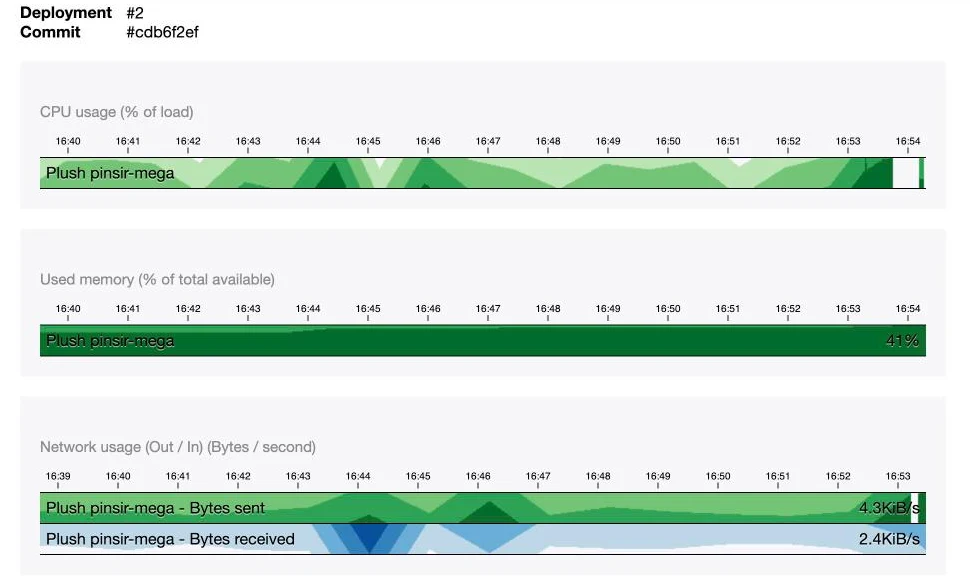
C'est un agent Telegraf, présent sur chaque instance, qui collecte l'essentiel de ces métriques et les range dans [Warp 10](https://www.clever.cloud/developers/doc/develop/observability/warp10/), une base de données timeseries. L'onglet Metrics donne un jeton de lecture valable 5 jours, et un lien vers Quantum, l'éditeur en ligne de Warp 10, avec une première requête déjà écrite. Son langage, WarpScript, place les arguments avant l'opération (`1 2 +` au lieu de `1 + 2`), ce qui déroute un peu au premier abord 🤯. Rassurez-vous, une ligne suffira pour la suite.
## Des métriques métier avec Prometheus
Le CPU d'une instance ne dit évidemment pas combien de liens ont été créés aujourd'hui. Pour ça, l'application doit publier ses propres métriques, et Clever Cloud sait les [collecter au format Prometheus](https://www.clever.cloud/developers/doc/develop/observability/metrics/#publish-your-own-metrics) : son agent interroge chaque minute une URL de l'instance, et range ce qu'il trouve dans Warp 10.
Le bundle installé plus haut compte déjà les requêtes HTTP par route, par famille de code de réponse, et leur durée. Ajoutons-y trois compteurs métier, dans un petit service :
```php
final readonly class LinkMetrics
{
public function __construct(
private CollectorRegistry $registry,
) {
}
public function linkCreated(): void
{
$this->registry->getOrRegisterCounter('app', 'links_created_total', 'Liens créés')->inc();
}
public function linkVisited(): void
{
$this->registry->getOrRegisterCounter('app', 'link_redirects_total', 'Redirections servies')->inc();
}
public function titleFetchFailed(): void
{
$this->registry->getOrRegisterCounter('app', 'link_title_failures_total', 'Échecs de récupération du titre')->inc();
}
}
```
Le contrôleur appelle `linkCreated()` après le `dispatch()` et `linkVisited()` à chaque redirection, le handler appelle `titleFetchFailed()` dans son `catch`. Le bundle ne rend pas son registre injectable par son type, une ligne dans `config/services.yaml` s'en charge :
```yaml
services:
Prometheus\CollectorRegistry: '@prometheus_metrics_bundle.collector_registry'
```
Ces compteurs ont besoin d'un stockage partagé, car PHP oublie tout à la fin de chaque requête, et le worker ne tourne pas dans le même processus que le serveur web. L'application a déjà un add-on Redis pour ses sessions, et le bundle accepte son URL :
```yaml
artprima_prometheus_metrics:
namespace: app
storage: '%env(REDIS_URL)%'
```
En local, un conteneur Redis rejoint le `compose.yaml`, et la CLI Symfony en expose l'URL dans `REDIS_URL`.
La route `/metrics/prometheus` n'a rien à faire en accès libre. Protégeons-la avec un pare-feu dédié, en HTTP Basic, et un utilisateur en mémoire (pour le test, ça fera l'affaire) :
```yaml
security:
password_hashers:
Symfony\Component\Security\Core\User\InMemoryUser: 'plaintext'
# ...
providers:
metrics_scraper:
memory:
users:
prometheus: { password: '%env(CC_METRICS_PROMETHEUS_PASSWORD)%', roles: [ROLE_METRICS] }
firewalls:
metrics:
pattern: ^/metrics/
stateless: true
provider: metrics_scraper
http_basic: ~
# ...
access_control:
- { path: ^/metrics/, roles: ROLE_METRICS }
```
Le mot de passe vient de `CC_METRICS_PROMETHEUS_PASSWORD`, la variable de la plateforme avec laquelle son agent s'authentifie : une seule valeur sert des deux côtés. Il reste à dire à l'agent où chercher, avec quatre variables Clever :
```bash
clever env set -a symfony-clever-demo CC_METRICS_PROMETHEUS_PORT 8080
clever env set -a symfony-clever-demo CC_METRICS_PROMETHEUS_PATH /metrics/prometheus
clever env set -a symfony-clever-demo CC_METRICS_PROMETHEUS_USER prometheus
clever env set -a symfony-clever-demo CC_METRICS_PROMETHEUS_PASSWORD "$(openssl rand -hex 16)"
```
Par défaut, l'agent attend les métriques sur le port 9100, alors que l'application répond sur le port 8080 de l'instance. Une minute après le déploiement, les compteurs arrivent dans Warp 10, préfixés par `prometheus.`. Dans Quantum, remplacez la requête pré-remplie par celle-ci, en gardant le jeton :
```
[ '' '~prometheus.app_link.*' { 'app_id' 'app_xxxxxxxx-xxxx-xxxx-xxxx-xxxxxxxxxxxx' } NOW 1 h ] FETCH
```
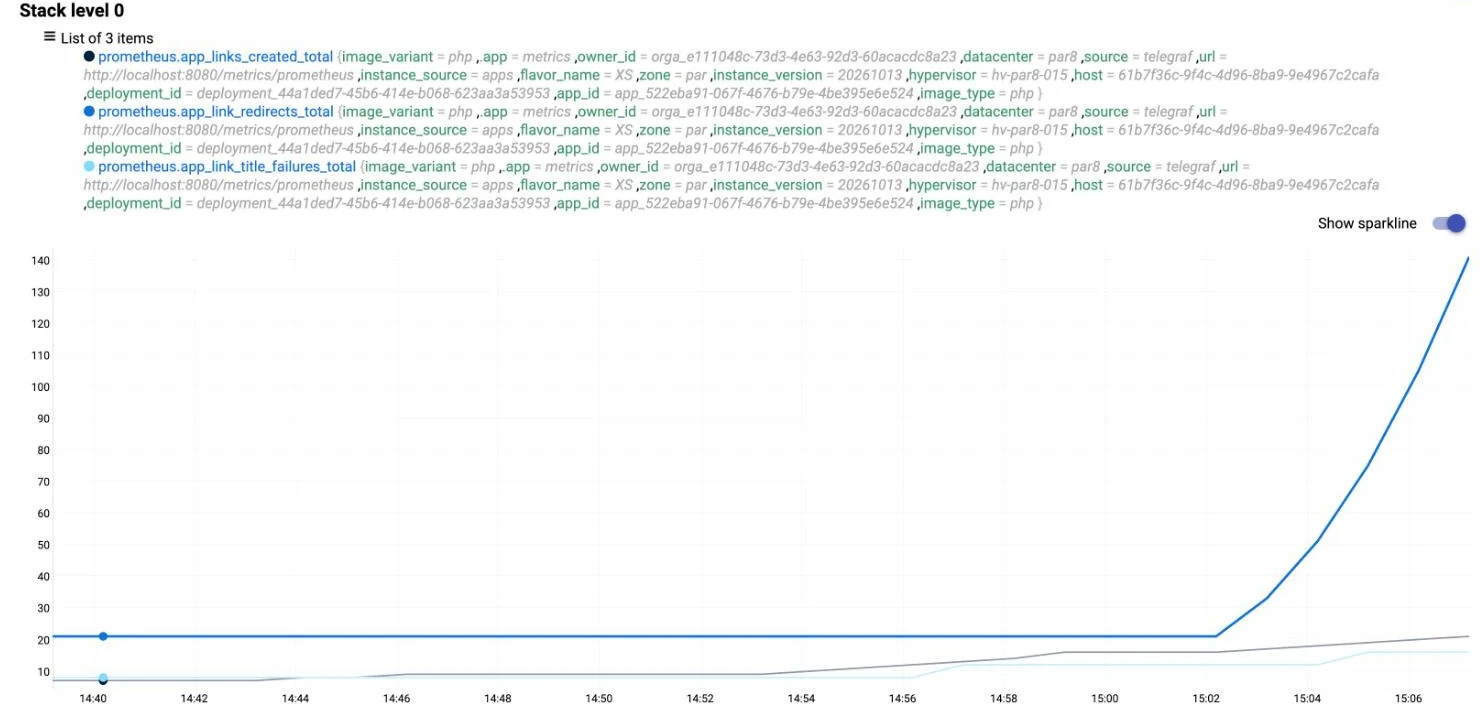
Gardez deux choses en tête. Les compteurs vivent dans Redis, donc chaque instance renvoie les mêmes valeurs : avec deux scalers, Warp 10 reçoit deux séries identiques, et les additionner compterait tout en double. Et ces métriques ne sont [conservées que 7 jours](https://www.clever.cloud/developers/changelog/2026/01-27-metrics-retention-change/), contrairement aux métriques système.
## Suivre une requête avec OpenTelemetry
Avec les compteurs et les logs, on sait que la récupération du titre échoue, et sur quel site. Pour savoir où passe le temps d'un traitement lent, il faut le découper en étapes, et c'est le rôle des traces.
Clever Cloud ne stocke pas de traces, il faut un outil pour les recevoir. Pour l'exemple, j'ai choisi [OpenObserve](https://openobserve.ai/docs/), open source, qui reçoit les traces au format OpenTelemetry et sert son interface sur le même port HTTP. Il s'héberge sur Clever Cloud dans une [application Docker](https://www.clever.cloud/developers/doc/deploy/applications/docker/), construite à partir d'un Dockerfile d'une ligne, rangé dans `clevercloud/openobserve.Dockerfile` :
```dockerfile
FROM openobserve/openobserve:v1.0.4
```
```bash
O2_TOKEN="$(openssl rand -hex 16)"
clever create --type docker symfony-clever-o2 -a symfony-clever-o2
clever scale -a symfony-clever-o2 --flavor XS
clever env set -a symfony-clever-o2 CC_DOCKERFILE clevercloud/openobserve.Dockerfile
clever env set -a symfony-clever-o2 ZO_HTTP_PORT 8080
clever env set -a symfony-clever-o2 ZO_ROOT_USER_EMAIL vous@example.com
clever env set -a symfony-clever-o2 ZO_ROOT_USER_PASSWORD 'Un-Vrai-Mot-de-passe-42!'
clever env set -a symfony-clever-o2 ZO_ROOT_USER_TOKEN "$O2_TOKEN"
clever deploy -a symfony-clever-o2
```
`CC_DOCKERFILE` désigne ce Dockerfile, et `ZO_HTTP_PORT` aligne OpenObserve sur le port 8080 qu'attend Clever Cloud. OpenObserve refuse de démarrer si le mot de passe ne mélange pas minuscules, majuscules, chiffres et caractères spéciaux. Le déploiement prend une trentaine de secondes.
⚠ Une application Docker n'a pas accès aux FS Buckets : les données d'OpenObserve disparaissent à chaque redéploiement, jeton d'ingestion compris. C'est pour ça qu'on le fixe avec `ZO_ROOT_USER_TOKEN`. Pour l'exemple, perdre l'historique n'est pas bien grave. Pour un usage réel, OpenObserve sait [ranger ses données dans un bucket S3](https://openobserve.ai/docs/environment-variables/), comme Cellar.
Passons à l'application, avec les variables standard d'OpenTelemetry :
```bash
# Dans le même shell : O2_TOKEN est celui généré plus haut
clever env set -a symfony-clever-demo OTEL_PHP_AUTOLOAD_ENABLED true
clever env set -a symfony-clever-demo OTEL_SERVICE_NAME symfony-clever-demo
clever env set -a symfony-clever-demo OTEL_EXPORTER_OTLP_PROTOCOL http/json
clever env set -a symfony-clever-demo OTEL_EXPORTER_OTLP_ENDPOINT https:///api/default
clever env set -a symfony-clever-demo OTEL_EXPORTER_OTLP_HEADERS \
"Authorization=Basic $(printf 'vous@example.com:%s' "$O2_TOKEN" | openssl base64 -A)"
```
`OTEL_PHP_AUTOLOAD_ENABLED` démarre le SDK, `OTEL_SERVICE_NAME` nomme l'application dans OpenObserve, et `http/json` évite d'avoir à installer Protobuf. L'en-tête encode l'adresse e-mail et le jeton posés sur OpenObserve.
Reste un détail propre aux workers. Le SDK n'envoie pas chaque span dès qu'il se termine, il les accumule, et les envoie quand le processus s'arrête ou quand un span suivant se termine. Une requête web s'arrête vite, mais un worker tourne une heure : lors de mes tests, la trace d'un message isolé n'était toujours pas arrivée au bout de plusieurs minutes. Un listener sur les événements du worker force l'envoi après chaque message :
```php
#[AsEventListener(event: WorkerMessageHandledEvent::class)]
#[AsEventListener(event: WorkerMessageFailedEvent::class)]
final class FlushTracesListener
{
public function __invoke(): void
{
$tracerProvider = Globals::tracerProvider();
if ($tracerProvider instanceof TracerProviderInterface) {
$tracerProvider->forceFlush();
}
}
}
```
`TracerProviderInterface` est celle du SDK, `OpenTelemetry\SDK\Trace\TracerProviderInterface`. Quand le SDK n'est pas démarré, `Globals` renvoie une implémentation vide, et le listener ne fait rien.
Déployons, créons quelques liens, et ouvrons la page Traces d'OpenObserve. Chaque requête web y a sa trace, avec la route, le code de réponse, la durée et ses requêtes SQL. La création d'un lien va plus loin : le bundle fait voyager le contexte de la trace avec le message, et son traitement par le worker vient s'ajouter à la même trace. On y lit l'`INSERT` du lien, l'envoi du message, puis, côté worker, l'appel au site cible et, si la page a un titre, l'`UPDATE` qui l'enregistre. Pour une page qui met 3 secondes à répondre ([httpbin.org/delay/3](https://httpbin.org/delay/3)), cet appel pèse 3,349 s sur les 3,352 s du traitement.
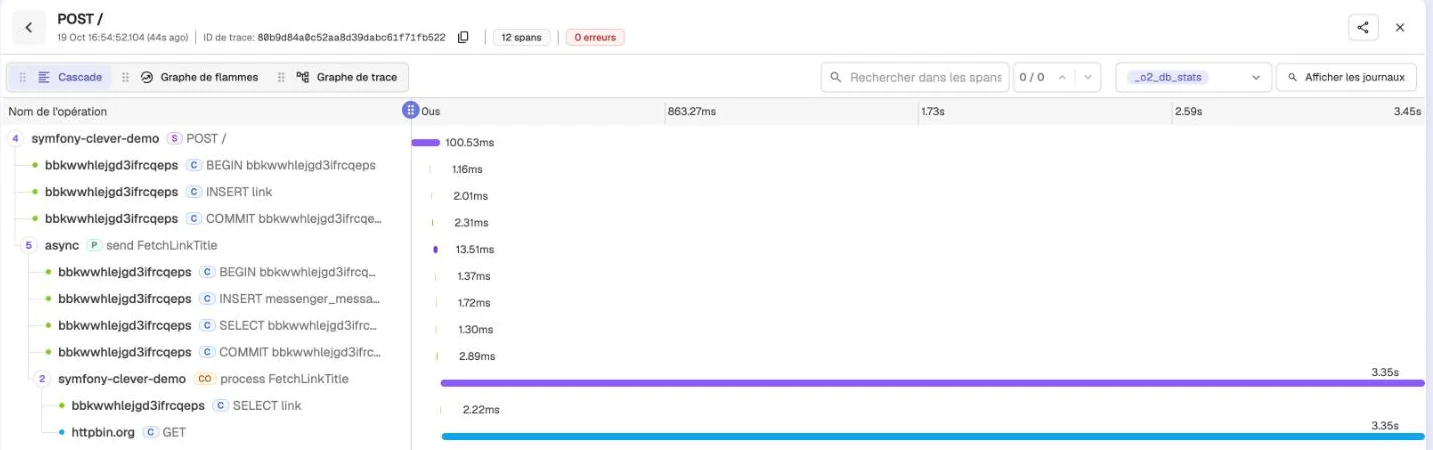
Les échecs ressortent en rouge, avec le message de l'exception, et les nouvelles tentatives s'ajoutent elles aussi à la trace.
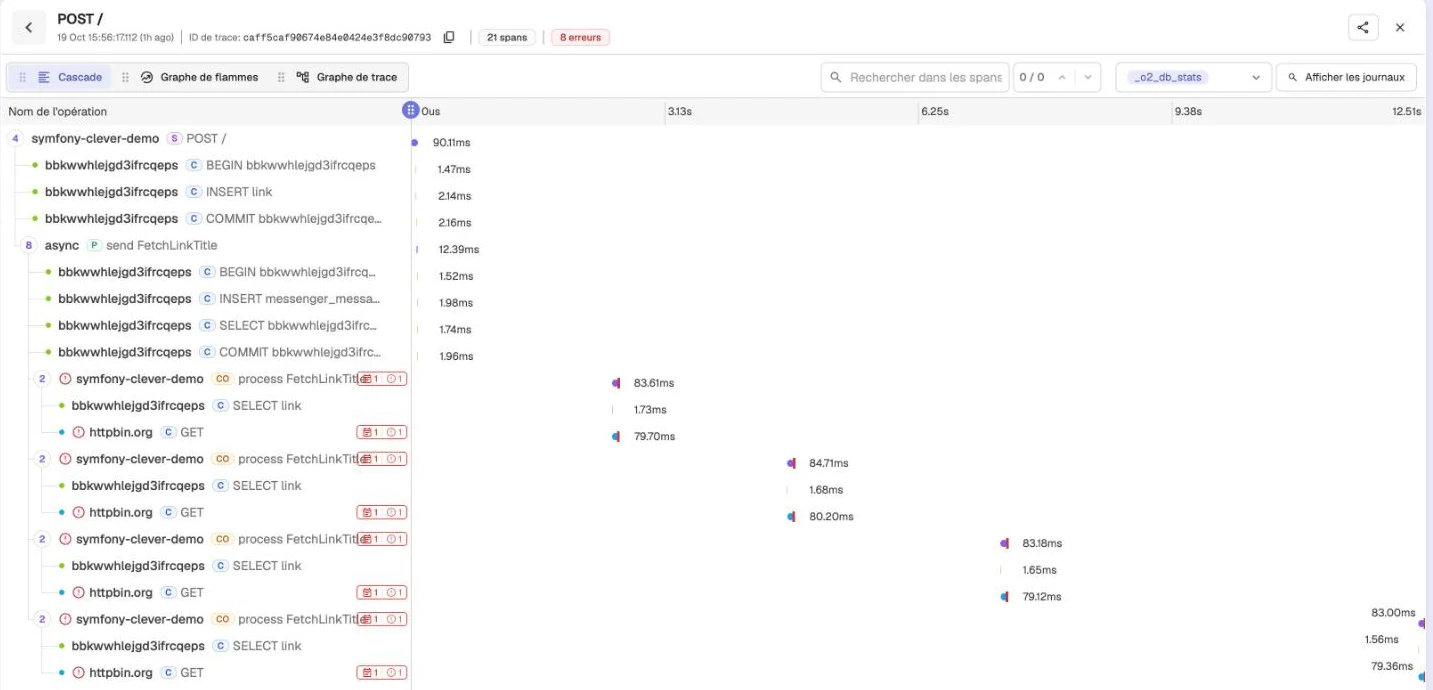
Les logs en profitent. Le bundle ajoute à chaque ligne l'identifiant de la trace en cours, et l'avertissement vu plus haut devient :
```
WARNING [app] Impossible de récupérer la page cible. ["code" => "GfRCHE","host" => "toujours-absent.invalid","error" => "…"] ["trace_id" => "3a0122646a1e41c0c27c0da4bca45197","span_id" => "4b709fdcef432225","trace_flags" => "01"]
```
Il suffit de chercher ce `trace_id` dans OpenObserve pour retrouver la création du lien, l'envoi du message et chaque tentative. Dans l'onglet Logs de la console, les quatre tentatives d'un même message portent d'ailleurs le même `trace_id`.
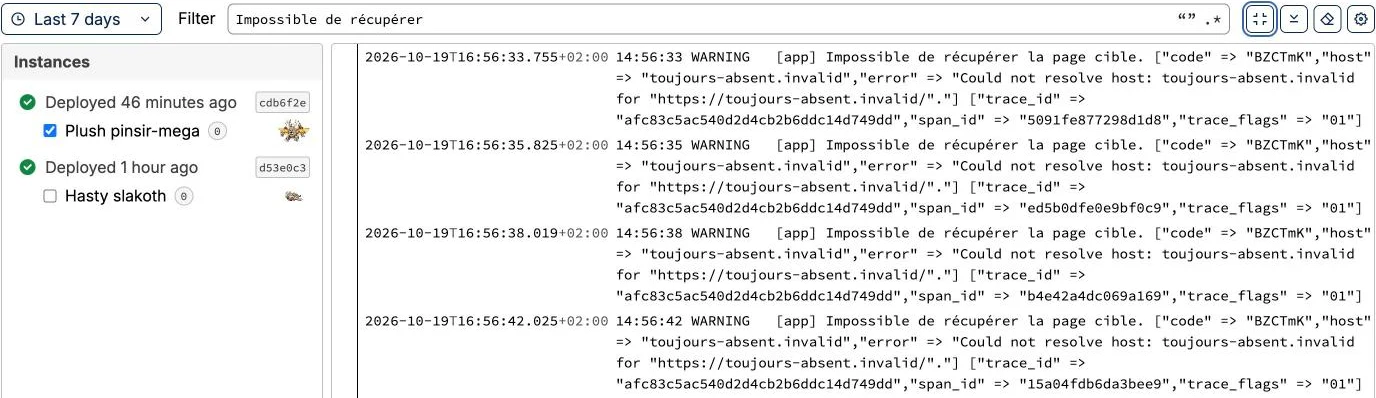
Enfin, vous verrez passer chaque minute, sur chaque instance, la requête de l'agent Telegraf sur `/`. Celle qu'il fait sur `/metrics/prometheus` n'apporte rien, la configuration du bundle l'écarte des traces, avec le healthcheck :
```yaml
open_telemetry:
traces:
excluded_paths: ['/_profiler', '/_wdt', '/cc-health', '/metrics/']
```
## Être prévenu quand ça casse
Pour les déploiements, Clever Cloud prévient déjà : ses [notifications](https://www.clever.cloud/developers/doc/account-billing/notifications/) envoient par défaut un e-mail à chaque déploiement réussi ou échoué, et peuvent aussi appeler un webhook.
Pour l'application elle-même, OpenObserve sait [déclencher des alertes](https://openobserve.ai/docs/user-guide/alerts/) sur ses propres données. Dans son menu Fiabilité, créez d'abord une destination : Slack, Discord, Microsoft Teams ou PagerDuty ont chacun un modèle prêt à l'emploi, et pour Slack, l'URL d'un webhook entrant suffit. Créez ensuite une alerte sur le flux de traces `default`, en mode SQL :
```sql
SELECT trace_id, operation_name FROM "default" WHERE span_status = 'ERROR'
```
Vérifiée chaque minute sur les cinq dernières minutes, avec un seuil à 1, elle se déclenche dès qu'un span est en erreur. Lors de mes tests, la notification est arrivée moins d'une minute après l'échec. Comme le reste des données d'OpenObserve, destinations et alertes disparaissent à chaque redéploiement de son application : notez leur configuration quelque part.
## Pour conclure
Le raccourcisseur publie maintenant ses compteurs dans Warp 10 et ses traces dans OpenObserve, et un lien vers un site injoignable déclenche une alerte en moins d'une minute.
> **Code source.** La branche [`07-observability`](https://github.com/welcoMattic/symfony-clever-cloud-series/tree/07-observability) du [dépôt de la série](https://github.com/welcoMattic/symfony-clever-cloud-series) contient le raccourcisseur, ses compteurs et l'instrumentation OpenTelemetry. En local, `docker compose up -d` démarre aussi Redis et un OpenObserve sur http://localhost:5080. Les commandes de création de l'application OpenObserve et les variables à poser sur l'application web sont dans le `README` de la branche.
---
# Symfony on Clever Cloud #7: observability, what the platform provides and what we add
URL: https://blog.welcomattic.com/blog/2026-10-20-symfony-clever-cloud-7-observability/
Date: 2026-10-20
_Cet article est aussi disponible en 🇫🇷 Français : [Symfony sur Clever Cloud #7 : l'observabilité, ce que fournit la plateforme et ce qu'on ajoute](/blog/2026-10-20-symfony-clever-cloud-7-l-observabilite/)._
> **Transparency.** I am a Clever Cloud ambassador. I write this series independently, nobody on their side proofreads this series, and I allow myself the same criticism here as on any other platform.
Since [the previous article](/blog/2026-10-06-symfony-clever-cloud-6-recurring-tasks/), the demo application runs on several instances, with its workers and its Schedule. We know how to deploy it, but once in production, there is no way to tell which requests are slow or why a message fails.
Let's see what Clever Cloud provides without any configuration, then what we need to add to the application: Prometheus metrics, which the platform can collect on its own, and OpenTelemetry traces, sent to an OpenObserve instance that is also hosted on Clever Cloud.
## A link shortener to observe
Until now, the application had no visible feature, so there was not much to observe. Let's add a link shortener: you paste a URL on the home page, the application replaces it with a six-character code, and `/{code}` redirects to the original page while counting the clicks.
```php
#[Route('/', name: 'link_index', methods: ['GET', 'POST'])]
public function index(Request $request, LinkRepository $links, EntityManagerInterface $entityManager, MessageBusInterface $bus): Response
{
$form = $this->createForm(ShortenLinkType::class);
$form->handleRequest($request);
if ($form->isSubmitted() && $form->isValid()) {
$link = new Link(ByteString::fromRandom(6)->toString(), $form->get('url')->getData());
$entityManager->persist($link);
$entityManager->flush();
$bus->dispatch(new FetchLinkTitle($link->getId()));
return $this->redirectToRoute('link_index');
}
return $this->render('link/index.html.twig', [
'form' => $form,
'links' => $links->findLatest(),
]);
}
#[Route('/{code}', name: 'link_redirect', requirements: ['code' => '[a-zA-Z0-9]{6}'], methods: ['GET'])]
public function redirectToTarget(#[MapEntity(mapping: ['code' => 'code'])] Link $link, LinkRepository $links): RedirectResponse
{
$links->countClick($link);
return $this->redirect($link->getUrl());
}
```
To show a title rather than a raw URL in the list of links, the application fetches the target page. That site may be slow, or even unreachable, so this work goes to the `async` queue, and the Messenger worker already in place takes care of it:
```php
#[AsMessageHandler]
final readonly class FetchLinkTitleHandler
{
// Constructor: LinkRepository, EntityManagerInterface, HttpClientInterface, LoggerInterface
public function __invoke(FetchLinkTitle $message): void
{
$link = $this->links->find($message->linkId);
if (null === $link) {
return;
}
$context = [
'code' => $link->getCode(),
'host' => parse_url($link->getUrl(), \PHP_URL_HOST),
];
try {
$html = $this->httpClient->request('GET', $link->getUrl(), ['timeout' => 5])->getContent();
} catch (\Throwable $e) {
$this->logger->warning('Impossible de récupérer la page cible.', $context + ['error' => $e->getMessage()]);
throw $e;
}
$title = \Dom\HTMLDocument::createFromString($html, \LIBXML_NOERROR)->title;
$link->setTitle('' !== $title ? mb_substr($title, 0, 255) : null);
$this->entityManager->flush();
$this->logger->info('Titre récupéré.', $context + ['title' => $link->getTitle()]);
}
}
```
`\Dom\HTMLDocument`, introduced in PHP 8.4, reads the title without any extra dependency. If the target site does not answer, the exception bubbles up, Messenger retries the message three times, if needed, then moves it to the `failed` transport. This behaviour comes from Messenger's default configuration, all you need is the line that routes `FetchLinkTitle` to `async`.
With that, a single user action involves the controller, the database, the message queue, the worker and an external site: there is finally something to observe 😅
## The tooling to install in the application
Before installing anything, let's set the vocabulary.
A metric is a number measured at regular intervals: CPU usage, the number of links created, the average duration of requests. Put end to end, these measurements draw a curve, which shows a trend over time.
A trace tells the journey of a single request, or a single message, through the application. It is broken down into spans, and each span is a step of that journey (the HTTP request, a SQL query, the call to an external site), with its start, its duration and its error, if any. Spans are nested: the SQL query is the child of the HTTP request that triggered it.
On the code side, two building blocks are needed. For the metrics, the [`artprima/prometheus-metrics-bundle`](https://github.com/artprima/prometheus-metrics-bundle) bundle exposes a route in the Prometheus format. For the traces, the [`traceway/opentelemetry-symfony`](https://github.com/tracewayapp/opentelemetry-symfony-bundle) bundle instruments Symfony in pure PHP: HTTP requests, Messenger, HttpClient, Doctrine, Twig… It relies on the [OpenTelemetry for PHP](https://opentelemetry.io/docs/languages/php/) SDK, to which you add the OTLP exporter.
```bash
composer require artprima/prometheus-metrics-bundle
composer require traceway/opentelemetry-symfony open-telemetry/exporter-otlp
```
The Flex recipes of both bundles come from the "contrib" repository: Composer asks whether it should apply them, answer yes. Among other things, they add the `/metrics/prometheus` route and a `config/packages/open_telemetry.yaml` file.
> Note: OpenTelemetry also provides an [official instrumentation](https://opentelemetry.io/docs/zero-code/php/). It relies on a PHP extension written in C, and its Doctrine instrumentation also traces the worker polling the queue, several queries per second, enough to drown everything else. The bundle from Traceway, an APM vendor, works with any OpenTelemetry-compatible tool, needs no extension, and only traces a SQL query when it belongs to an HTTP request or to the handling of a message.
## The logs
Let's start with what requires nothing. Everything the application writes to its standard output or error output ends up in the [Clever Cloud logs](https://www.clever.cloud/developers/doc/develop/observability/logs/), from the web server as well as from the workers. You read them in the console, or with the CLI:
```bash
clever logs -a symfony-clever-demo --since 1h --search "Impossible de récupérer"
```
Let's create a link to a site that does not exist. On each attempt, the worker writes:
```
WARNING [app] Impossible de récupérer la page cible. ["code" => "dJ5Dhe","host" => "ce-site-n-existe-pas.invalid","error" => "Could not resolve host: ce-site-n-existe-pas.invalid for \"https://ce-site-n-existe-pas.invalid/\"."]
```
The array passed as the logger's second argument, the context, is what makes this line useful. The link's code and the failing domain are there, without having been slipped into the message, and a `--search` on the domain finds every attempt.
Note that the `info` level `Titre récupéré.` does not show up in production. The Monolog configuration set up by the recipe keeps the logs in memory and only writes them when an error occurs, along with everything that came before it. In the workers, its `console` handler also writes warnings as they come, and that is the handler that prints the line above.
These logs are kept for 7 days. To keep them longer, you need to send them elsewhere with a [drain](https://www.clever.cloud/developers/doc/develop/observability/drains/).
## The metrics provided by the platform
On the metrics side, Clever Cloud collects out of the box the system metrics of every instance: CPU, memory, disk and network. The "Server metrics" card of the application's overview sums up the last 24 hours, and the Metrics tab details them instance by instance. An icon on that card also opens preconfigured [Grafana dashboards](https://www.clever.cloud/developers/doc/develop/observability/metrics/).

A Telegraf agent, present on every instance, collects most of these metrics and stores them in [Warp 10](https://www.clever.cloud/developers/doc/develop/observability/warp10/), a time series database. The Metrics tab gives a read token valid for 5 days, and a link to Quantum, Warp 10's online editor, with a first query already written. Its language, WarpScript, puts the arguments before the operation (`1 2 +` instead of `1 + 2`), which is a bit puzzling at first 🤯. Don't worry, a single line will be enough for what follows.
## Business metrics with Prometheus
An instance's CPU obviously does not tell you how many links were created today. For that, the application has to publish its own metrics, and Clever Cloud can [collect them in the Prometheus format](https://www.clever.cloud/developers/doc/develop/observability/metrics/#publish-your-own-metrics): its agent queries a URL of the instance every minute, and stores what it finds in Warp 10.
The bundle installed above already counts HTTP requests per route, per response code family, and their duration. Let's add three business counters, in a small service:
```php
final readonly class LinkMetrics
{
public function __construct(
private CollectorRegistry $registry,
) {
}
public function linkCreated(): void
{
$this->registry->getOrRegisterCounter('app', 'links_created_total', 'Liens créés')->inc();
}
public function linkVisited(): void
{
$this->registry->getOrRegisterCounter('app', 'link_redirects_total', 'Redirections servies')->inc();
}
public function titleFetchFailed(): void
{
$this->registry->getOrRegisterCounter('app', 'link_title_failures_total', 'Échecs de récupération du titre')->inc();
}
}
```
The controller calls `linkCreated()` after the `dispatch()` and `linkVisited()` on every redirection, the handler calls `titleFetchFailed()` in its `catch`. The bundle does not make its registry injectable by type, one line in `config/services.yaml` takes care of that:
```yaml
services:
Prometheus\CollectorRegistry: '@prometheus_metrics_bundle.collector_registry'
```
These counters need a shared storage, because PHP forgets everything at the end of each request, and the worker does not run in the same process as the web server. The application already has a Redis add-on for its sessions, and the bundle accepts its URL:
```yaml
artprima_prometheus_metrics:
namespace: app
storage: '%env(REDIS_URL)%'
```
Locally, a Redis container joins the `compose.yaml`, and the Symfony CLI exposes its URL in `REDIS_URL`.
The `/metrics/prometheus` route has no business being publicly accessible. Let's protect it with a dedicated firewall, using HTTP Basic, and an in-memory user (good enough for the test):
```yaml
security:
password_hashers:
Symfony\Component\Security\Core\User\InMemoryUser: 'plaintext'
# ...
providers:
metrics_scraper:
memory:
users:
prometheus: { password: '%env(CC_METRICS_PROMETHEUS_PASSWORD)%', roles: [ROLE_METRICS] }
firewalls:
metrics:
pattern: ^/metrics/
stateless: true
provider: metrics_scraper
http_basic: ~
# ...
access_control:
- { path: ^/metrics/, roles: ROLE_METRICS }
```
The password comes from `CC_METRICS_PROMETHEUS_PASSWORD`, the platform variable its agent authenticates with: a single value serves both sides. All that's left is to tell the agent where to look, with four Clever variables:
```bash
clever env set -a symfony-clever-demo CC_METRICS_PROMETHEUS_PORT 8080
clever env set -a symfony-clever-demo CC_METRICS_PROMETHEUS_PATH /metrics/prometheus
clever env set -a symfony-clever-demo CC_METRICS_PROMETHEUS_USER prometheus
clever env set -a symfony-clever-demo CC_METRICS_PROMETHEUS_PASSWORD "$(openssl rand -hex 16)"
```
By default, the agent expects the metrics on port 9100, whereas the application answers on the instance's port 8080. A minute after the deployment, the counters reach Warp 10, prefixed with `prometheus.`. In Quantum, replace the prefilled query with this one, keeping the token:
```
[ '' '~prometheus.app_link.*' { 'app_id' 'app_xxxxxxxx-xxxx-xxxx-xxxx-xxxxxxxxxxxx' } NOW 1 h ] FETCH
```

Keep two things in mind. The counters live in Redis, so every instance returns the same values: with two scalers, Warp 10 receives two identical series, and adding them up would count everything twice. And these metrics are [only kept for 7 days](https://www.clever.cloud/developers/changelog/2026/01-27-metrics-retention-change/), unlike the system metrics.
## Following a request with OpenTelemetry
With the counters and the logs, we know that fetching the title fails, and on which site. To find out where the time of a slow operation goes, it has to be broken down into steps, and that is what traces do.
Clever Cloud does not store traces, so you need a tool to receive them. For this example, I picked [OpenObserve](https://openobserve.ai/docs/), open source, which receives traces in the OpenTelemetry format and serves its interface on the same HTTP port. It can be hosted on Clever Cloud as a [Docker application](https://www.clever.cloud/developers/doc/deploy/applications/docker/), built from a one-line Dockerfile, stored in `clevercloud/openobserve.Dockerfile`:
```dockerfile
FROM openobserve/openobserve:v1.0.4
```
```bash
O2_TOKEN="$(openssl rand -hex 16)"
clever create --type docker symfony-clever-o2 -a symfony-clever-o2
clever scale -a symfony-clever-o2 --flavor XS
clever env set -a symfony-clever-o2 CC_DOCKERFILE clevercloud/openobserve.Dockerfile
clever env set -a symfony-clever-o2 ZO_HTTP_PORT 8080
clever env set -a symfony-clever-o2 ZO_ROOT_USER_EMAIL you@example.com
clever env set -a symfony-clever-o2 ZO_ROOT_USER_PASSWORD 'A-Real-Password-42!'
clever env set -a symfony-clever-o2 ZO_ROOT_USER_TOKEN "$O2_TOKEN"
clever deploy -a symfony-clever-o2
```
`CC_DOCKERFILE` points to that Dockerfile, and `ZO_HTTP_PORT` aligns OpenObserve with the 8080 port Clever Cloud expects. OpenObserve refuses to start if the password does not mix lowercase and uppercase letters, digits and special characters. The deployment takes about thirty seconds.
⚠ A Docker application has no access to FS Buckets: OpenObserve's data is lost on every redeployment, ingestion token included. That's why we pin it with `ZO_ROOT_USER_TOKEN`. For this example, losing the history is no big deal. For real use, OpenObserve can [store its data in an S3 bucket](https://openobserve.ai/docs/environment-variables/), such as Cellar.
Now the application, with the standard OpenTelemetry variables:
```bash
# Same shell: O2_TOKEN is the one generated above
clever env set -a symfony-clever-demo OTEL_PHP_AUTOLOAD_ENABLED true
clever env set -a symfony-clever-demo OTEL_SERVICE_NAME symfony-clever-demo
clever env set -a symfony-clever-demo OTEL_EXPORTER_OTLP_PROTOCOL http/json
clever env set -a symfony-clever-demo OTEL_EXPORTER_OTLP_ENDPOINT https:///api/default
clever env set -a symfony-clever-demo OTEL_EXPORTER_OTLP_HEADERS \
"Authorization=Basic $(printf 'you@example.com:%s' "$O2_TOKEN" | openssl base64 -A)"
```
`OTEL_PHP_AUTOLOAD_ENABLED` starts the SDK, `OTEL_SERVICE_NAME` names the application in OpenObserve, and `http/json` saves us from installing Protobuf. The header encodes the e-mail address and the token set on OpenObserve.
One detail remains, specific to workers. The SDK does not send each span as soon as it ends, it accumulates them, and sends them when the process stops or when a later span ends. A web request stops quickly, but a worker runs for an hour: in my tests, the trace of an isolated message still had not arrived after several minutes. A listener on the worker events forces the export after each message:
```php
#[AsEventListener(event: WorkerMessageHandledEvent::class)]
#[AsEventListener(event: WorkerMessageFailedEvent::class)]
final class FlushTracesListener
{
public function __invoke(): void
{
$tracerProvider = Globals::tracerProvider();
if ($tracerProvider instanceof TracerProviderInterface) {
$tracerProvider->forceFlush();
}
}
}
```
`TracerProviderInterface` is the SDK's one, `OpenTelemetry\SDK\Trace\TracerProviderInterface`. When the SDK is not started, `Globals` returns an empty implementation, and the listener does nothing.
Let's deploy, create a few links, and open OpenObserve's Traces page. Each web request has its own trace, with the route, the response code, the duration and its SQL queries. Creating a link goes further: the bundle carries the trace context along with the message, and its handling by the worker joins the same trace. You can read the link's `INSERT`, the message being sent, then, on the worker side, the call to the target site and, if the page has a title, the `UPDATE` that stores it. For a page that takes 3 seconds to answer ([httpbin.org/delay/3](https://httpbin.org/delay/3)), that call weighs 3.349 s out of the handling's 3.352 s.
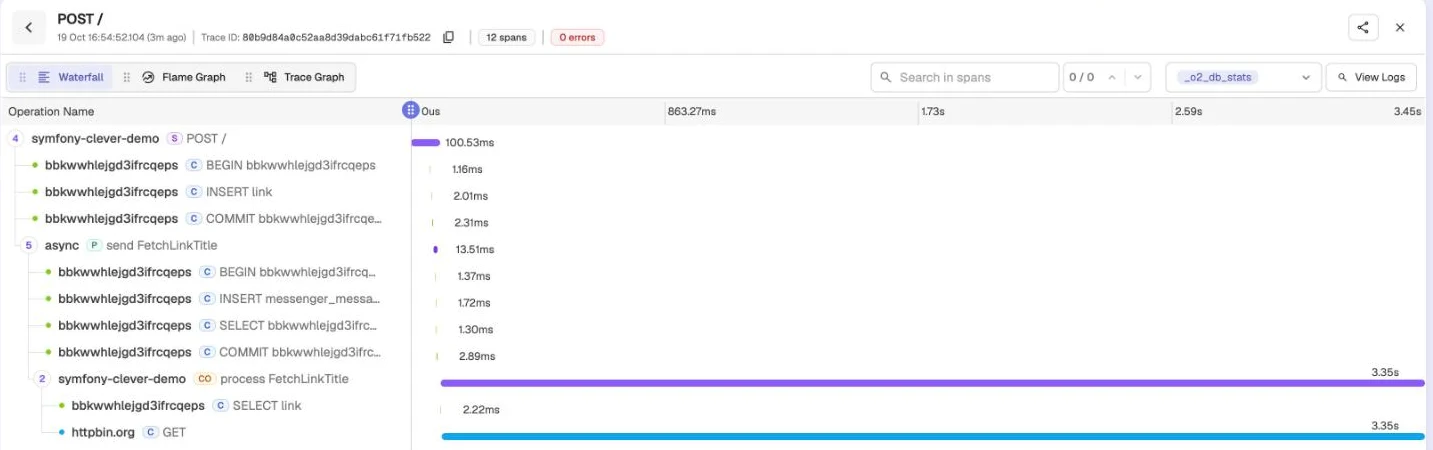
Failures stand out in red, with the exception message, and the retries join the trace as well.
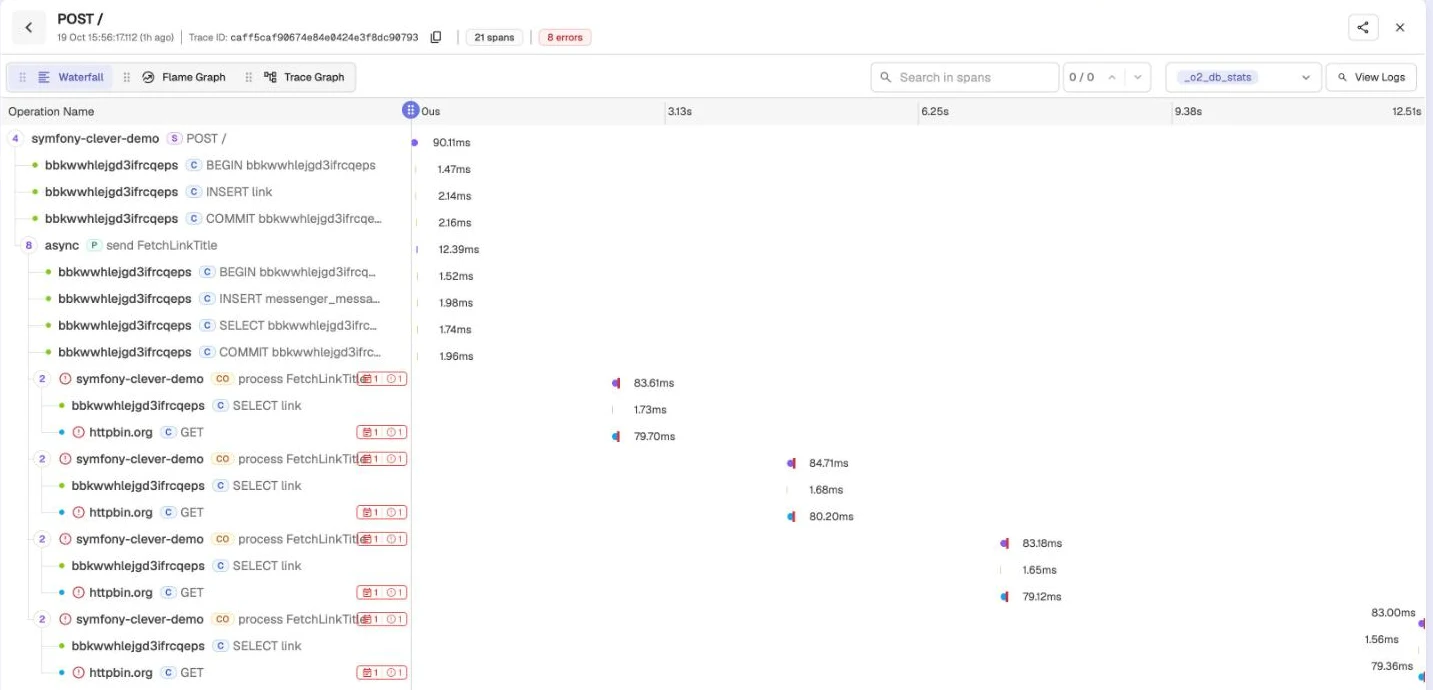
The logs benefit from it too. The bundle adds the current trace's identifier to every line, and the warning seen earlier becomes:
```
WARNING [app] Impossible de récupérer la page cible. ["code" => "GfRCHE","host" => "toujours-absent.invalid","error" => "…"] ["trace_id" => "3a0122646a1e41c0c27c0da4bca45197","span_id" => "4b709fdcef432225","trace_flags" => "01"]
```
Searching for that `trace_id` in OpenObserve brings back the link's creation, the message being sent and every attempt. In the console's Logs tab, the four attempts of the same message do carry the same `trace_id`.

Finally, every minute and on every instance, you will see the Telegraf agent's request on `/`. The one it makes on `/metrics/prometheus` brings nothing, and the bundle's configuration keeps it out of the traces, along with the healthcheck:
```yaml
open_telemetry:
traces:
excluded_paths: ['/_profiler', '/_wdt', '/cc-health', '/metrics/']
```
## Getting notified when things break
For deployments, Clever Cloud already warns you: its [notifications](https://www.clever.cloud/developers/doc/account-billing/notifications/) send an e-mail by default on every successful or failed deployment, and can also call a webhook.
For the application itself, OpenObserve can [trigger alerts](https://openobserve.ai/docs/user-guide/alerts/) on its own data. In its Reliability menu, first create a destination: Slack, Discord, Microsoft Teams or PagerDuty each have a ready-made template, and for Slack, the URL of an incoming webhook is enough. Then create an alert on the `default` traces stream, in SQL mode:
```sql
SELECT trace_id, operation_name FROM "default" WHERE span_status = 'ERROR'
```
Checked every minute over the last five minutes, with a threshold of 1, it fires as soon as a span is in error. In my tests, the notification arrived less than a minute after the failure. Like the rest of OpenObserve's data, destinations and alerts are lost on every redeployment of its application: write their configuration down somewhere.
## Wrapping up
The link shortener now publishes its counters to Warp 10 and its traces to OpenObserve, and a link to an unreachable site triggers an alert in less than a minute.
> **Source code.** The [`07-observability`](https://github.com/welcoMattic/symfony-clever-cloud-series/tree/07-observability) branch of the [series repository](https://github.com/welcoMattic/symfony-clever-cloud-series) holds the link shortener, its counters and the OpenTelemetry instrumentation. Locally, `docker compose up -d` also starts Redis and an OpenObserve instance on http://localhost:5080. The commands to create the OpenObserve application and the variables to set on the web application are in the branch's `README`.
---
# Messenger Central: drive your Messenger workers from the terminal
URL: https://blog.welcomattic.com/blog/2026-10-14-messenger-central-drive-messenger-workers-from-the-terminal/
Date: 2026-10-14
_Cet article est aussi disponible en 🇫🇷 Français : [Messenger Central : piloter les workers Messenger depuis le terminal](/blog/2026-10-14-messenger-central-piloter-les-workers-messenger-depuis-le-terminal/)._
## One terminal per transport
In [article #5 of the Symfony on Clever Cloud series](/blog/2026-09-29-symfony-clever-cloud-5-messenger-workers/), I covered Messenger workers in production: one process per transport, restarted by the platform, watched through metrics. In development, it is another story. You open a terminal per transport to run `messenger:consume`, forget to restart the one still running the old code, scroll back through the logs to find the message that failed, and end up with `messenger:failed:show` and `messenger:failed:retry` in a fifth terminal tab.
I wanted a single window for all of it. The [TUI component](https://symfony.com/doc/current/tui.html), experimental since Symfony 8.1, gave me the opportunity: [Messenger Central](https://github.com/welcoMattic/messenger-central) is a development bundle that drives your workers from the terminal.
## What the bundle does
- **The transports** of your application, in a sidebar, with their running workers and waiting messages.
- **The workers**, started, stopped and scaled from the keyboard. They are real `messenger:consume` processes, started through your console: nothing to change in the application. The ones that stop by themselves (`--time-limit`, `--memory-limit`) are started again at once, the ones that crash too, after a growing delay.
- **A live view**: incoming rate, the message each worker handles and for how long, the queue, the last handled, retried or failed messages with their error, and what the workers write (logs, `dump()`).
- **Failed messages**: on a failure transport, you page through them, read the full error with its stack trace, remove them, or send them back to the transport they failed on, as is or after fixing their properties in a JSON editor.
- **The concurrency** of Symfony 8.2, due in November: with `amphp/parallel`, each worker can handle several messages at a time.
Each worker also gets a unique `MESSENGER_CONSUMER_NAME`, to plug into the `consumer` option of Redis transports, so that scaled workers do not share their pending messages.
Everything is driven from the keyboard, and a help screen (`?`) lists all the useful shortcuts.
## Shall we try it?
It is a development tool, so it goes in your dev dependencies:
```bash
composer require --dev welcomattic/messenger-central
php bin/console messenger:central
```
It needs PHP 8.4 or higher, Symfony 8.1 with Messenger, and a Unix-like system (Linux, macOS or WSL). With the `pcntl` extension, workers finish their current message when you stop them. As a safety net, the command refuses to run when the kernel runs without debug, which still lets you use it locally, in the prod environment with debug on, if needed.
The README details [the keys](https://github.com/welcoMattic/messenger-central#usage) and [the configuration](https://github.com/welcoMattic/messenger-central#configuration), all of it optional: options given to `messenger:consume`, stop timeout of the workers, default concurrency.
## What comes next
This [0.1.0](https://github.com/welcoMattic/messenger-central/releases/tag/v0.1.0) is the first release. It builds on a component that is still experimental, so it will follow its changes release after release. If you try it, I would love your feedback: issues, pull requests, and "it would be great if it also did X" are all welcome on [GitHub](https://github.com/welcoMattic/messenger-central).
---
# Messenger Central : piloter les workers Messenger depuis le terminal
URL: https://blog.welcomattic.com/blog/2026-10-14-messenger-central-piloter-les-workers-messenger-depuis-le-terminal/
Date: 2026-10-14
_This blog post is also available in 🇬🇧 English: [Messenger Central: drive your Messenger workers from the terminal](/blog/2026-10-14-messenger-central-drive-messenger-workers-from-the-terminal/)._
## Un terminal par transport
Dans [l'article #5 de la série Symfony sur Clever Cloud](/blog/2026-09-29-symfony-clever-cloud-5-les-workers-messenger/), je parlais des workers Messenger en production : un process par transport, relancé par la plateforme, suivi par des métriques. En développement, c'est une autre histoire. On ouvre un terminal par transport pour y lancer `messenger:consume`, on oublie de relancer celui qui tourne encore avec l'ancien code, on remonte les logs pour retrouver le message qui a échoué, et on finit avec `messenger:failed:show` et `messenger:failed:retry` dans un cinquième onglet de terminal.
Je voulais une seule fenêtre pour tout ça. Le [composant TUI](https://symfony.com/doc/current/tui.html), arrivé en expérimental dans Symfony 8.1, m'en a donné l'occasion : [Messenger Central](https://github.com/welcoMattic/messenger-central) est un bundle de développement qui pilote vos workers depuis le terminal.
## Ce que fait le bundle
- **Les transports** de votre application, dans une barre latérale, avec leurs workers en cours et les messages en attente.
- **Les workers**, démarrés, arrêtés et scalés au clavier. Ce sont de vrais `messenger:consume`, lancés par votre console : rien à changer dans l'application. Ceux qui s'arrêtent d'eux-mêmes (`--time-limit`, `--memory-limit`) sont relancés aussitôt, ceux qui plantent aussi, avec un délai croissant.
- **Une vue en temps réel** : débit entrant, message en cours de chaque worker et depuis combien de temps, file d'attente, derniers messages traités, réessayés ou en échec avec leur erreur, et ce que les workers écrivent (logs, `dump()`).
- **Les messages en échec** : sur un transport de failure, on les parcourt page par page, on lit l'erreur complète avec sa trace, on les supprime, ou on les renvoie dans leur transport d'origine, tels quels ou après avoir corrigé leurs propriétés dans un éditeur JSON.
- **La concurrence** de Symfony 8.2, attendu en novembre : avec `amphp/parallel`, chaque worker peut traiter plusieurs messages à la fois.
Chaque worker reçoit aussi un `MESSENGER_CONSUMER_NAME` unique, à brancher sur l'option `consumer` des transports Redis : des workers scalés ne se partagent alors pas leurs messages en attente.
Tout est pilotable au clavier, un menu d'aide (`?`) permet d'afficher tous les raccourcis utiles.
## On l'essaye ?
C'est un outil de développement, il s'installe donc en dépendance de dev :
```bash
composer require --dev welcomattic/messenger-central
php bin/console messenger:central
```
Il faut PHP 8.4 minimum, Symfony 8.1 avec Messenger, et un système de type Unix (Linux, macOS ou WSL). Avec l'extension `pcntl`, les workers terminent leur message en cours quand on les arrête. Par précaution, la commande refuse de tourner quand le kernel n'est pas en debug, ce qui permet quand même de l'utiliser en local, en env prod et mode debug si besoin.
Le README détaille [les touches](https://github.com/welcoMattic/messenger-central#usage) et [la configuration](https://github.com/welcoMattic/messenger-central#configuration), entièrement optionnelle : options passées à `messenger:consume`, délai d'arrêt des workers, concurrence par défaut.
## La suite
Cette [0.1.0](https://github.com/welcoMattic/messenger-central/releases/tag/v0.1.0) est la première release. Elle s'appuie sur un composant encore expérimental, et suivra donc ses évolutions version après version. Si vous l'essayez, vos retours m'intéressent : issues, pull requests et « ce serait bien qu'il fasse aussi X » sont les bienvenus sur [GitHub](https://github.com/welcoMattic/messenger-central).
---
# Symfony sur Clever Cloud #6 : les tâches récurrentes, entre cron, Scheduler et Clever Tasks
URL: https://blog.welcomattic.com/blog/2026-10-06-symfony-clever-cloud-6-les-taches-recurrentes/
Date: 2026-10-06
_This blog post is also available in 🇬🇧 English: [Symfony on Clever Cloud #6: recurring tasks, between cron, Scheduler and Clever Tasks](/blog/2026-10-06-symfony-clever-cloud-6-recurring-tasks/)._
> **Transparence.** Je suis ambassadeur Clever Cloud. J'écris cette série en toute indépendance, personne chez eux ne relit cette série, et je m'y autorise les mêmes critiques que sur n'importe quelle autre plateforme.
Depuis [le précédent article](/blog/2026-09-29-symfony-clever-cloud-5-les-workers-messenger/), les workers Messenger consomment les messages de l'application de démonstration en production. Chaque message traité laisse une clé dans la table `handled_message`, le registre qui permet au handler de reconnaître un message rejoué. Seulement voilà, personne ne vide cette table, elle ne fait donc que grandir.
Il faut la purger chaque nuit, et une seule fois, même quand l'application tourne sur plusieurs scalers. Sur Clever Cloud, trois outils permettent de faire tourner ce genre de tâche : le cron de la plateforme, le Scheduler de Symfony et les Clever Tasks. Voyons ce que chacun donne avec cette purge.
> Note : la purge de `handled_message` n'est qu'un prétexte. C'est un cas d'usage volontairement simple, qui permet de montrer le cron, le Scheduler et les Clever Tasks sans développer une vraie fonctionnalité métier dans l'application de démonstration. Remplacez-la par votre propre tâche récurrente : un récapitulatif envoyé chaque matin, un import nocturne, un nettoyage de fichiers…
## La commande de purge
Quel que soit l'outil, la purge sera une commande console, que l'on peut aussi lancer à la main :
```php
#[AsCommand(
name: 'app:handled-messages:purge',
description: "Supprime du registre d'idempotence les clés trop anciennes",
)]
final class PurgeHandledMessagesCommand
{
public function __construct(
private readonly HandledMessageRepository $handledMessages,
) {
}
public function __invoke(
SymfonyStyle $io,
#[Option(description: 'Âge au-delà duquel une clé est supprimée')]
string $olderThan = '30 days',
): int {
$limit = new DatePoint('-'.$olderThan);
$deleted = $this->handledMessages->purgeOlderThan($limit);
$io->success(\sprintf('%d clé(s) enregistrée(s) avant le %s supprimée(s).', $deleted, $limit->format('Y-m-d H:i:s T')));
return Command::SUCCESS;
}
}
```
La suppression se fait dans `HandledMessageRepository::purgeOlderThan()`, avec une simple requête `DELETE` sur la date d'enregistrement des clés. Par défaut, on garde 30 jours de clés.
## Le cron de Clever Cloud
Clever Cloud installe dans le crontab de chaque instance les lignes du fichier [`clevercloud/cron.json`](https://www.clever.cloud/developers/doc/develop/cron/) du dépôt. Pour notre purge, ça donnerait ceci :
```json
[
"0 3 * * * $ROOT/clevercloud/purge.sh"
]
```
```bash
#!/bin/bash -l
if [[ "$INSTANCE_NUMBER" != "0" ]]; then
exit 0
fi
cd "$APP_HOME"
php bin/console app:handled-messages:purge
```
Le `-l` du shebang charge l'environnement de l'application, sans lui le script n'a accès à aucune de ses variables. Le test sur `INSTANCE_NUMBER`, une variable fournie par la plateforme, est là parce que le cron tourne sur chaque scaler : avec deux scalers, la purge tournerait deux fois. La [documentation](https://www.clever.cloud/developers/doc/develop/cron/) propose cette astuce pour ne la lancer que sur l'instance 0.
Deux limites cependant. Pendant un déploiement, Clever Cloud garde les anciennes instances en vie le temps que les nouvelles démarrent, et deux instances portent alors le numéro 0. Lors de mes tests, ce chevauchement a duré deux à trois minutes, pendant lesquelles la tâche peut tourner deux fois. Et les instances sont en UTC, donc `0 3 * * *` veut dire 4 h ou 5 h du matin à Paris, selon la saison.
Pour notre purge, ces deux défauts ne sont pas bien graves. Mais pour une tâche qui envoie un e-mail, une double exécution est rarement acceptable. C'est là qu'intervient le Scheduler.
## Le Scheduler de Symfony
Le [Scheduler](https://symfony.com/doc/current/scheduler.html) s'appuie sur Messenger. Un Schedule est exposé comme un transport, et c'est un `messenger:consume` sur ce transport qui génère les messages au bon moment, puis les traite. Commençons par l'installer :
```bash
composer require symfony/scheduler dragonmantank/cron-expression
```
La seconde dépendance permet d'utiliser une expression cron. Pour planifier la purge, il suffit ensuite d'ajouter l'attribut [`#[AsCronTask]`](https://symfony.com/doc/current/scheduler.html#cron-expression-triggers) à notre commande :
```php
#[AsCommand(
name: 'app:handled-messages:purge',
description: "Supprime du registre d'idempotence les clés trop anciennes",
)]
#[AsCronTask('0 3 * * *', timezone: 'Europe/Paris')]
final class PurgeHandledMessagesCommand
```
Le paramètre `timezone` est important, car PHP tourne lui aussi [en UTC](https://www.clever.cloud/developers/doc/deploy/applications/php/) sur Clever Cloud. La commande `php bin/console debug:scheduler` affiche la date de la prochaine exécution, pratique pour vérifier.
Côté Clever Cloud, le Schedule a besoin d'un [worker](https://www.clever.cloud/developers/doc/develop/common-configuration/workers/) qui consomme le transport `scheduler_default`. On garde celui des workers Messenger, défini dans `CC_WORKER_COMMAND`, et on en ajoute un second :
```bash
clever env set -a symfony-clever-demo CC_WORKER_COMMAND_1 \
"php bin/console messenger:consume scheduler_default --time-limit=3600 --memory-limit=64M"
clever restart -a symfony-clever-demo
```
Il profite des mêmes réglages de redémarrage que le premier (`CC_WORKER_RESTART=always` et 30 secondes de délai).
### Une seule exécution
Comme pour le cron, chaque scaler fait tourner ses workers, donc chaque scaler joue le Schedule. Il faut un verrou, comme le recommande la [documentation du Scheduler](https://symfony.com/doc/current/scheduler.html#efficient-management-with-symfony-scheduler), et ce verrou doit être partagé par toutes les instances. Celui que pose la recette du composant Lock (`LOCK_DSN=flock`) est un fichier sur le disque de la machine, il ne protège donc pas d'une exécution sur un autre scaler.
L'application utilise déjà un [add-on Redis](https://www.clever.cloud/developers/doc/deploy/databases/redis/) pour ses sessions en production, et la [configuration du composant Lock](https://symfony.com/doc/current/lock.html#configuration) accepte directement son URL :
```yaml
framework:
lock: '%env(LOCK_DSN)%'
when@prod:
framework:
lock: '%env(REDIS_URL)%'
```
En local, on garde le verrou par défaut. En production, avec deux scalers, une tâche de test lancée toutes les minutes n'a plus tourné qu'une fois par minute, y compris quand anciennes et nouvelles instances tournaient en même temps.
### Une exécution qui ne se perd pas
Le worker du Scheduler ne tourne pas en continu. Il s'arrête toutes les heures à cause de `--time-limit`, attend 30 secondes avant de redémarrer, et il est remplacé à chaque déploiement. Or, [comme l'explique la documentation](https://symfony.com/doc/current/scheduler.html#efficient-management-with-symfony-scheduler), ce qui devait partir pendant que le worker était arrêté est perdu. Si un redémarrage tombe pile à l'heure prévue pour la purge, elle risque de sauter une nuit.
Pour éviter ça, le Schedule peut retenir la date de sa dernière exécution dans un cache, et rattraper au redémarrage ce qu'il a manqué. Ce cache doit lui aussi être partagé par les instances et survivre aux déploiements, on déclare donc un [pool de cache](https://symfony.com/doc/current/cache.html#creating-custom-namespaced-pools) sur le même Redis :
```yaml
framework:
cache:
pools:
cache.scheduler: null
when@prod:
framework:
cache:
pools:
cache.scheduler:
adapter: cache.adapter.redis
provider: '%env(REDIS_URL)%'
```
Il ne reste plus qu'à brancher le verrou et ce pool dans `src/Schedule.php`, le fichier créé par la recette Flex du Scheduler. C'est le rôle de `stateful()` et de `lock()` :
```php
use Symfony\Component\DependencyInjection\Attribute\Target;
use Symfony\Component\Lock\LockFactory;
use Symfony\Component\Scheduler\Attribute\AsSchedule;
use Symfony\Component\Scheduler\Schedule as SymfonySchedule;
use Symfony\Component\Scheduler\ScheduleProviderInterface;
use Symfony\Contracts\Cache\CacheInterface;
#[AsSchedule]
final class Schedule implements ScheduleProviderInterface
{
public function __construct(
#[Target('cache.scheduler')]
private readonly CacheInterface $cache,
private readonly LockFactory $lockFactory,
) {
}
public function getSchedule(): SymfonySchedule
{
return (new SymfonySchedule())
->stateful($this->cache)
->lock($this->lockFactory->createLock('scheduler_default'))
;
}
}
```
La purge n'apparaît pas dans ce fichier, c'est l'attribut `#[AsCronTask]` de la commande qui l'ajoute au Schedule. Pour vérifier le rattrapage, j'ai arrêté tous les workers pendant plus d'une minute en production : l'exécution manquée s'est bien lancée à leur redémarrage.
## Les Clever Tasks
Une [Clever Task](https://www.clever.cloud/developers/doc/develop/tasks/) est une application qui démarre le temps d'exécuter une commande, puis s'éteint. Elle n'a pas de déclencheur périodique, ce n'est donc pas le bon outil pour notre purge nocturne. En revanche, elle est très pratique pour lancer la purge à la demande, ou pour un traitement lourd qui ne doit pas tourner sur les machines qui servent le trafic web.
```bash
clever create --type php symfony-clever-task \
--task "php bin/console app:handled-messages:purge" -a symfony-clever-task
clever service -a symfony-clever-task link-addon symfony-clever-demo-db
clever env set -a symfony-clever-task CC_PHP_VERSION 8.4
clever env set -a symfony-clever-task APP_ENV prod
clever env set -a symfony-clever-task APP_SECRET "$(openssl rand -hex 32)"
clever config set cancel-on-push false -a symfony-clever-task
clever deploy -a symfony-clever-task
```
Une Task a son propre environnement, il faut donc lui redonner la version de PHP, `APP_ENV` et `APP_SECRET`, et la lier au même add-on PostgreSQL que l'application web. Ensuite, déployer une Task revient à l'exécuter : `clever deploy` construit le code sur une machine neuve, lance la commande, puis éteint la machine. Pour relancer la commande sans changer le code, c'est `clever restart -a symfony-clever-task`. Comptez 20 à 30 secondes environ avant que la commande ne démarre : chaque lancement démarre une machine neuve et reconstruit l'application, `composer install` compris, car une Task n'a pas de cache de build.
⚠ Attention au réglage `cancel-on-push`. Il vaut `true` par défaut, et dans ce cas, relancer une Task pendant qu'elle tourne peut interrompre l'exécution en cours, alors que la documentation indique que la seconde attend la fin de la première. C'est pour ça que les commandes de création le passent à `false`.
## Lancer la Task depuis GitHub Actions
```yaml
name: Purge du registre (Clever Task)
on:
workflow_dispatch:
jobs:
task:
name: Lancer la Clever Task
runs-on: ubuntu-latest
steps:
- uses: actions/checkout@v7
with:
fetch-depth: 0
- uses: 47ng/actions-clever-cloud@v2.2.0
with:
appID: ${{ secrets.CLEVER_TASK_APP_ID }}
sameCommitPolicy: restart
env:
CLEVER_TOKEN: ${{ secrets.CLEVER_TOKEN }}
CLEVER_SECRET: ${{ secrets.CLEVER_SECRET }}
```
Ce workflow se lance à la main depuis l'onglet Actions, avec la même [action](https://github.com/47ng/actions-clever-cloud) et les mêmes secrets que le pipeline de déploiement continu, plus l'identifiant de la Task dans `CLEVER_TASK_APP_ID`. L'option `sameCommitPolicy: restart` relance la commande quand le code n'a pas changé depuis le dernier passage, sans quoi le job échouerait sans rien lancer. Et si la purge échoue, le job passe au rouge.
Par contre, je déconseille de confier la purge nocturne au `schedule:` de GitHub Actions. La [documentation de GitHub](https://docs.github.com/en/actions/reference/workflows-and-actions/events-that-trigger-workflows#schedule) prévient que ces lancements peuvent être retardés, voire abandonnés, en période de forte charge.
## Pour conclure
La purge tourne maintenant chaque nuit, une seule fois, grâce au Scheduler, et une Task permet de la lancer à la demande.
> **Code source.** La branche [`06-recurring`](https://github.com/welcoMattic/symfony-clever-cloud-series/tree/06-recurring) du [dépôt de la série](https://github.com/welcoMattic/symfony-clever-cloud-series) contient la purge et son Schedule. Pour voir quand la purge se lancera sans attendre 3 h du matin : `symfony console debug:scheduler`. La création de la Task et le secret qu'attend le workflow `task.yml` sont dans le `README` de la branche.
---
# Symfony on Clever Cloud #6: recurring tasks, between cron, Scheduler and Clever Tasks
URL: https://blog.welcomattic.com/blog/2026-10-06-symfony-clever-cloud-6-recurring-tasks/
Date: 2026-10-06
_Cet article est aussi disponible en 🇫🇷 Français : [Symfony sur Clever Cloud #6 : les tâches récurrentes, entre cron, Scheduler et Clever Tasks](/blog/2026-10-06-symfony-clever-cloud-6-les-taches-recurrentes/)._
> **Transparency.** I am a Clever Cloud ambassador. I write this series independently, nobody on their side proofreads this series, and I allow myself the same criticism here as on any other platform.
Since [the previous article](/blog/2026-09-29-symfony-clever-cloud-5-messenger-workers/), Messenger workers have been consuming the demo application's messages in production. Each handled message leaves a key in the `handled_message` table, the registry that lets the handler recognize a message that is delivered again. The thing is, nobody ever empties that table, so it just keeps growing.
It needs to be purged every night, and only once, even when the application runs on several scalers. On Clever Cloud, three tools can run this kind of job: the platform cron, the Symfony Scheduler and Clever Tasks. Let's see how each of them handles this purge.
> Note: purging `handled_message` is only a pretext. It is a deliberately simple use case, which lets me show the cron, the Scheduler and Clever Tasks without building a real business feature into the demo application. Replace it with your own recurring task: a summary sent every morning, a nightly import, a file cleanup…
## The purge command
Whichever tool we use, the purge will be a console command, which you can also run by hand:
```php
#[AsCommand(
name: 'app:handled-messages:purge',
description: "Supprime du registre d'idempotence les clés trop anciennes",
)]
final class PurgeHandledMessagesCommand
{
public function __construct(
private readonly HandledMessageRepository $handledMessages,
) {
}
public function __invoke(
SymfonyStyle $io,
#[Option(description: 'Âge au-delà duquel une clé est supprimée')]
string $olderThan = '30 days',
): int {
$limit = new DatePoint('-'.$olderThan);
$deleted = $this->handledMessages->purgeOlderThan($limit);
$io->success(\sprintf('%d clé(s) enregistrée(s) avant le %s supprimée(s).', $deleted, $limit->format('Y-m-d H:i:s T')));
return Command::SUCCESS;
}
}
```
The deletion happens in `HandledMessageRepository::purgeOlderThan()`, with a plain `DELETE` query on the date each key was recorded. By default, 30 days of keys are kept.
## The Clever Cloud cron
Clever Cloud installs the lines of the repository's [`clevercloud/cron.json`](https://www.clever.cloud/developers/doc/develop/cron/) file in the crontab of every instance. For our purge, it would look like this:
```json
[
"0 3 * * * $ROOT/clevercloud/purge.sh"
]
```
```bash
#!/bin/bash -l
if [[ "$INSTANCE_NUMBER" != "0" ]]; then
exit 0
fi
cd "$APP_HOME"
php bin/console app:handled-messages:purge
```
The `-l` in the shebang loads the application environment; without it, the script has none of its variables. The check on `INSTANCE_NUMBER`, a variable provided by the platform, is there because the cron runs on every scaler: with two scalers, the purge would run twice. The [documentation](https://www.clever.cloud/developers/doc/develop/cron/) suggests this trick to only run it on instance 0.
There are two limits, though. During a deployment, Clever Cloud keeps the old instances alive while the new ones start, and two instances then carry the number 0. In my tests, this overlap lasted two to three minutes, during which the task may run twice. And the instances run in UTC, so `0 3 * * *` means 4 or 5 am in Paris, depending on the season.
For our purge, neither of these is a big deal. But for a task that sends an email, running twice is rarely acceptable. That's where the Scheduler comes in.
## The Symfony Scheduler
The [Scheduler](https://symfony.com/doc/current/scheduler.html) builds on Messenger. A schedule is exposed as a transport, and a `messenger:consume` on that transport generates the messages at the right time, then handles them. Let's start by installing it:
```bash
composer require symfony/scheduler dragonmantank/cron-expression
```
The second dependency lets you use a cron expression. To schedule the purge, all we need to do is add the [`#[AsCronTask]`](https://symfony.com/doc/current/scheduler.html#cron-expression-triggers) attribute to our command:
```php
#[AsCommand(
name: 'app:handled-messages:purge',
description: "Supprime du registre d'idempotence les clés trop anciennes",
)]
#[AsCronTask('0 3 * * *', timezone: 'Europe/Paris')]
final class PurgeHandledMessagesCommand
```
The `timezone` parameter matters, because PHP also runs [in UTC](https://www.clever.cloud/developers/doc/deploy/applications/php/) on Clever Cloud. The `php bin/console debug:scheduler` command shows when it will run next, which is handy to check.
On the Clever Cloud side, the schedule needs a [worker](https://www.clever.cloud/developers/doc/develop/common-configuration/workers/) consuming the `scheduler_default` transport. We keep the Messenger worker defined in `CC_WORKER_COMMAND`, and add a second one:
```bash
clever env set -a symfony-clever-demo CC_WORKER_COMMAND_1 \
"php bin/console messenger:consume scheduler_default --time-limit=3600 --memory-limit=64M"
clever restart -a symfony-clever-demo
```
It gets the same restart settings as the first one (`CC_WORKER_RESTART=always` and a 30 second delay).
### Only once
As with the cron, each scaler runs its workers, so each scaler runs the schedule. We need a lock, as the [Scheduler documentation](https://symfony.com/doc/current/scheduler.html#efficient-management-with-symfony-scheduler) recommends, and that lock has to be shared by all the instances. The one set up by the Lock component recipe (`LOCK_DSN=flock`) is a file on the machine's disk, so it does not prevent a run on another scaler.
The application already uses a [Redis add-on](https://www.clever.cloud/developers/doc/deploy/databases/redis/) for its sessions in production, and the [Lock component configuration](https://symfony.com/doc/current/lock.html#configuration) accepts its URL directly:
```yaml
framework:
lock: '%env(LOCK_DSN)%'
when@prod:
framework:
lock: '%env(REDIS_URL)%'
```
Locally, we keep the default lock. In production, with two scalers, a test task running every minute only ran once a minute, including while old and new instances were running at the same time.
### A run that doesn't get lost
The Scheduler worker does not run continuously. It stops every hour because of `--time-limit`, waits 30 seconds before restarting, and is replaced on every deployment. And [as the documentation explains](https://symfony.com/doc/current/scheduler.html#efficient-management-with-symfony-scheduler), whatever was due while the worker was stopped is lost. If a restart happens right when the purge is due, it may skip a night.
To avoid that, the schedule can remember the date of its last run in a cache, and catch up on what it missed when it restarts. That cache also has to be shared by the instances and survive deployments, so we declare a [cache pool](https://symfony.com/doc/current/cache.html#creating-custom-namespaced-pools) on the same Redis:
```yaml
framework:
cache:
pools:
cache.scheduler: null
when@prod:
framework:
cache:
pools:
cache.scheduler:
adapter: cache.adapter.redis
provider: '%env(REDIS_URL)%'
```
All that's left is to plug the lock and this pool into `src/Schedule.php`, the file created by the Scheduler Flex recipe. That's what `stateful()` and `lock()` are for:
```php
use Symfony\Component\DependencyInjection\Attribute\Target;
use Symfony\Component\Lock\LockFactory;
use Symfony\Component\Scheduler\Attribute\AsSchedule;
use Symfony\Component\Scheduler\Schedule as SymfonySchedule;
use Symfony\Component\Scheduler\ScheduleProviderInterface;
use Symfony\Contracts\Cache\CacheInterface;
#[AsSchedule]
final class Schedule implements ScheduleProviderInterface
{
public function __construct(
#[Target('cache.scheduler')]
private readonly CacheInterface $cache,
private readonly LockFactory $lockFactory,
) {
}
public function getSchedule(): SymfonySchedule
{
return (new SymfonySchedule())
->stateful($this->cache)
->lock($this->lockFactory->createLock('scheduler_default'))
;
}
}
```
The purge does not appear in this file, it is the command's `#[AsCronTask]` attribute that adds it to the schedule. To check the catch-up, I stopped all the workers for more than a minute in production: the missed run did fire when they restarted.
## Clever Tasks
A [Clever Task](https://www.clever.cloud/developers/doc/develop/tasks/) is an application that starts just long enough to run a command, then shuts down. It has no periodic trigger, so it is not the right tool for our nightly purge. It is very handy, however, to run the purge on demand, or for a heavy job that should not run on the machines serving web traffic.
```bash
clever create --type php symfony-clever-task \
--task "php bin/console app:handled-messages:purge" -a symfony-clever-task
clever service -a symfony-clever-task link-addon symfony-clever-demo-db
clever env set -a symfony-clever-task CC_PHP_VERSION 8.4
clever env set -a symfony-clever-task APP_ENV prod
clever env set -a symfony-clever-task APP_SECRET "$(openssl rand -hex 32)"
clever config set cancel-on-push false -a symfony-clever-task
clever deploy -a symfony-clever-task
```
A Task has its own environment, so you need to give it the PHP version, `APP_ENV` and `APP_SECRET` again, and link it to the same PostgreSQL add-on as the web application. After that, deploying a Task means running it: `clever deploy` builds the code on a fresh machine, runs the command, then shuts the machine down. To run the command again without changing the code, use `clever restart -a symfony-clever-task`. Expect roughly 20 to 30 seconds before the command starts: each run boots a fresh machine and rebuilds the application, `composer install` included, because a Task has no build cache.
⚠ Watch out for the `cancel-on-push` setting. It defaults to `true`, and in that case, restarting a Task while it runs can interrupt the current run, even though the documentation says the second run waits for the first one to finish. That's why the creation commands set it to `false`.
## Starting the Task from GitHub Actions
```yaml
name: Purge du registre (Clever Task)
on:
workflow_dispatch:
jobs:
task:
name: Lancer la Clever Task
runs-on: ubuntu-latest
steps:
- uses: actions/checkout@v7
with:
fetch-depth: 0
- uses: 47ng/actions-clever-cloud@v2.2.0
with:
appID: ${{ secrets.CLEVER_TASK_APP_ID }}
sameCommitPolicy: restart
env:
CLEVER_TOKEN: ${{ secrets.CLEVER_TOKEN }}
CLEVER_SECRET: ${{ secrets.CLEVER_SECRET }}
```
This workflow is started by hand from the Actions tab, with the same [action](https://github.com/47ng/actions-clever-cloud) and the same secrets as the continuous deployment pipeline, plus the Task's ID in `CLEVER_TASK_APP_ID`. The `sameCommitPolicy: restart` option runs the command again when the code hasn't changed since the last run; otherwise the job would fail without running anything. And if the purge fails, the job turns red.
On the other hand, I advise against handing the nightly purge over to GitHub Actions' `schedule:`. The [GitHub documentation](https://docs.github.com/en/actions/reference/workflows-and-actions/events-that-trigger-workflows#schedule) warns that these runs can be delayed, or even dropped, during periods of high load.
## Wrapping up
The purge now runs every night, only once, thanks to the Scheduler, and a Task lets us run it on demand.
> **Source code.** The [`06-recurring`](https://github.com/welcoMattic/symfony-clever-cloud-series/tree/06-recurring) branch of the [series repository](https://github.com/welcoMattic/symfony-clever-cloud-series) holds the purge and its schedule. To see when the purge will run without waiting for 3 am: `symfony console debug:scheduler`. Creating the Task, and the secret the `task.yml` workflow expects, are covered in the branch `README`.
---
# Symfony sur Clever Cloud #5 : opérer les workers Messenger en production
URL: https://blog.welcomattic.com/blog/2026-09-29-symfony-clever-cloud-5-les-workers-messenger/
Date: 2026-09-29
_This blog post is also available in 🇬🇧 English: [Symfony on Clever Cloud #5: running Messenger workers in production](/blog/2026-09-29-symfony-clever-cloud-5-messenger-workers/)._
> **Transparence.** Je suis ambassadeur Clever Cloud. J'écris cette série en toute indépendance, personne chez eux ne relit cette série, et je m'y autorise les mêmes critiques que sur n'importe quelle autre plateforme.
Dans [l'article précédent](/blog/2026-09-22-symfony-clever-cloud-4-automatiser-le-deploiement/), le déploiement est devenu un pipeline : les tests passent, `main` bouge, l'application se met en production toute seule. Il manque une brique souvent présente dans les environnements de production pour que la boucle soit complète : les traitements de messages asynchrones. L'application embarque [Messenger](https://symfony.com/doc/current/messenger.html) depuis le premier article, son transport pointe vers la base PostgreSQL de l'add-on, et les messages de Mailer et Notifier y sont déjà routés par défaut. Sauf que personne ne les consomme.
À la fin de cet article, la file d'attente (queue) de l'application est consommée en production par un processus que la plateforme surveille, relance quand il s'arrête, et remplace à chaque déploiement. Sans Supervisor, sans accès root, et avec une variable d'environnement.
## Ce que l'application a déjà
Le `config/packages/messenger.yaml` posé par Flex n'a jamais servi, mais il est complet :
```yaml
framework:
messenger:
failure_transport: failed
transports:
async:
dsn: '%env(MESSENGER_TRANSPORT_DSN)%'
retry_strategy:
max_retries: 3
multiplier: 2
failed: 'doctrine://default?queue_name=failed'
routing:
Symfony\Component\Mailer\Messenger\SendEmailMessage: async
Symfony\Component\Notifier\Message\ChatMessage: async
Symfony\Component\Notifier\Message\SmsMessage: async
```
Le `MESSENGER_TRANSPORT_DSN=doctrine://default?auto_setup=0` du `.env` désigne le [transport Doctrine](https://symfony.com/doc/current/messenger.html#doctrine-transport) : les messages vivent dans une table `messenger_messages` de la base PostgreSQL, et les queues s'y séparent par une colonne `queue_name`. Le `auto_setup=0` est le bon choix en production (la documentation recommande de créer la table par une migration plutôt que de laisser le premier `dispatch()` le faire), il ne reste qu'à la générer : le transport publie son schéma, donc `doctrine:migrations:diff` la voit, et le hook de post-build joue la migration.
Les messages partent dans le transport `async`, s'ils échouent trois fois ils finissent par atterrir dans le transport `failed`. Reste le maillon absent : une commande `messenger:consume` qui tourne en permanence pour consommer les messages de la queue. Sur votre machine, ce maillon peut s'appeler Supervisor ou systemd, et [j'ai écrit en 2021](/blog/2021-12-29-symfony-messenger-systemd/) un article expliquant comment le configurer à la main. Sur Clever Cloud, ni l'un ni l'autre ne sont accessibles : pas de root, pas de process manager à installer, pas de « process types » à la Heroku. Il y a [une page de documentation](https://www.clever.cloud/developers/doc/develop/common-configuration/workers/), trois variables d'environnement, et c'est suffisant.
## Un worker, c'est une variable d'environnement
```bash
clever env set -a symfony-clever-demo CC_WORKER_COMMAND \
"php bin/console messenger:consume async --time-limit=3600 --memory-limit=64M"
clever restart -a symfony-clever-demo
```
C'est tout. La documentation est explicite sur ce qui se passe : la commande est lancée comme un service systemd, dans le dossier de l'application, et le worker tourne dans le même environnement qu'elle. Mêmes variables, même add-on PostgreSQL, même code que le processus web. Les logs du worker remontent dans `clever logs` comme les autres, la config Monolog écrivant sur `php://stderr` en production.
Il est possible de lancer plusieurs workers en parallèle, grâce à un système d'index (`_0`, `_1`, etc.) dans le nom des variables d'environnement. C'est ce qui permet de séparer une file lente d'une file rapide sans multiplier les applications :
```bash
clever env set -a symfony-clever-demo CC_WORKER_COMMAND_0 \
"php bin/console messenger:consume async_low --time-limit=3600"
clever env set -a symfony-clever-demo CC_WORKER_COMMAND_1 \
"php bin/console messenger:consume async_high --time-limit=3600"
```
À vous de déclarer ces deux transports dans `messenger.yaml`, la config par défaut n'en pose qu'un, `async`. Et gardez `failed` hors des workers : un message qui échoue alors qu'il est consommé depuis le transport d'échec n'y retourne pas, il sera rejeté, donc perdu définitivement. La queue des échecs se rejoue généralement à la main, c'est tout l'intérêt de la séparer.
Et comme chaque scaler est une machine qui exécute l'application entière, chaque scaler exécute aussi ses workers : trois scalers, trois consommateurs sur la même queue. C'est ce qu'on veut pour absorber la charge, et ce qu'on ne veut pas pour une tâche qui doit rester unique. Dans ce second cas, la réponse simple est une application dédiée, dont il est question plus bas.
## Le contrat de redémarrage
[La documentation de Symfony](https://symfony.com/doc/current/messenger.html#deploying-to-production) est claire : un worker ne doit pas tourner indéfiniment. Doctrine, entre autres, accumule de la mémoire au fil des messages, donc on lui donne des conditions d'arrêt (`--limit`, `--memory-limit`, `--time-limit`), et le process manager le relance si l'une de ces limites est atteinte ou dépassée. Ces options ne sont pas des exceptions : quand le worker atteint la limite, il finit son message en cours et **sort proprement, en code 0**.
Or le (petit) défaut de Clever Cloud (eh oui, j'avais prévenu que je serai honnête 😁), c'est `CC_WORKER_RESTART=on-failure` : le worker n'est relancé que s'il échoue. Une sortie en code 0 n'est pas un échec. Un `messenger:consume --time-limit=3600` vit donc exactement une heure, sort proprement, et n'est jamais relancé. La file cesse d'être consommée sans la moindre ligne d'erreur dans les logs : la plateforme a vu un processus finir normalement, c'est tout.
La parade tient dans les 2 variables suivantes :
```bash
clever env set -a symfony-clever-demo CC_WORKER_RESTART always
clever env set -a symfony-clever-demo CC_WORKER_RESTART_DELAY 30
```
`always` relance aussi les sorties propres, en code 0 : `--time-limit=3600` devient ce qu'il doit être, un redémarrage périodique du processus contre les fuites mémoire, et non un arrêt définitif. `CC_WORKER_RESTART_DELAY` est le délai entre la sortie et la relance, en secondes, appliqué à tous les workers de l'application, à ajuster selon votre cas.
Ne laissez pas ce délai à sa valeur par défaut pour autant. Un worker dont la configuration est cassée, ou dont la base est injoignable, se stoppe immédiatement : à une seconde de délai, c'est un redémarrage par seconde, et systemd finit par refuser de relancer ce qui plante en boucle. C'est la « restart burst limit » que la documentation de Clever mentionne sans la détailler. 30 secondes laissent le temps à un service indisponible de revenir, et ne coûtent (presque) rien quand le worker tourne une heure.
Un mot sur `--memory-limit`, puisqu'il faut le choisir. Il doit rester sous le `memory_limit` de PHP, que Clever Cloud calcule d'après la taille du scaler et que sa variable `MEMORY_LIMIT` permet de surcharger, comme n'importe quelle autre variable de la plateforme. Au-dessus, PHP meurt en erreur fatale avant que Messenger ait pu sortir proprement. D'où le `64M` de la commande plus haut plutôt que le `128M` de la documentation de Symfony : le plus petit scaler s'arrête à 91 Mio. Lisez la valeur par vous même sur votre instance :
```bash
clever ssh -a symfony-clever-demo --command "php -r 'echo ini_get(\"memory_limit\"), PHP_EOL;'"
```
En résumé, le couple qui tient en production : `--time-limit` et `--memory-limit` comme garde-fous, `CC_WORKER_RESTART=always` pour que le redémarrage du worker soit vraiment pris en compte, et un délai assez long pour qu'un plantage en boucle ne brûle pas la limite de systemd.
## Le déploiement, vu du worker
Que devient le worker quand le pipeline de déploiement continu pousse une nouvelle version ? La plateforme ne redéploie pas un processus, elle remplace des machines : le worker de l'ancienne instance disparaît avec elle, celui de la nouvelle démarre sur le code fraîchement construit. Le `messenger:stop-workers` des déploiements classiques n'a donc rien à faire ici, et il ne servirait pas à grand-chose : son signal passe par le cache de l'application, local à chaque scaler, et n'atteindrait de toute façon pas les autres instances.
Le remplacement reste propre grâce à une extension : `pcntl` fait partie de [celles activées par défaut](https://www.clever.cloud/developers/doc/deploy/applications/php/extensions/) sur le runtime PHP, donc `messenger:consume` capte les signaux d'arrêt, finit le message en cours, puis sort.
Reste le message que le worker traitait au moment de disparaître, et son sort est le même chez n'importe quel hébergeur. Un message pris en charge n'est retiré de la table qu'une fois terminé : si personne ne le termine, le transport Doctrine le redonnera à un worker. Autrement dit, **un message interrompu sera rejoué**, et un handler doit être [idempotent](https://symfony.com/doc/current/messenger.html#writing-idempotent-handlers), c'est-à-dire avoir les mêmes effets qu'on le joue une ou deux fois. La parade tient en deux choses : une clé dérivée de l'événement métier, jamais tirée au hasard à l'envoi, et une contrainte d'unicité en base pour la faire respecter. Si vos handlers dépassent l'heure, allongez le `redeliver_timeout` du transport, sinon la file les rejouera pendant qu'ils travaillent encore. Mais ce sont des considérations à avoir dans le code de vos applications, et la plateforme n'y peut rien à votre place.
Dernier point d'attention, le chevauchement des versions : avec le déploiement sans interruption, l'ancienne instance continue de consommer pendant que la nouvelle démarre, et les deux partagent la même table. Un message sérialisé par l'ancien code puis décodé par le nouveau échoue si la classe du message a changé de nom ou disparu. Avant Symfony 8.1, le receveur le supprimait de la file ; depuis, il suit le chemin normal des échecs, atterrit dans `failed`, et pourra être rejoué manuellement une fois la cause corrigée. La règle qui évite le problème tient en une phrase : un message écrit par la version N doit rester consommable par la version N+1. Smaïne Milianni la développe dans [son article sur le zéro downtime deployment](https://smaine-milianni.medium.com/le-z%C3%A9ro-downtime-deployment-74eb9112be3d), et l'a outillée dans [`youtrust/zdd-message-bundle`](https://github.com/Youtrust/zdd-message-bundle), qui vérifie cette compatibilité depuis votre suite de tests.
## Sur l'application web, ou sur une application à part
Par défaut, le worker vit sur l'application web, et c'est le bon défaut : une application, une base, un seul pipeline de déploiement, un seul `clever env set` à retenir. Cependant, 3 situations peuvent justifier de le séparer :
- la consommation ne suit pas le rythme du trafic HTTP, et une file lente appelle un scaler dédié ;
- un job gourmand en mémoire cohabite mal avec des requêtes web qui n'ont pas la même limite (`MEMORY_LIMIT` fixe le `memory_limit` de tout le PHP de l'application, requêtes web comprises) ;
- les deux n'ont pas besoin de la même taille d'instance, ni du même calendrier de déploiement.
La séparation reprend le chemin de l'application FrankenPHP de [l'article 3](/blog/2026-09-14-symfony-clever-cloud-3-frankenphp-ou-apache/) : `clever create -t php`, liaison du même add-on PostgreSQL, une deuxième entrée dans le `.clever.json`, puis un job de plus dans le workflow de la CI/CD. Et il n'y a rien à prévoir côté HTTP, même si cette application ne sert aucune page : le runtime PHP démarre Apache de toute façon, et sans `CC_HEALTH_CHECK_PATH`, la plateforme se contente d'une réponse entre 200 et 499 sur `/`. Le 404 d'une application sans route lui suffit, donc une application de workers passe le healthcheck sans rien avoir à servir.
## Regarder ce qui se passe
**Suivre le worker dans les logs.** `clever logs -a symfony-clever-demo --search worker` attrape la bannière que `messenger:consume` écrit à chaque démarrage : « The worker will automatically exit once it has exceeded 64M of memory, been running for 3600s or received a stop signal via the messenger:stop-workers command. » La voir réapparaître toutes les heures est la preuve que le redémarrage fonctionne. Ne cherchez pas le « Worker stopped due to time limit » correspondant : il est en niveau `info`, et en production la configuration Monolog n'écrit que les erreurs, le reste étant mis en tampon par son `fingers_crossed` ou filtré par son handler `console`, qui s'arrête à `warning` en verbosité normale. C'est la même raison qui réserve les messages traités à un `-vv` de débogage.
**Compter la file.** Le transport Doctrine sait se compter :
```bash
clever ssh -a symfony-clever-demo --command "php bin/console messenger:stats"
```
`messenger:stats` sans argument liste tous les transports, `--format=json` peut vous servir à alimenter un graphique. C'est la seule métrique qui compte vraiment : une file qui grandit, c'est un consommateur qui ne suit pas, quel que soit l'état de santé apparent du worker.
**Traiter les échecs.** Les messages ratés trois fois atterrissent dans `failed`. La commande `messenger:failed:show --stats` fait l'inventaire par classe de message, `messenger:failed:retry ` rejoue un message, `messenger:failed:remove ` supprime définitivement un message. Pour aller plus loin, la taille de la file peut s'exporter comme métrique custom (si besoin, Clever Cloud collecte le protocole statsd sur le port 8125, et un endpoint Prometheus sur `localhost:9100/metrics`) et se tracer dans le Grafana de la console, avec une alerte quand elle s'allonge.
## Et ensuite
L'application consomme ses messages, et elle le fait en suivant le même contrat que le reste : une variable d'environnement, un service sous la surveillance de la plateforme, des déploiements qui remplacent les instances sans perdre de message. Ce contrat va resservir : le Scheduler de Symfony est un worker Messenger comme un autre, et les tâches récurrentes sont le sujet du prochain article, entre le cron de la plateforme, les Clever Tasks et ce Scheduler.
> **Code source.** La branche [`05-workers`](https://github.com/welcoMattic/symfony-clever-cloud-series/tree/05-workers) du [dépôt de la série](https://github.com/welcoMattic/symfony-clever-cloud-series) contient le worker de cet article, et de quoi le voir travailler sans attendre de vrais visiteurs : `symfony console app:welcome alice@example.com` met un message en file, et la même commande relancée avec la même adresse montre le handler qui reconnaît le rejeu. Les variables de worker sont dans le `README` de la branche.
---
# Symfony on Clever Cloud #5: running Messenger workers in production
URL: https://blog.welcomattic.com/blog/2026-09-29-symfony-clever-cloud-5-messenger-workers/
Date: 2026-09-29
_Cet article est aussi disponible en 🇫🇷 Français : [Symfony sur Clever Cloud #5 : opérer les workers Messenger en production](/blog/2026-09-29-symfony-clever-cloud-5-les-workers-messenger/)._
> **Transparency.** I am a Clever Cloud ambassador. I write this series independently, nobody on their side proofreads this series, and I allow myself the same criticism here as on any other platform.
In [the previous article](/blog/2026-09-22-symfony-clever-cloud-4-automating-the-deployment/), the deployment became a pipeline: tests pass, `main` moves, and the application ships itself to production. One brick that most production environments have is still missing for the loop to be complete: asynchronous message handling. The application has shipped [Messenger](https://symfony.com/doc/current/messenger.html) since the first article, its transport points at the PostgreSQL add-on database, and the Mailer and Notifier messages are already routed there by default. Except that nobody consumes them.
By the end of this article, the application queue is consumed in production by a process that the platform watches, restarts when it stops, and replaces on every deployment. No Supervisor, no root access, and one environment variable.
## What the application already has
The `config/packages/messenger.yaml` that Flex wrote has never been used, but it is complete:
```yaml
framework:
messenger:
failure_transport: failed
transports:
async:
dsn: '%env(MESSENGER_TRANSPORT_DSN)%'
retry_strategy:
max_retries: 3
multiplier: 2
failed: 'doctrine://default?queue_name=failed'
routing:
Symfony\Component\Mailer\Messenger\SendEmailMessage: async
Symfony\Component\Notifier\Message\ChatMessage: async
Symfony\Component\Notifier\Message\SmsMessage: async
```
The `MESSENGER_TRANSPORT_DSN=doctrine://default?auto_setup=0` in `.env` points at the [Doctrine transport](https://symfony.com/doc/current/messenger.html#doctrine-transport): messages live in a `messenger_messages` table of the PostgreSQL database, and the queues are kept apart there by a `queue_name` column. The `auto_setup=0` is the right call in production (the documentation recommends creating the table with a migration rather than letting the first `dispatch()` do it), so it only remains to generate it: the transport publishes its schema, so `doctrine:migrations:diff` sees it, and the post-build hook runs the migration.
Messages go into the `async` transport, and if they fail three times they end up in the `failed` transport. The missing link is a `messenger:consume` command running permanently to consume the messages in the queue. On your own machine, that link may be called Supervisor or systemd, and [I wrote an article in 2021](/blog/2021-12-29-symfony-messenger-systemd/) explaining how to configure it by hand. On Clever Cloud, neither of them is reachable: no root, no process manager to install, no Heroku-style "process types". There is [one documentation page](https://www.clever.cloud/developers/doc/develop/common-configuration/workers/), three environment variables, and that is enough.
## A worker is an environment variable
```bash
clever env set -a symfony-clever-demo CC_WORKER_COMMAND \
"php bin/console messenger:consume async --time-limit=3600 --memory-limit=64M"
clever restart -a symfony-clever-demo
```
That is all. The documentation is explicit about what happens: the command is launched as a systemd service, in the application directory, and the worker runs in the same environment as the application. Same variables, same PostgreSQL add-on, same code as the web process. The worker logs show up in `clever logs` like the others, the Monolog configuration writing to `php://stderr` in production.
Several workers can run in parallel, thanks to an index in the variable names (`_0`, `_1`, and so on). That is what lets you keep a slow queue apart from a fast one without multiplying applications:
```bash
clever env set -a symfony-clever-demo CC_WORKER_COMMAND_0 \
"php bin/console messenger:consume async_low --time-limit=3600"
clever env set -a symfony-clever-demo CC_WORKER_COMMAND_1 \
"php bin/console messenger:consume async_high --time-limit=3600"
```
Declaring those two transports in `messenger.yaml` is up to you, the default configuration only sets one, `async`. And keep `failed` out of your workers: a message that fails while being consumed from the failure transport does not go back to it, it gets rejected, and is therefore lost for good. The failure queue is usually replayed by hand, which is the whole point of keeping it apart.
And since each scaler is a machine running the whole application, each scaler also runs its workers: three scalers, three consumers on the same queue. That is what you want to absorb load, and what you do not want for a task that has to stay unique. In that second case, the simple answer is a dedicated application, which is covered below.
## The restart contract
[The Symfony documentation](https://symfony.com/doc/current/messenger.html#deploying-to-production) is clear: a worker should not run forever. Doctrine, among others, accumulates memory as messages go by, so you give it stop conditions (`--limit`, `--memory-limit`, `--time-limit`), and the process manager restarts it when one of those limits is reached or exceeded. Those options are not exceptions: when the worker reaches the limit, it finishes the message in flight and **exits cleanly, with code 0**.
Now, Clever Cloud's (small) flaw here (yes, I did warn you I would be honest 😁) is `CC_WORKER_RESTART=on-failure`: the worker is only restarted if it fails. An exit with code 0 is not a failure. A `messenger:consume --time-limit=3600` therefore lives for exactly one hour, exits cleanly, and is never restarted. The queue stops being consumed without a single error line in the logs: the platform saw a process finish normally, that is all.
The fix lies in these 2 variables:
```bash
clever env set -a symfony-clever-demo CC_WORKER_RESTART always
clever env set -a symfony-clever-demo CC_WORKER_RESTART_DELAY 30
```
`always` also restarts clean exits, with code 0: `--time-limit=3600` becomes what it is meant to be, a periodic restart of the process to fight memory leaks, and not a definitive stop. `CC_WORKER_RESTART_DELAY` is the delay between the exit and the restart, in seconds, applied to every worker of the application, to be adjusted to your own case.
Do not leave that delay at its default value though. A worker whose configuration is broken, or whose database is unreachable, stops immediately: at a one second delay, that is one restart per second, and systemd ends up refusing to restart what crashes in a loop. That is the "restart burst limit" that the Clever documentation mentions without detailing it. 30 seconds leave time for an unavailable service to come back, and cost (almost) nothing when the worker runs for an hour.
A word on `--memory-limit`, since you have to pick a value. It has to stay below PHP's `memory_limit`, which Clever Cloud computes from the scaler size and which its `MEMORY_LIMIT` variable lets you override, like any other platform variable. Above it, PHP dies on a fatal error before Messenger gets a chance to exit cleanly. Hence the `64M` in the command above rather than the `128M` of the Symfony documentation: the smallest scaler stops at 91 MiB. Read the value yourself on your own instance:
```bash
clever ssh -a symfony-clever-demo --command "php -r 'echo ini_get(\"memory_limit\"), PHP_EOL;'"
```
In short, the combination that holds in production: `--time-limit` and `--memory-limit` as guardrails, `CC_WORKER_RESTART=always` so that the worker restart is actually honoured, and a delay long enough that a crash loop does not burn systemd's limit.
## The deployment, seen from the worker
What happens to the worker when the continuous deployment pipeline pushes a new version? The platform does not redeploy a process, it replaces machines: the worker of the old instance disappears with it, the one of the new instance starts on the freshly built code. The `messenger:stop-workers` of classic deployments therefore has nothing to do here, and it would not help much: its signal goes through the application cache, local to each scaler, and would not reach the other instances anyway.
The replacement stays clean thanks to an extension: `pcntl` is among [those enabled by default](https://www.clever.cloud/developers/doc/deploy/applications/php/extensions/) on the PHP runtime, so `messenger:consume` catches the stop signals, finishes the message in flight, then exits.
That leaves the message the worker was handling when it disappeared, and its fate is the same with any host. A message that has been picked up is only removed from the table once it is finished: if nobody finishes it, the Doctrine transport will hand it back to a worker. In other words, **an interrupted message will be replayed**, and a handler has to be [idempotent](https://symfony.com/doc/current/messenger.html#writing-idempotent-handlers), meaning it has the same effects whether it runs once or twice. The remedy comes down to two things: a key derived from the business event, never drawn at random when dispatching, and a uniqueness constraint in the database to enforce it. If your handlers run for more than an hour, raise the transport's `redeliver_timeout`, otherwise the queue will replay them while they are still working. But these are concerns for your own application code, and the platform cannot deal with them on your behalf.
One last thing to watch out for, overlapping versions: with zero downtime deployment, the old instance keeps consuming while the new one starts, and both share the same table. A message serialized by the old code and then decoded by the new one fails if the message class has been renamed or has disappeared. Before Symfony 8.1, the receiver used to remove it from the queue; since then, it follows the normal failure path, lands in `failed`, and can be replayed by hand once the cause is fixed. The rule that avoids the problem fits in one sentence: a message written by version N has to stay consumable by version N+1. Smaïne Milianni develops it in [his article on zero downtime deployment](https://smaine-milianni.medium.com/the-b768b8fe315c), and has tooled it in [`youtrust/zdd-message-bundle`](https://github.com/Youtrust/zdd-message-bundle), which checks that compatibility from your test suite.
## On the web application, or on a separate one
By default, the worker lives on the web application, and that is the right default: one application, one database, one deployment pipeline, one `clever env set` to remember. However, 3 situations can justify splitting it out:
- consumption does not follow the rhythm of HTTP traffic, and a slow queue calls for a dedicated scaler;
- a memory hungry job sits badly next to web requests that do not have the same limit (`MEMORY_LIMIT` sets the `memory_limit` of all the PHP in the application, web requests included);
- the two do not need the same instance size, nor the same deployment schedule.
Splitting it out follows the same path as the FrankenPHP application of [article 3](/blog/2026-09-14-symfony-clever-cloud-3-frankenphp-or-apache/): `clever create -t php`, linking the same PostgreSQL add-on, a second entry in `.clever.json`, then one more job in the CI/CD workflow. And there is nothing to plan on the HTTP side, even though this application serves no page: the PHP runtime starts Apache anyway, and without `CC_HEALTH_CHECK_PATH`, the platform is happy with any response between 200 and 499 on `/`. The 404 of an application without routes is enough for it, so a worker application passes the healthcheck without having anything to serve.
## Watching what happens
**Following the worker in the logs.** `clever logs -a symfony-clever-demo --search worker` catches the banner that `messenger:consume` writes on every start: "The worker will automatically exit once it has exceeded 64M of memory, been running for 3600s or received a stop signal via the messenger:stop-workers command." Seeing it reappear every hour is the proof that the restart works. Do not look for the matching "Worker stopped due to time limit": it is at `info` level, and in production the Monolog configuration only writes errors, the rest being buffered by its `fingers_crossed` or filtered by its `console` handler, which stops at `warning` at normal verbosity. That is the same reason why handled messages are reserved for a `-vv` debugging session.
**Counting the queue.** The Doctrine transport knows how to count itself:
```bash
clever ssh -a symfony-clever-demo --command "php bin/console messenger:stats"
```
`messenger:stats` without an argument lists every transport, and `--format=json` can feed a graph. It is the only metric that really matters: a queue that grows is a consumer that cannot keep up, whatever the apparent health of the worker.
**Dealing with failures.** Messages that failed three times land in `failed`. The `messenger:failed:show --stats` command takes inventory by message class, `messenger:failed:retry ` replays a message, and `messenger:failed:remove ` deletes one for good. To go further, the queue size can be exported as a custom metric (if needed, Clever Cloud collects the statsd protocol on port 8125, and a Prometheus endpoint on `localhost:9100/metrics`) and be plotted in the Grafana of the console, with an alert for when it grows.
## What comes next
The application consumes its messages, and it does so following the same contract as everything else: an environment variable, a service watched by the platform, and deployments that replace instances without losing a message. That contract is about to be useful again: the Symfony Scheduler is a Messenger worker like any other, and recurring tasks are the topic of the next article, between the platform cron, Clever Tasks and that Scheduler.
> **Source code.** The [`05-workers`](https://github.com/welcoMattic/symfony-clever-cloud-series/tree/05-workers) branch of the [series repository](https://github.com/welcoMattic/symfony-clever-cloud-series) holds this article's worker, and a way to watch it work without waiting for real visitors: `symfony console app:welcome alice@example.com` queues a message, and running it again with the same address shows the handler recognising the replay. The worker variables are in the branch `README`.
---
# Symfony on Clever Cloud #4: automating the deployment with GitHub Actions
URL: https://blog.welcomattic.com/blog/2026-09-22-symfony-clever-cloud-4-automating-the-deployment/
Date: 2026-09-22
_Cet article est aussi disponible en 🇫🇷 Français : [Symfony sur Clever Cloud #4 : automatiser le déploiement avec GitHub Actions](/blog/2026-09-22-symfony-clever-cloud-4-automatiser-le-deploiement/)._
> **Transparency.** I am a Clever Cloud ambassador. I write this series independently, nobody on their side proofreads this series, and I allow myself the same criticism here as on any other platform.
In [the previous article](/blog/2026-09-14-symfony-clever-cloud-3-frankenphp-or-apache/), we put the runtimes on the table: FrankenPHP on one side, Apache and PHP-FPM on the other. The deployment itself stayed manual: a `clever deploy` typed by hand, on a branch nobody checks. The pipeline below automates the Apache application; for the FrankenPHP variant, you only change the alias.
By the end of this article, the same application deploys on its own from its reference branch, once its tests have passed, with [GitHub Actions](https://docs.github.com/en/actions). The commands typed by hand so far are about to leave your terminal and go live in a YAML file.
The versions quoted here were checked against their source, and they move fast. A CI/CD pipeline gets reread once a year, when the tokens expire, and that is the right moment to check that nothing has moved.
## Why automate a deployment that already works
The question comes before the first line of YAML: `clever deploy` works, so why bother. On a personal project, on a single branch, the honest answer is that there is not much to gain. **CI/CD only becomes interesting once deployment stops being an individual gesture.** Three things change then.
- **Tests run before the deployment**, not after. A manual `clever deploy` deploys whatever you have at hand, including the test suite you have not re-run in three commits.
- **The deployment starts from a single branch.** Nobody ships to production from their working branch any more, neither by mistake nor because it was urgent.
- **Rolling back is one command**, not a reconstruction: [`clever restart --commit `](https://www.clever.cloud/developers/doc/cli/applications/deployment-lifecycle/) restarts the application on an already deployed commit.
Clever Cloud imposes no CI/CD tool. Three paths lead to the same place: pushing by hand, wiring up the [native GitHub integration](https://www.clever.cloud/developers/doc/ci-cd/github/) from the console, where the platform sets a webhook and deploys on every push, or writing your own pipeline. Keep the second one in mind: it will cause us a problem a few paragraphs from now.
## What a Clever pipeline needs
Whatever tool runs it, a pipeline that deploys to Clever needs the same three things.
**`CLEVER_TOKEN` and `CLEVER_SECRET`** are the credential pair the CLI authenticates with, without a browser. `clever login` already wrote them to your disk, in `~/.config/clever-cloud/clever-tools.json` on Linux and macOS, in `%APPDATA%\clever-cloud\clever-tools.json` on Windows.
Those two values expire after one year, behind an authentication error message that mentions no date at all. Set yourself a reminder the day you create the tokens. And do not use your own: **create a Clever user dedicated to the CI**, invite it into the organisation hosting the application, and use its tokens. The day a secret leaks, or the day somebody leaves the team, you revoke that user without cutting anyone else's access or invalidating your own session.
**The application identifier** next, and you already have it. The `.clever.json` in version control since [article 2](/blog/2026-09-08-symfony-clever-cloud-2-first-deployment/) carries the `app_id` of both applications of the series and the organisation's `org_id`. Keep that file in mind, the sections that follow depend on it: with two entries and no `default` key, every command that deploys has to name its alias, or the CLI stops on `Several applications are linked`.
**Finally, a property of the CLI that simplifies a lot of things.** When `CLEVER_TOKEN` and `CLEVER_SECRET` are present in the environment, [Clever Tools](https://github.com/CleverCloud/clever-tools) activates a virtual profile on its own, with no login step: a job that sets those two variables can deploy without ever calling `clever login`. An explicit `clever login --token "$CLEVER_TOKEN" --secret "$CLEVER_SECRET"` works just as well, and stays more readable six months later.
## GitHub Actions: test, then deploy
The first pipeline is the simplest: one job that tests, one job that deploys if the first one succeeded, and nothing else. In `.github/workflows/deploy.yml`:
```yaml
name: Deploy to Clever Cloud
on:
push:
branches: [main]
jobs:
test:
name: Unit tests
runs-on: ubuntu-latest
steps:
- uses: actions/checkout@v7
- uses: shivammathur/setup-php@v2
with:
php-version: '8.4'
extensions: intl, pdo_pgsql
- run: composer install --no-interaction --prefer-dist
- run: vendor/bin/phpunit
deploy:
name: Deployment
needs: test
runs-on: ubuntu-latest
steps:
- uses: actions/checkout@v7
with:
fetch-depth: 0
- uses: 47ng/actions-clever-cloud@v2.2.0
with:
alias: symfony-clever-demo
env:
CLEVER_TOKEN: ${{ secrets.CLEVER_TOKEN }}
CLEVER_SECRET: ${{ secrets.CLEVER_SECRET }}
```
The test job reuses the PHP version set in `CC_PHP_VERSION`: testing on a version other than the one that will run the code in production proves very little.
**`fetch-depth: 0` is not a precaution, it is a requirement.** `clever deploy` pushes the current branch to a Git remote run by the platform, with everything a `git push` implies. And [`actions/checkout`](https://github.com/actions/checkout) clones with a depth of 1 by default. A shallow clone cannot be pushed, and it is the remote that refuses. The action's README mentions it as a comment on its usage example, in a spot that is easy to skip.
**`alias`** is the one from `.clever.json`. It is what the action passes to `clever deploy`, which shields this workflow from the file's two entries. If you do not version it, the `appID` input takes the application identifier and wins over the alias.
A word on the action: [`47ng/actions-clever-cloud`](https://github.com/47ng/actions-clever-cloud) is **community-maintained, not official**. It is the most visible one in the ecosystem and its latest tag is `v2.2.0`. It is a Docker action, shipping a pinned version of Clever Tools, so it only runs on Linux runners; elsewhere, you go through the CLI by hand.
One input worth knowing: `sameCommitPolicy`, which mirrors the CLI's `--same-commit-policy`. Its default value, `error`, fails the redeployment of an already deployed commit, the case of a pipeline re-run by hand after a network failure.
### The trigger and the permissions
`push` on `main` is this workflow's only trigger, and that is deliberate. Production deploys from the reference branch, once the pull request has been merged, never from the proposed branch.
Permissions follow: this workflow reads the repository and pushes to Clever, not to GitHub. The [read-only `GITHUB_TOKEN` default](https://docs.github.com/en/actions/tutorials/authenticate-with-github_token), the recommended setting, is enough for it, and there is no `permissions` block to write.
### The trap of the application created from GitHub
Here is the anti-pattern announced earlier. An application created from the console by wiring it to a GitHub repository already deploys on its own, through a webhook. Adding this action on top does not work: the job stops on `[ERROR] HTTP Error: 401 Authorization Required`, which does not come from your tokens.
The fix is on the platform side: the application has to have been created "from a local repository", which is what article 2's `clever create` does. On an application already wired up, the action's README gives the route: recreate it that way, then remove the webhook Clever set on the GitHub repository, otherwise it keeps triggering deployments.
## And on GitLab CI?
The same deployment transposes to [GitLab CI](https://www.clever.cloud/developers/doc/ci-cd/gitlab/), but by hand: a job you write yourself, calling the `clever` CLI. Clever publishes an [official Docker image](https://hub.docker.com/r/clevercloud/clever-tools), `clevercloud/clever-tools`, which spares you installing it on every run. The job needs a full clone, for the exact reason behind the `fetch-depth: 0` above, then a `clever login` with the same two secrets and a `clever deploy` on the alias. There is an [official component in the GitLab catalog](https://gitlab.com/explore/catalog/CleverCloud/clever-cloud-pipeline), but its hard-coded `clever link` fails on a repository whose `.clever.json` is versioned, like ours.
## What comes next
The manual deployment has become a pipeline: the same commands, the same environment variables, the same post-build hook, moved into a file the whole team can reread and adjust, and that nobody runs from memory.
> **Source code.** The workflow is on the [`04-ci-cd`](https://github.com/welcoMattic/symfony-clever-cloud-series/tree/04-ci-cd) branch of the [series repository](https://github.com/welcoMattic/symfony-clever-cloud-series), along with the application's first test, the health check one. If you copy it, two lines are specific to the series repository: the trigger names the `04-ci-cd` branch instead of `main`, and the application ID comes from a `CLEVER_APP_ID` secret instead of `.clever.json`.
---
# Symfony sur Clever Cloud #4 : automatiser le déploiement avec GitHub Actions
URL: https://blog.welcomattic.com/blog/2026-09-22-symfony-clever-cloud-4-automatiser-le-deploiement/
Date: 2026-09-22
_This blog post is also available in 🇬🇧 English: [Symfony on Clever Cloud #4: automating the deployment with GitHub Actions](/blog/2026-09-22-symfony-clever-cloud-4-automating-the-deployment/)._
> **Transparence.** Je suis ambassadeur Clever Cloud. J'écris cette série en toute indépendance, personne chez eux ne relit cette série, et je m'y autorise les mêmes critiques que sur n'importe quelle autre plateforme.
Dans [l'article précédent](/blog/2026-09-14-symfony-clever-cloud-3-frankenphp-ou-apache/), nous avons mis les runtimes sur la table : FrankenPHP d'un côté, Apache + PHP-FPM de l'autre. Le déploiement, lui, est resté manuel : un `clever deploy` tapé à la main, sur une branche que personne ne vérifie. Le pipeline qui suit automatise l'application Apache ; pour la variante FrankenPHP, il suffit de changer l'alias.
À la fin de cet article, la même application se déploie seule depuis sa branche de référence, une fois ses tests passés, avec [GitHub Actions](https://docs.github.com/en/actions). Les commandes tapées à la main jusqu'ici vont quitter votre terminal pour aller vivre dans un fichier YAML.
Les versions citées ont été relues à leur source, et elles bougent vite. Un pipeline de CI/CD se relit régulièrement, surtout quand les tokens expirent, et c'est le bon moment pour vérifier que rien n'a bougé ou comment l'optimiser.
## Pourquoi automatiser un déploiement qui marche
`clever deploy` fonctionne, alors pourquoi s'embêter. Sur un projet personnel à une seule branche, la réponse honnête est qu'il n'y a pas grand-chose à gagner. **La CI/CD ne devient intéressante qu'au moment où le déploiement cesse d'être un geste individuel.** Trois choses changent alors.
- **Les tests tournent avant le déploiement**, et pas après. Un `clever deploy` manuel déploie ce que vous avez sous la main, y compris la suite de tests que vous n'avez peut-être pas relancée depuis trois commits.
- **Le déploiement part d'une seule branche.** Plus personne ne met en production depuis sa branche de travail, ni par erreur, ni parce que c'était urgent.
- **Le retour arrière est une commande**, pas une reconstitution : [`clever restart --commit `](https://www.clever.cloud/developers/doc/cli/applications/deployment-lifecycle/) redémarre l'application sur un commit déjà déployé.
Clever Cloud n'impose aucun outil de CI/CD. Trois chemins mènent au même endroit : pousser à la main, brancher l'[intégration GitHub native](https://www.clever.cloud/developers/doc/ci-cd/github/) depuis la console, où la plateforme pose un webhook et déploie à chaque push, ou écrire votre propre pipeline. Retenez le deuxième : il va nous poser un problème dans quelques paragraphes.
## Ce dont un pipeline Clever a besoin
Quel que soit l'outil qui l'exécute, un pipeline qui déploie sur Clever a besoin des mêmes trois choses.
**`CLEVER_TOKEN` et `CLEVER_SECRET`** forment le couple d'identifiants avec lequel la CLI s'authentifie sans navigateur. `clever login` les a déjà écrits sur votre disque, dans `~/.config/clever-cloud/clever-tools.json` sur Linux et macOS, dans `%APPDATA%\clever-cloud\clever-tools.json` sur Windows.
Ces deux valeurs expirent au bout d'un an. Posez-vous un rappel le jour où vous créez les tokens. Et ne prenez pas les vôtres : **créez un utilisateur Clever dédié à la CI**, invitez-le dans l'organisation qui héberge l'application, et utilisez ses tokens. Le jour où un secret fuite, ou celui où quelqu'un quitte l'équipe, vous révoquez cet utilisateur sans couper l'accès de personne d'autre ni invalider votre propre session.
**L'identifiant de l'application** ensuite, et vous l'avez déjà. Le `.clever.json` versionné depuis [l'article 2](/blog/2026-09-08-symfony-clever-cloud-2-premier-deploiement/) porte l'`app_id` des deux applications de la série et l'`org_id` de l'organisation. Retenez ce fichier, les sections qui suivent en dépendent : avec deux entrées et aucune clé `default`, toute commande qui déploie doit nommer son alias, sinon la CLI s'arrête sur `Several applications are linked`.
**Enfin, une propriété de la CLI qui simplifie beaucoup de choses.** Quand `CLEVER_TOKEN` et `CLEVER_SECRET` sont présents dans l'environnement, [Clever Tools](https://github.com/CleverCloud/clever-tools) active d'elle-même un profil virtuel, sans étape de connexion : un job qui pose ces deux variables peut déployer sans jamais appeler `clever login`. Un `clever login --token "$CLEVER_TOKEN" --secret "$CLEVER_SECRET"` explicite fonctionne aussi bien, et reste plus lisible six mois plus tard.
## GitHub Actions : tester, puis déployer
Le premier pipeline est le plus simple : un job qui teste, un job qui déploie si le premier a réussi, et rien d'autre. Dans `.github/workflows/deploy.yml` :
```yaml
name: Deploy to Clever Cloud
on:
push:
branches: [main]
jobs:
test:
name: Tests unitaires
runs-on: ubuntu-latest
steps:
- uses: actions/checkout@v7
- uses: shivammathur/setup-php@v2
with:
php-version: '8.4'
extensions: intl, pdo_pgsql
- run: composer install --no-interaction --prefer-dist
- run: vendor/bin/phpunit
deploy:
name: Déploiement
needs: test
runs-on: ubuntu-latest
steps:
- uses: actions/checkout@v7
with:
fetch-depth: 0
- uses: 47ng/actions-clever-cloud@v2.2.0
with:
alias: symfony-clever-demo
env:
CLEVER_TOKEN: ${{ secrets.CLEVER_TOKEN }}
CLEVER_SECRET: ${{ secrets.CLEVER_SECRET }}
```
Le job de tests reprend la version de PHP posée dans `CC_PHP_VERSION` : tester sur une autre version que celle qui exécutera le code en production ne prouve pas grand-chose.
**`fetch-depth: 0` n'est pas une précaution, c'est une obligation.** `clever deploy` pousse la branche courante sur un dépôt Git géré par la plateforme, avec tout ce qu'un `git push` implique. Or [`actions/checkout`](https://github.com/actions/checkout) clone par défaut avec une profondeur de 1. Un dépôt superficiel (*shallow clone*) ne se pousse pas, et c'est le distant qui refuse. Le README de l'action le mentionne en commentaire de son exemple d'usage, à un endroit facile à sauter.
**`alias`** est celui du `.clever.json`. C'est lui que l'action passe à `clever deploy`, ce qui met ce workflow à l'abri des deux entrées du fichier. Si vous ne le versionnez pas, l'entrée `appID` accepte l'identifiant de l'application et prend le pas sur l'alias.
Un mot sur l'action : [`47ng/actions-clever-cloud`](https://github.com/47ng/actions-clever-cloud) est **communautaire, pas officielle**. C'est la plus visible de l'écosystème et son dernier tag est `v2.2.0`. C'est une action Docker, qui embarque une version figée de Clever Tools et ne tourne donc que sur des runners Linux ; ailleurs, il faut passer par la CLI à la main.
Une entrée à connaître : `sameCommitPolicy`, qui reprend le `--same-commit-policy` de la CLI. Sa valeur par défaut, `error`, fait échouer le redéploiement d'un commit déjà déployé, cas d'un pipeline relancé à la main après un échec réseau.
### Le déclencheur et les permissions
`push` sur `main` est le seul déclencheur de ce workflow, et c'est délibéré. La production se déploie depuis la branche de référence, une fois la pull request fusionnée, jamais depuis la branche proposée.
Les permissions suivent : ce workflow lit le dépôt et pousse vers Clever, pas vers GitHub. Le [`GITHUB_TOKEN` en lecture seule par défaut](https://docs.github.com/en/actions/tutorials/authenticate-with-github_token), la valeur recommandée, lui suffit, et il n'y a aucun bloc `permissions` à écrire.
### Le piège de l'application créée depuis GitHub
Voilà l'anti-pattern annoncé plus haut. Une application créée depuis la console en la branchant sur un dépôt GitHub déploie déjà d'elle-même, par un webhook. Lui ajouter cette action ne marche pas : le job s'arrête sur `[ERROR] HTTP Error: 401 Authorization Required`, qui ne vient pas de vos tokens.
La correction est côté plateforme : l'application doit avoir été créée "from a local repository", ce que fait le `clever create` de l'article 2. Sur une application déjà branchée, le README de l'action donne le chemin : la recréer ainsi, puis retirer du dépôt GitHub le webhook posé par Clever, faute de quoi il continue de déclencher des déploiements.
## Et sur GitLab CI ?
Le même déploiement se transpose sur [GitLab CI](https://www.clever.cloud/developers/doc/ci-cd/gitlab/), mais à la main : un job que vous écrivez vous-même et qui appelle la CLI `clever`. Clever publie une [image Docker officielle](https://hub.docker.com/r/clevercloud/clever-tools), `clevercloud/clever-tools`, qui vous évite de l'installer à chaque exécution. Le job a besoin d'un clone complet, pour la raison exacte du `fetch-depth: 0` ci-dessus, puis d'un `clever login` avec les deux mêmes secrets et d'un `clever deploy` sur l'alias. Il existe bien un [composant officiel dans le catalogue GitLab](https://gitlab.com/explore/catalog/CleverCloud/clever-cloud-pipeline), mais son `clever link` en dur échoue sur un dépôt dont le `.clever.json` est versionné, comme le nôtre.
## Et ensuite
Le déploiement manuel est devenu un pipeline : les mêmes commandes, les mêmes variables d'environnement, le même hook de post-build, déplacés dans un fichier que toute l'équipe peut relire et ajuster mais que personne n'exécute de mémoire.
> **Code source.** Le workflow est sur la branche [`04-ci-cd`](https://github.com/welcoMattic/symfony-clever-cloud-series/tree/04-ci-cd) du [dépôt de la série](https://github.com/welcoMattic/symfony-clever-cloud-series), avec le premier test de l'application, celui du healthcheck. Si vous le copiez, deux lignes sont propres au dépôt de la série : le déclencheur nomme la branche `04-ci-cd` au lieu de `main`, et l'identifiant de l'application vient d'un secret `CLEVER_APP_ID` au lieu du `.clever.json`.
---
# Symfony on Clever Cloud #3: FrankenPHP, and when to stay on Apache
URL: https://blog.welcomattic.com/blog/2026-09-14-symfony-clever-cloud-3-frankenphp-or-apache/
Date: 2026-09-14
_Cet article est aussi disponible en 🇫🇷 Français : [Symfony sur Clever Cloud #3 : FrankenPHP, et quand rester sur Apache](/blog/2026-09-14-symfony-clever-cloud-3-frankenphp-ou-apache/)._
> **Transparency.** I am a Clever Cloud ambassador. I write this series independently, nobody on their side proofreads this series, and I allow myself the same criticism here as on any other platform.
By the end of [the second article in this series](/blog/2026-09-08-symfony-clever-cloud-2-first-deployment/), a Symfony 8.1 application was running in production on Clever Cloud: Apache in front, PHP-FPM behind, a managed PostgreSQL database, migrations and a healthcheck, on the `php` runtime.
Today, we redo the same deployment on the `frankenphp` runtime of this PaaS, next to the first one rather than in its place.
Two things break when you change runtime, and they structure what follows. Worker mode, which keeps your application in memory and makes you responsible for what PHP used to erase at the end of every request. And sessions: the `php` runtime mounts a store shared between instances without asking you anything, the `frankenphp` runtime does not, and your users get logged out without an error message.
## FrankenPHP in a few words
**[FrankenPHP](https://frankenphp.dev/) is a PHP application server written in Go.** It embeds PHP's official interpreter inside [Caddy](https://caddyserver.com/) and removes the separate process that PHP-FPM used to be: one binary is both the web server and the code execution.
Two modes coexist. **Classic** mode runs your script on every request then cleans everything up, the functional equivalent of PHP-FPM. **Worker** mode boots your application once, keeps it in memory, and hands it requests inside a loop: the model of [Laravel Octane](https://laravel.com/framework/docs/octane) and [RoadRunner](https://roadrunner.dev/), the one Node and Go have always followed.
It is the work of [Kévin Dunglas](https://dunglas.dev/), a Symfony Core Team member, which explains the integration we are about to see. Versions move, and the documentation lags behind them: it announces PHP 8.4.12, my deployment serves `FrankenPHP v1.9.1 PHP 8.4.13 Caddy v2.10.2`.
## Creating the second application
**There is no `clever env set CC_RUNTIME frankenphp`.** The runtime is picked at creation time and never changes: moving from `php` to `frankenphp` means creating a second application, with its own configuration, its own domain and its own bill. The old one keeps running, which is convenient when you want to compare.
```bash
clever create --type frankenphp symfony-clever-franken --region par --alias franken
```
The `--alias` is not decorative: `clever create` adds a second entry to the `.clever.json`, and every command that follows must say which application it is talking about. Without `-a`, the CLI does not ask, it refuses:
```
[ERROR] Several applications are linked. You can specify one with the "--alias" option.
```
`clever make-default franken` saves the repetition, but I keep `-a` everywhere: naming the application you talk to beats an invisible default. One last detail, this runtime's default instance type is `XS`.
## The deployment, variable by variable
This is the most tedious part, and the one where nasty surprises hide: nothing tells you a variable has no effect. It is accepted, it shows up in `clever env`, it does nothing.
### What carries over untouched
```bash
clever env set -a franken CC_WEBROOT "/public"
clever env set -a franken CC_PHP_VERSION "8.4"
clever env set -a franken CC_COMPOSER_VERSION "2"
clever env set -a franken CC_HEALTH_CHECK_PATH "/cc-health"
clever env set -a franken CC_POST_BUILD_HOOK "./clevercloud/post-build-frankenphp.sh"
clever env set -a franken APP_ENV "prod"
clever env set -a franken APP_SECRET "$(openssl rand -hex 32)"
```
**`CC_WEBROOT`** keeps its role and its trap, with an even less forgiving default: `/`, the root of the repository. Forgetting it exposes your `composer.json` and your `.env`.
**The five deployment hooks** are the same variables, at the same moments, and their `php bin/console` actually calls `frankenphp php-cli` underneath. Since they are environment variables, they belong to the application and not to the repository: that is how two applications born from the same branch run different hooks, `clevercloud/post-build.sh` on one side, `clevercloud/post-build-frankenphp.sh` on the other.
**The healthcheck** passes on the first deployment, without one extra line of configuration:
```
Response from GET {:url=>"/cc-health", :expected_response=>200...300} is 200
```
**The trusted proxies** do not move: `CC_REVERSE_PROXY_IPS` is injected the same way, the Load Balancers terminate TLS the same way, and the `TRUSTED_PROXIES` line stays valid.
### What moves somewhere else
**The `public/.htaccess` file** becomes inert, Caddy does not read it, and that is not a loss: the `php_server` directive tries `{path}`, then `{path}/index.php`, then `index.php`, and the front controller is reached without a single rewrite rule.
**The `public/.user.ini` file** does not follow, and it is the quietest trap in the list. That mechanism belongs to [PHP's CGI and FastCGI interfaces](https://www.php.net/manual/en/configuration.file.per-user.php); FrankenPHP is not one of them and will never read that file. The equivalent is a `php.ini` at the root, which FrankenPHP loads automatically. Both files coexist without stepping on each other: the `php` runtime only reads the `.user.ini` in the webroot, a `php.ini` dropped at the root is not on its search path, and one request is enough to check it: `ini_get()` ignores its directives and applies the `.user.ini` ones. A hook exporting `PHP_INI_SCAN_DIR`, the documented way to let the PHP-CLI see the `.user.ini`, is the exception: the directory it names is scanned whole, `php.ini` included, but for that command-line process only, not for Apache.
```ini
; php.ini, at the repository root. public/.user.ini stays in place for Apache.
date.timezone = "Europe/Paris"
```
It is also through that file that `memory_limit` and the `opcache.*` directives go, the `MEMORY_LIMIT` variable and the `CC_OPCACHE_*` ones being [documented](https://www.clever.cloud/developers/doc/reference/reference-environment-variables/) only for the `php` runtime.
Fine-tuning PHP-FPM, for its part, disappears along with PHP-FPM: **`CC_CONFIGURATION_PM_MAX_CHILDREN`** has no object any more, replaced by PHP threads whose default count is twice the number of CPUs and which is set in the Caddyfile. A thread holding a Symfony application in memory consumes, and multiplying threads multiplies that consumption.
### The trap: Composer's auto-scripts do not run
Composer's options do not change name: both runtimes document the same base flags, `--no-interaction --no-progress --no-scripts`, and the same `CC_PHP_COMPOSER_FLAGS` to replace them. What changes is the behaviour, and it can be read in the build logs.
On the `php` runtime, Flex's `auto-scripts` do run:
```
Executing script cache:clear [OK]
Executing script assets:install public [OK]
Executing script importmap:install [OK]
```
On the `frankenphp` runtime, none of those lines, which is in fact the documented behaviour: the surprise is rather that the `php` runtime runs them despite its own `--no-scripts`. Yet our `composer.json` declares `importmap:install` in its `auto-scripts`, and that command is the one downloading the [importmap](https://symfony.com/doc/current/frontend/asset_mapper.html)'s JavaScript packages into `assets/vendor/`, a gitignored folder. Without it, the post-build hook stops dead on the asset compilation:
```
The "@hotwired/stimulus" vendor asset is missing. Try running the "importmap:install" command.
[ERROR] POST_BUILD_HOOK failed, aborting
[ERROR] Deploy failed
```
The trap is loud, good news: the deployment is red, not silently broken. The fix is one line, to be added to the hook before `asset-map:compile`:
```bash
php bin/console importmap:install
```
Should the two other auto-scripts be carried over while we are at it? Here, no: `cache:clear` duplicates the `cache:warmup` the hook already runs, and `assets:install public` answers `No assets were provided by any bundle` as long as no bundle ships public files. The rule itself does not depend on this project: read your `auto-scripts` again, and carry into the hook the ones that produce a build artefact.
The other path is to hand the scripts back to Composer, with `CC_PHP_COMPOSER_FLAGS="--no-interaction --no-progress"`. I prefer the explicit line in the hook: it says what it does, and it does not depend on a `composer.json` nobody reads any more.
### Wiring the database, and deploying
Every application gets its own database. Without a linked add-on, `POSTGRESQL_ADDON_URI` is not injected, Doctrine falls back on the `DATABASE_URL` from `.env` and the post-build fails.
```bash
clever addon create postgresql-addon symfony-clever-franken-db \
--plan dev --region par --link franken
```
An add-on keeps the PostgreSQL version it received at creation time: read `POSTGRESQL_ADDON_VERSION` in the output of `clever addon env symfony-clever-franken-db` rather than copying a number.
That leaves the deployment.
```bash
git add .clever.json php.ini clevercloud/post-build-frankenphp.sh
git commit -m "Deploy the same application on the FrankenPHP runtime"
clever deploy -a franken
clever open -a franken
```
## Worker mode, and its traps
What we have deployed so far runs in classic mode: a different web server, an identical execution model. [Worker mode](https://frankenphp.dev/docs/worker/) is another matter, and one variable is enough to turn it on:
```bash
clever env set -a franken CC_FRANKENPHP_WORKER "/public/index.php"
```
The path is written from the project root, and the script must sit inside the webroot. A worker tucked anywhere else does start: it simply never receives a request, which takes longer to diagnose than a failure to boot.
On the Symfony side, there is nothing to install. [`symfony/runtime`](https://symfony.com/doc/current/components/runtime.html), laid down by the skeleton, spots the `FRANKENPHP_WORKER` that FrankenPHP puts into the script's `$_SERVER` and switches to a `FrankenPhpWorkerRunner` looping on `frankenphp_handle_request()`. That detection is native since Symfony 7.4.
**Worker mode is not a performance setting, it is a change of contract.** PHP has always offered a guarantee nobody bothered to state because it went without saying: at the end of each request, everything disappears, the variables, the objects, the connections, the leaks. Worker mode removes it.
### What Symfony resets, and what it does not
The framework does more than people think, and less than they hope.
**By default, between two requests, Symfony calls `reset()` on every service implementing [`ResetInterface`](https://symfony.com/doc/current/reference/dic_tags.html#kernel-reset).** There is no variable to set: the kernel keeps a `services_resetter` and triggers it at the start of the next request. The framework's own services are covered, it is yours that need reviewing and implementing that interface.
**`FRANKENPHP_RESET_KERNEL`, introduced in Symfony 8.1, goes further: it throws away the kernel and its container after each request.** The next one rebuilds a fresh one, so nothing that lived inside a service survives, whether it implements `ResetInterface` or not. If it is not on by default, it is because it makes you pay the kernel boot again on every request, which is a good part of what worker mode came for.
**Neither one touches what does not belong to the container.** A `static` variable inside a function, a static class property, a global of the worker script, `$_ENV` which is the only superglobal FrankenPHP does not reset: those states are attached to the class or to the process, not to an object, and no kernel cloning brings them back to zero.
One guard rail is left, **`FRANKENPHP_LOOP_MAX`**, which sets the number of requests after which the worker stops and gets restarted: 500 by default, zero meaning never.
### What stays on you
A `static $cache = [];` that never needed a bound becomes a leak. A service remembering the current user or the locale, without implementing `ResetInterface`, now lies to the next request in a plausible way, which is worse than a clean error.
To avoid hunting them by hand, [Igor PHP](https://github.com/igor-php/igor-php) is a static analyser designed for exactly this: services missing `ResetInterface`, properties holding state, mutable local statics, calls to `exit()`, writes to superglobals. It also inspects `vendor/`, and that is where its real value lies.
```bash
composer require --dev igor-php/igor-php
vendor/bin/igor-php .
```
`exit()` and `die()`, precisely: under PHP-FPM, `die('error')` ends the request; in a worker, it ends the worker, which is a thread and not a process. FrankenPHP restarts it at the price of a full boot, and every call to that route pays that restart.
Connections, finally. A connection opened when the worker boots now lives for hours, and it goes through the proxy Clever puts in front of PostgreSQL databases, the very one direct access bypasses. A connection left idle can be closed on the other side without your application noticing, and no timeout is documented. The protection sits in [DoctrineBundle](https://symfony.com/bundles/DoctrineBundle/current/configuration.html), which closes at the start of every request any connection left idle for longer than `idle_connection_ttl`, 600 seconds by default: lower that value if you see connections dropped after quiet hours.
None of these traps shows up on the first request. It is the instance's memory, watched over several hours of real traffic, that reveals them.
## Sessions, the trap that costs the most
By default, Symfony defers to PHP's native handler, which writes sessions wherever `session.save_path` points. On the `php` runtime, the platform mounts an [FS Bucket](https://www.clever.cloud/developers/doc/addons/fs-bucket/) there, a network filesystem shared between instances, and the problem never comes up. On the `frankenphp` runtime, that bucket does not exist: each instance has its own local folder, and the load balancer does the rest.
Here is what that looks like on two instances, with a probe counting the session's requests and exposing `INSTANCE_NUMBER`:
```
hits=5 instance=0 sid=ba6283f4
hits=1 instance=1 sid=a8ad59bc <- new session
hits=1 instance=0 sid=0b2303bc <- and another one
```
Every instance switch creates a brand new session: user logged out, cart empty, multi-step form back to zero, and not one line of log to say so.
On the `php` runtime, `ENABLE_REDIS=true` and `SESSION_TYPE=redis` are enough to [hand sessions over to the platform](https://www.clever.cloud/developers/doc/applications/php/sessions-emails/). On the `frankenphp` runtime, those two variables are indeed injected, they show up in `clever env`, and they do nothing: the probe reads an empty `session.save_path`, so nothing was wired by the platform, and sessions stay local to each instance. It is the textbook case of the variable with no effect announced above.
So it has to be said in the code. First a [Redis add-on](https://www.clever.cloud/developers/doc/addons/redis/), linked to the application:
```bash
clever addon create redis-addon symfony-clever-franken-redis \
--plan s_mono --region par --link franken
```
Then one line in `config/packages/framework.yaml`:
```yaml
when@prod:
framework:
session:
handler_id: '%env(REDIS_URL)%'
```
That is all. The add-on injects `REDIS_URL` as is, [`SessionHandlerFactory`](https://symfony.com/doc/current/session.html#store-sessions-in-a-key-value-database-redis) recognises that URL and builds the handler, and the connection is built by Symfony Cache: you write no service, and you never instantiate `\Redis` yourself. The `when@prod:` keeps your development machine from looking for a Redis server the skeleton's `compose.yaml` does not contain.
Verified afterwards on both instances: same session identifier, counter going up, across instance 0 and instance 1.
```
hits= 5 instance=1 sid=ac48c874
hits= 6 instance=1 sid=ac48c874
hits= 7 instance=0 sid=ac48c874
hits= 8 instance=0 sid=ac48c874
hits= 9 instance=0 sid=ac48c874
hits=10 instance=1 sid=ac48c874
hits=11 instance=0 sid=ac48c874
```
That configuration lives in the code both applications share, so the Apache one needs its own Redis add-on. It is progress for it too: its sessions no longer depend on a store mounted by the platform.
Clever offers an in-house alternative, [Materia KV](https://www.clever.cloud/developers/doc/addons/materia-kv/), a key-value store compatible with the Redis protocol and free during the beta. I have not wired it here, and I am not going to sell you a path I have not walked. What the documentation says: on this runtime you need, for now, `tcp` mode and port `6378`, so no TLS, and the add-on injects `KV_HOST`, `KV_PORT` and `KV_TOKEN` with their `REDIS_*` aliases, but no ready-made `REDIS_URL` like the Redis add-on's. Neither official demo covers this case: [`php-sessions-kv-example`](https://github.com/CleverCloud/php-sessions-kv-example) is plain PHP relying on `ENABLE_REDIS` and `SESSION_TYPE`, the two variables with no effect here, and [`frankenphp-kv-json-example`](https://github.com/CleverCloud/frankenphp-kv-json-example) stores JSON with Predis, not sessions.
## The Caddyfile, and what it hands back to you
By default, the platform starts your application with `frankenphp php-server`: that command is the one reading `CC_WEBROOT`, listening on the port from `CC_FRANKENPHP_PORT` (8080) and installing the worker from `CC_FRANKENPHP_WORKER`. Dropping a [`Caddyfile`](https://frankenphp.dev/docs/config/) at the root is not enough, nothing loads it: you have to go through `CC_RUN_COMMAND`, which **completely replaces** the platform's command. The listening port, the served root, the `worker` directive, everything then falls back to your file, and an application listening anywhere other than 8080 fails the healthcheck.
```caddyfile
:8080 {
encode zstd br gzip
root public/
php_server {
worker ./public/index.php
}
}
```
It is rarely worth it, and I did not do it here. Two cases come back: fine-tuning the number of PHP threads, which only the `frankenphp` global option exposes, and the pre-compressed assets AssetMapper produces in Brotli and Zstandard.
## Extensions, a subset
The `php` runtime enabled its extensions through variables, following the `ENABLE_` and `DISABLE_` pattern. Here, that mechanism is not documented: [the extensions page](https://www.clever.cloud/developers/doc/applications/frankenphp/#included-extensions) lists what is included, and stops there.
The set covers an ordinary Symfony application: `intl`, `mbstring`, `pdo_pgsql`, `opcache`, `redis`, `apcu`, `sodium`, `zip`, `curl`, `gd` and `imagick` are there. Missing are `mongodb`, `xdebug`, `blackfire`, `newrelic`, `grpc` and `event`: if your application or your tooling depends on them, the question is settled.
A calendar point, next. In the first image released after 1 October 2026, PHP 8.5 becomes the default, and two extensions present in 8.4 go with it, `memcache` and `pdo_sqlsrv`. Clever recommends setting `CC_PHP_VERSION` to `8.4` before that image if you want to stay there.
## What actually changes
A table, but not the one you expect: no milliseconds, properties instead, the ones that decide the choice far more often.
| Property | `php` runtime (Apache and PHP-FPM) | `frankenphp` runtime |
|---|---|---|
| Execution model | One process per request, destroyed afterwards | PHP threads, application in memory in worker mode |
| Cost of booting Symfony | Paid on every request | Paid once per worker |
| State leaking between requests | Impossible by construction | Possible, and on you |
| URL rewriting | `.htaccess` and `symfony/apache-pack` | `php_server`, nothing to write |
| PHP directives | `.user.ini` in the webroot | `php.ini` at the root, `.user.ini` ignored |
| Default sessions | FS Bucket mounted by the platform | Nothing, shared store to configure |
| Composer auto-scripts | Run at build time | Not run |
| Extensions | Wide catalogue, `ENABLE_*` and `DISABLE_*` | Fixed set, more restricted |
| Concurrency tuning | `CC_CONFIGURATION_PM_MAX_CHILDREN` | FrankenPHP threads, through the Caddyfile |
| Server configuration | Apache directives | Caddyfile, if you take over the start command |
Two rows are not symmetrical, and they are the two that matter: "impossible by construction" is the real argument for the FPM model, "default sessions: nothing" the real cost of the switch.
As for performance, the gain is real, but its size depends on what your application does between booting and answering: a page dominated by one slow SQL query gains nothing. I have no figure for yours, and a fabricated figure would be worth less than no figure.
## What we would like to see next
The `frankenphp` runtime is young and moving fast, its image updates follow upstream releases closely. Nothing below is a complaint, it is the list of what would make the switch smoother.
**Changing runtime without changing application.** Today, `php` and `frankenphp` are two application types: two domains, two configurations, two invoices for the same code. One day, perhaps, a runtime you can change on an existing application.
**A signal on variables with no effect.** `ENABLE_REDIS` and `SESSION_TYPE` are accepted silently, as are the PHP-FPM settings that no longer have an object. One warning line at deployment, "this variable is not used by this runtime", would replace an evening of diagnosis.
**A word about sessions.** The `php` runtime mounts an FS Bucket without being asked, `frankenphp` mounts nothing, and production is what teaches the reader. A default store would be ideal; a sentence in the documentation would already help a lot.
**Thread count without taking over the start command.** A dedicated variable would spare you writing a whole `Caddyfile`, and owning the port, the served root and the worker, just to change one number.
**Two or three extensions.** [Blackfire](https://www.blackfire.io/) and [Xdebug](https://xdebug.org/) first: profiling an application that stays in memory matters more than elsewhere, and that is precisely where they are missing.
**And documentation aligned with behaviour.** Both runtimes announce the same `--no-scripts`, only one applies it.
## When to stay on Apache
There are good reasons not to migrate, and none of them is laziness.
**You depend on `.htaccess` or on Apache modules.** Three rewrite rules translate into a Caddyfile painlessly. An `.htaccess` accumulating ten years of redirects and finely tuned `mod_expires` is a project in its own right, and some modules have no equivalent.
**A PHP extension is missing.** Full stop. If your application talks to MongoDB, or your team profiles with Blackfire or Xdebug, the list settles it for you.
**You were counting on platform-managed sessions.** `ENABLE_REDIS=true` and `SESSION_TYPE=redis` are enough on the `php` runtime. On the `frankenphp` runtime, those variables are injected and have no effect, and the store becomes your responsibility.
**Your application is old, or full of statics.** Worker mode requires an application you can claim keeps nothing between two requests, and on a codebase nobody has the map of, that claim is expensive. You can deploy in classic mode, but you then give up the only argument that justified the migration.
**Your traffic does not justify it.** The least glorious and most frequent reason. Worker mode's gain is on booting PHP: a site made of static pages and assets does not pay it, and an internal application serving three hundred requests a day will gain nothing noticeable. You will only have added a session store to operate and a class of bugs to watch.
Conversely, the cases where the switch is justified all look alike: a brand new application written with worker mode in mind, a high-traffic API whose response time is dominated by framework boot, a well-factored service whose test suite exists. The question is not "which one is better", but "what does my application already know how to do".
## What comes next
Two applications now run from the same repository, one on Apache and PHP-FPM, the other on FrankenPHP. They share their code and differ by a handful of variables, a PHP directives file, a post-build hook of their own, and a session configuration the application should have carried from day one.
In the next article, we stop deploying by hand: GitHub Actions, deployment triggered by a commit, and the precautions so that a pipeline never puts into production what it has not tested.
> **Source code.** The [`03-frankenphp`](https://github.com/welcoMattic/symfony-clever-cloud-series/tree/03-frankenphp) branch of the [series repository](https://github.com/welcoMattic/symfony-clever-cloud-series) holds both deployments, Apache and FrankenPHP, from the same code, and `git diff 02-first-deployment 03-frankenphp` shows what sets them apart. The identifiers in `.clever.json` are placeholders: replace them with your own applications'. The `Caddyfile` is only an example and is not used.
---
# Symfony sur Clever Cloud #3 : FrankenPHP, et quand rester sur Apache
URL: https://blog.welcomattic.com/blog/2026-09-14-symfony-clever-cloud-3-frankenphp-ou-apache/
Date: 2026-09-14
_This blog post is also available in 🇬🇧 English: [Symfony on Clever Cloud #3: FrankenPHP, and when to stay on Apache](/blog/2026-09-14-symfony-clever-cloud-3-frankenphp-or-apache/)._
> **Transparence.** Je suis ambassadeur Clever Cloud. J'écris cette série en toute indépendance, personne chez eux ne relit cette série, et je m'y autorise les mêmes critiques que sur n'importe quelle autre plateforme.
À la fin [du deuxième article de cette série](/blog/2026-09-08-symfony-clever-cloud-2-premier-deploiement/), une application Symfony 8.1 tournait en production sur Clever Cloud : Apache en frontal, PHP-FPM derrière, une base PostgreSQL managée, des migrations et un healthcheck, sur le runtime `php`.
Aujourd'hui, on refait le même déploiement sur le runtime `frankenphp` de ce PaaS, à côté du premier plutôt qu'à sa place.
Deux choses cassent en changeant de runtime, et elles structurent la suite. Le mode worker, qui garde votre application en mémoire et vous rend responsable de ce que PHP effaçait à la fin de chaque requête. Et les sessions : le runtime `php` leur monte un stockage partagé entre instances sans rien vous demander, le runtime `frankenphp` ne le fait pas, et vos utilisateurs se déconnectent sans un message d'erreur.
## FrankenPHP en quelques mots
**[FrankenPHP](https://frankenphp.dev/) est un serveur d'application PHP écrit en Go, initié par [Kévin Dunglas](https://dunglas.dev/).** Il embarque l'interpréteur officiel de PHP dans le serveur web [Caddy](https://caddyserver.com/) et supprime le processus séparé qu'était PHP-FPM : un seul binaire fait le serveur web et l'exécution du code.
Deux modes cohabitent. Le mode **classic** exécute votre script à chaque requête puis nettoie tout, l'équivalent fonctionnel de PHP-FPM. Le mode **worker** démarre votre application une fois, la garde en mémoire, et lui passe les requêtes dans une boucle : le modèle de [Laravel Octane](https://laravel.com/framework/docs/octane) et de [RoadRunner](https://roadrunner.dev/), celui que Node et Go pratiquent depuis toujours.
## Créer la seconde application
**Il n'existe pas de `clever env set CC_RUNTIME frankenphp`.** Le runtime se choisit à la création et ne change plus : passer de `php` à `frankenphp`, c'est créer une deuxième application, avec sa configuration, son domaine et sa facture. L'ancienne continue de tourner, ce qui tombe bien quand on veut comparer.
```bash
clever create --type frankenphp symfony-clever-franken --region par --alias franken
```
Le `--alias` (ou `-a`) n'est pas décoratif : `clever create` ajoute une seconde entrée au `.clever.json`, et toutes les commandes qui suivent doivent dire de quelle application elles parlent. Sans `-a`, la CLI ne pose pas de question, elle refuse :
```
[ERROR] Several applications are linked. You can specify one with the "--alias" option.
```
`clever make-default franken` évite la répétition, mais je garde `-a` partout : nommer l'application à qui l'on parle vaut mieux qu'un défaut invisible. Dernier détail, le type d'instance par défaut de ce runtime est `XS`.
## Le déploiement, variable par variable
C'est le passage le plus fastidieux, et celui où les mauvaises surprises se cachent : rien ne signale une variable sans effet. Elle est acceptée, elle apparaît dans `clever env`, elle ne fait rien. Ce qui n'est pas grave en soi, mais procédons soigneusement.
### Ce qui se transpose tel quel
```bash
clever env set -a franken CC_WEBROOT "/public"
clever env set -a franken CC_PHP_VERSION "8.4"
clever env set -a franken CC_COMPOSER_VERSION "2"
clever env set -a franken CC_HEALTH_CHECK_PATH "/cc-health"
clever env set -a franken CC_POST_BUILD_HOOK "./clevercloud/post-build-frankenphp.sh"
clever env set -a franken APP_ENV "prod"
clever env set -a franken APP_SECRET "$(openssl rand -hex 32)"
```
**`CC_WEBROOT`** ne change pas de rôle, et reste indispensable. Cette variable **doit** pointer vers le point d'entrée HTTP de l'application, pour nous `public/`, le dossier où Caddy ira chercher `index.php`.
**Les cinq hooks de déploiement** sont les mêmes, et leur `php bin/console` appelle en réalité `frankenphp php-cli bin/console` en dessous. Comme ce sont des variables d'environnement, elles appartiennent à l'application sur la plateforme et non au dépôt de code : c'est ainsi que deux applications nées de la même branche exécutent des hooks différents, `clevercloud/post-build.sh` d'un côté pour la version Apache/PHP-FPM, `clevercloud/post-build-frankenphp.sh` de l'autre pour FrankenPHP.
**Le healthcheck** passe au premier déploiement, sans une ligne de configuration en plus :
```
Response from GET {:url=>"/cc-health", :expected_response=>200...300} is 200
```
**Les proxys de confiance** ne bougent pas : `CC_REVERSE_PROXY_IPS` est injectée de la même façon, les Load Balancers terminent le TLS de la même façon, et le `TRUSTED_PROXIES` reste valable.
### Ce qui change de place
**Le fichier `public/.htaccess`** devient inerte, Caddy ne le lit pas, et ce n'est pas une perte : dans le `Caddyfile` par défaut du runtime, la directive `php_server` essaie `{path}`, puis `{path}/index.php`, puis `index.php`, et le contrôleur frontal est atteint sans une règle de réécriture.
**Le fichier `public/.user.ini`** ne suit pas, et c'est le piège le plus discret ici. Ce fichier n'est lu que par [les interfaces CGI et FastCGI de PHP](https://www.php.net/manual/en/configuration.file.per-user.php) ; FrankenPHP n'en est pas une et ne lira jamais ce fichier. L'équivalent est un `php.ini` à la racine, que FrankenPHP charge automatiquement. Les deux fichiers cohabitent sans se marcher dessus : le runtime `php` ne lit que le `.user.ini` du webroot, un `php.ini` posé à la racine n'est pas sur son chemin de recherche, et une requête suffit à le vérifier : `ini_get()` ignore ses directives et applique celles du `.user.ini`. Un hook qui exporte `PHP_INI_SCAN_DIR`, la méthode documentée pour que le PHP-CLI voie le `.user.ini`, fait exception : le dossier indiqué est scanné en entier, `php.ini` compris, mais pour ce seul processus en ligne de commande, pas pour Apache.
```ini
; php.ini, à la racine du dépôt. public/.user.ini reste en place pour Apache.
date.timezone = "Europe/Paris"
```
C'est aussi par ce fichier que passent `memory_limit` et les directives `opcache.*`, la variable `MEMORY_LIMIT` et les `CC_OPCACHE_*` n'étant [documentées](https://www.clever.cloud/developers/doc/reference/reference-environment-variables/) que pour le runtime `php`.
Le réglage fin de PHP-FPM, lui, disparaît avec le changement de runtime : **`CC_CONFIGURATION_PM_MAX_CHILDREN`** n'a plus d'objet, remplacée par des threads PHP dont le nombre par défaut vaut deux fois le nombre de CPU et se règle dans le `Caddyfile`. Un thread qui garde une application Symfony en mémoire consomme, et multiplier les threads multiplie cette consommation.
### Le piège : les auto-scripts de Composer ne tournent pas
Les options de Composer ne changent pas de nom : les deux runtimes documentent les mêmes flags de base, `--no-interaction --no-progress --no-scripts`, et la même variable `CC_PHP_COMPOSER_FLAGS` pour les remplacer. Ce qui change, c'est le comportement, et ça se lit dans les logs de build.
Sur le runtime `php`, les `auto-scripts` de Flex s'exécutent :
```
Executing script cache:clear [OK]
Executing script assets:install public [OK]
Executing script importmap:install [OK]
```
Sur le runtime `frankenphp`, aucune de ces lignes, ce qui est d'ailleurs le comportement annoncé : la surprise est plutôt que le runtime `php` les exécute malgré son propre `--no-scripts`. Or notre `composer.json` déclare `importmap:install` dans ses `auto-scripts`, et c'est cette commande qui télécharge les paquets JavaScript de l'[importmap](https://symfony.com/doc/current/frontend/asset_mapper.html) dans `assets/vendor/`. Sans elle, le hook de post-build s'arrête net sur la compilation des assets :
```
The "@hotwired/stimulus" vendor asset is missing. Try running the "importmap:install" command.
[ERROR] POST_BUILD_HOOK failed, aborting
[ERROR] Deploy failed
```
Le piège est bruyant, bonne nouvelle : le déploiement est rouge, pas silencieusement cassé. La correction tient en une ligne, à ajouter au hook avant `asset-map:compile` :
```bash
php bin/console importmap:install
```
Faut-il reporter les deux autres auto-scripts pendant qu'on y est ? Ici, non : `cache:clear` fait double emploi avec le `cache:warmup` que le hook exécute déjà, et `assets:install public` répond `No assets were provided by any bundle` tant qu'aucun bundle n'expose de fichiers publics. La règle, elle, ne dépend pas de ce projet : relisez vos `auto-scripts` et reportez dans le hook ceux qui produisent un artefact de build.
L'autre chemin est de rendre les scripts à Composer, avec `CC_PHP_COMPOSER_FLAGS="--no-interaction --no-progress"`. Je préfère la ligne explicite dans le hook : elle dit ce qu'elle fait, et elle ne dépend pas d'un `composer.json` que plus personne ne relit.
### Brancher la base, et déployer
Chaque application a sa propre base. Sans add-on lié, `POSTGRESQL_ADDON_URI` n'est pas injectée, Doctrine retombe sur le `DATABASE_URL` du `.env` et le post-build échoue.
```bash
clever addon create postgresql-addon symfony-clever-franken-db \
--plan dev --region par --link franken
```
Un add-on garde la version de PostgreSQL reçue à sa création : lisez `POSTGRESQL_ADDON_VERSION` dans la sortie de `clever addon env symfony-clever-franken-db` plutôt que de recopier un chiffre.
Reste à déployer.
```bash
git add .clever.json php.ini clevercloud/post-build-frankenphp.sh
git commit -m "Déployer la même application sur le runtime FrankenPHP"
clever deploy -a franken
clever open -a franken
```
## Le mode worker, et ses pièges
Ce qu'on a déployé jusqu'ici tourne en mode classic : un serveur web différent, un modèle d'exécution identique. [Le mode worker](https://frankenphp.dev/docs/worker/), c'est autre chose, et une variable suffit à l'activer :
```bash
clever env set -a franken CC_FRANKENPHP_WORKER "/public/index.php"
```
Le chemin s'écrit depuis la racine du projet, et le script doit se trouver dans le webroot. Un worker rangé ailleurs démarre quand même : il ne reçoit simplement jamais de requête, ce qui est plus long à diagnostiquer qu'un échec au démarrage.
Côté Symfony, il n'y a rien à installer. [`symfony/runtime`](https://symfony.com/doc/current/components/runtime.html), posé par le squelette, repère le `FRANKENPHP_WORKER` que FrankenPHP place dans le `$_SERVER` du script et bascule sur un `FrankenPhpWorkerRunner` qui boucle sur `frankenphp_handle_request()`. Cette détection est native depuis Symfony 7.4.
**Le mode worker n'est pas un réglage de performance, c'est un changement de contrat.** PHP offrait depuis toujours une garantie que personne ne formulait tant elle allait de soi : à la fin de chaque requête, tout disparaît, les variables, les objets, les connexions, les fuites. Le mode worker la retire.
### Ce que Symfony nettoie, et ce qu'il ne nettoie pas
Le framework en fait plus qu'on ne croit, et moins qu'on ne l'espère.
**Par défaut, entre deux requêtes, Symfony appelle `reset()` sur tous les services qui implémentent [`ResetInterface`](https://symfony.com/doc/current/reference/dic_tags.html#kernel-reset).** Il n'y a aucune variable à poser : le noyau garde un `services_resetter` et le déclenche au début de la requête suivante. Les services du framework sont couverts, ce sont les vôtres qu'il faut passer en revue et faire implémenter cette interface.
**`FRANKENPHP_RESET_KERNEL`, apparue avec Symfony 8.1, va plus loin : elle jette le noyau et son conteneur après chaque requête.** La suivante en reconstruit un neuf, donc rien de ce qui vivait dans un service ne survit, qu'il implémente `ResetInterface` ou pas. Si elle n'est pas active par défaut, c'est qu'elle fait repayer le démarrage du noyau à chaque requête, c'est-à-dire une bonne part de ce que le mode worker était venu chercher.
**Ni l'une ni l'autre ne touche à ce qui n'appartient pas au conteneur.** Une variable `static` dans une fonction, une propriété statique de classe, une globale du script worker, `$_ENV` qui est la seule superglobale que FrankenPHP ne réinitialise pas : ces états sont attachés à la classe ou au processus, pas à un objet, et aucun clonage de noyau ne les remet à zéro.
Reste un garde-fou, **`FRANKENPHP_LOOP_MAX`**, qui fixe le nombre de requêtes après lequel le worker s'arrête et se fait relancer : 500 par défaut, 0 signifiant jamais.
### Ce qui reste à votre charge
Un `static $cache = [];` qui n'avait jamais eu besoin de borne devient une fuite. Un service qui mémorise l'utilisateur courant ou la locale, sans implémenter `ResetInterface`, le conserve maintenant à la requête suivante de façon plausible, ce qui est pire qu'une erreur franche.
Pour ne pas les chercher à la main, [Igor PHP](https://github.com/igor-php/igor-php) est un analyseur statique conçu pour ce cas : services sans `ResetInterface`, propriétés qui gardent un état, statiques locales modifiables, appels à `exit()`, écritures dans les superglobales. Il inspecte aussi `vendor/`, et c'est là son vrai apport.
```bash
composer require --dev igor-php/igor-php
vendor/bin/igor-php .
```
`exit()` et `die()`, justement : sous PHP-FPM, `die('erreur')` termine la requête ; dans un worker, il termine le worker, qui est un thread et non un processus. FrankenPHP le relance au prix d'un démarrage complet, et chaque appel à cette route paie ce redémarrage.
Les connexions, enfin. Une connexion ouverte au démarrage du worker vit maintenant des heures, et elle traverse le proxy que Clever place devant les bases PostgreSQL, celui-là même que l'accès direct court-circuite. Une connexion laissée inactive peut être fermée de l'autre côté sans que votre application le remarque, et aucun délai n'est documenté. La protection est dans [DoctrineBundle](https://symfony.com/bundles/DoctrineBundle/current/configuration.html), qui ferme en début de requête toute connexion inactive depuis plus de `idle_connection_ttl`, 600 secondes par défaut : baissez cette valeur si vous voyez des connexions coupées après les heures creuses.
Aucun de ces pièges ne se voit à la première requête. C'est la mémoire de l'instance, regardée sur plusieurs heures de trafic réel, qui les révèle.
## Les sessions, le piège qui coûte le plus cher
Par défaut, Symfony s'en remet au gestionnaire natif de PHP, qui écrit les sessions là où pointe `session.save_path`. Sur le runtime `php`, la plateforme y monte un [FS Bucket](https://www.clever.cloud/developers/doc/addons/fs-bucket/), un système de fichiers réseau partagé entre les instances, et le problème ne se pose jamais. Sur le runtime `frankenphp`, ce bucket n'existe pas : chaque instance a son dossier local, et le répartiteur de charge fait le reste.
Voici ce que ça donne sur deux instances, avec une sonde qui compte les requêtes de la session et expose `INSTANCE_NUMBER` :
```
hits=5 instance=0 sid=ba6283f4
hits=1 instance=1 sid=a8ad59bc <- nouvelle session
hits=1 instance=0 sid=0b2303bc <- et encore une
```
Chaque bascule d'instance crée une session neuve : utilisateur déconnecté, panier vide, formulaire multi-étapes reparti à zéro, et pas une ligne de log pour le dire.
Sur le runtime `php`, `ENABLE_REDIS=true` et `SESSION_TYPE=redis` suffisent à [confier les sessions à la plateforme](https://www.clever.cloud/developers/doc/applications/php/sessions-emails/). Sur le runtime `frankenphp`, ces deux variables sont bien injectées, elles apparaissent dans `clever env`, et elles ne font rien : la sonde lit un `session.save_path` vide, donc aucun stockage branché par la plateforme, et les sessions restent locales à chaque instance. C'est le cas d'école de la variable sans effet décrit en intro.
Il faut donc le dire dans le code. D'abord un [add-on Redis](https://www.clever.cloud/developers/doc/addons/redis/), lié à l'application :
```bash
clever addon create redis-addon symfony-clever-franken-redis \
--plan s_mono --region par --link franken
```
Puis une ligne dans `config/packages/framework.yaml` :
```yaml
when@prod:
framework:
session:
handler_id: '%env(REDIS_URL)%'
```
C'est tout. L'add-on injecte `REDIS_URL` telle quelle, [`SessionHandlerFactory`](https://symfony.com/doc/current/session.html#store-sessions-in-a-key-value-database-redis) reconnaît cette URL et construit le gestionnaire, et la connexion est bâtie par Symfony Cache : vous n'écrivez aucun service, et vous n'instanciez jamais `\Redis` vous-même.
Vérifié ensuite sur les deux instances : même identifiant de session, compteur qui monte, à travers l'instance 0 et l'instance 1.
```
hits= 5 instance=1 sid=ac48c874
hits= 6 instance=1 sid=ac48c874
hits= 7 instance=0 sid=ac48c874
hits= 8 instance=0 sid=ac48c874
hits= 9 instance=0 sid=ac48c874
hits=10 instance=1 sid=ac48c874
hits=11 instance=0 sid=ac48c874
```
Cette configuration vit dans le code que partagent les deux applications, donc celle sous Apache a besoin de son propre add-on Redis. C'est un progrès pour elle aussi : ses sessions ne dépendent plus d'un stockage monté par la plateforme.
Clever propose une alternative maison, [Materia KV](https://www.clever.cloud/developers/doc/addons/materia-kv/), un stockage clé-valeur compatible avec le protocole Redis et gratuit pendant la bêta. Je ne l'ai pas branché ici, et je ne vais pas vous vendre un chemin que je n'ai pas parcouru. Ce que dit la documentation : sur ce runtime, il faut pour l'instant le mode `tcp` et le port `6378`, donc sans TLS, et l'add-on injecte `KV_HOST`, `KV_PORT` et `KV_TOKEN` avec leurs alias `REDIS_*`, mais pas de `REDIS_URL` toute faite comme celle de l'add-on Redis. Aucune des deux démonstrations officielles ne couvre ce cas : [`php-sessions-kv-example`](https://github.com/CleverCloud/php-sessions-kv-example) est du PHP nu qui repose sur `ENABLE_REDIS` et `SESSION_TYPE`, les deux variables sans effet ici, et [`frankenphp-kv-json-example`](https://github.com/CleverCloud/frankenphp-kv-json-example) range du JSON avec Predis, pas des sessions.
## Le Caddyfile, et ce qu'il vous fait reprendre
Par défaut, la plateforme démarre votre application avec `frankenphp php-server` : c'est cette commande qui lit `CC_WEBROOT`, écoute sur le port de `CC_FRANKENPHP_PORT` (8080) et installe le worker de `CC_FRANKENPHP_WORKER`. Poser un [`Caddyfile`](https://frankenphp.dev/docs/config/) à la racine ne suffit pas, rien ne le charge : il faut passer par `CC_RUN_COMMAND`, qui **remplace complètement** la commande de la plateforme. Le port d'écoute, la racine servie, la directive `worker`, tout revient alors à votre fichier, et une application qui écoute ailleurs qu'en 8080 échoue au healthcheck.
```caddyfile
:8080 {
encode zstd br gzip
root public/
php_server {
worker ./public/index.php
}
}
```
Ça vaut rarement le coup, et je ne l'ai pas fait ici. Deux cas reviennent : le réglage fin du nombre de threads PHP, que seule l'option globale `frankenphp` expose, et les assets pré-compressés qu'AssetMapper produit en Brotli et Zstandard.
## Les extensions, un sous-ensemble
Le runtime `php` activait ses extensions par variables, sur le modèle `ENABLE_` et `DISABLE_`. Ici, cette mécanique n'est pas documentée : [la page des extensions](https://www.clever.cloud/developers/doc/applications/frankenphp/#included-extensions) liste ce qui est inclus, et s'arrête là.
L'ensemble couvre une application Symfony ordinaire : `intl`, `mbstring`, `pdo_pgsql`, `opcache`, `redis`, `apcu`, `sodium`, `zip`, `curl`, `gd` et `imagick` sont là. Manquent `mongodb`, `xdebug`, `blackfire`, `newrelic`, `grpc` et `event` : si votre application ou votre outillage en dépend, la question est tranchée, restez pour l'instant sur le runtime `php`.
## Ce que ça change vraiment
Un tableau, mais pas celui qu'on attend : pas de millisecondes, des propriétés, celles qui décident du choix bien plus souvent.
| Propriété | Runtime `php` (Apache et PHP-FPM) | Runtime `frankenphp` (mode Worker) |
|----------------------------------|--------------------------------------------|------------------------------------------------------|
| Modèle d'exécution | Un processus par requête, détruit ensuite | Threads PHP, application en mémoire en mode worker |
| Coût du démarrage de Symfony | Payé à chaque requête | Payé une fois par worker |
| État qui fuit entre les requêtes | Impossible par construction | Possible, et à votre charge |
| Réécriture d'URL | `.htaccess` et `symfony/apache-pack` | `php_server`, rien à écrire |
| Directives PHP | `.user.ini` dans le webroot | `php.ini` à la racine, `.user.ini` ignoré |
| Sessions par défaut | FS Bucket monté par la plateforme | Rien, stockage partagé à configurer |
| Auto-scripts de Composer | Exécutés au build | Non exécutés |
| Extensions | Catalogue large, `ENABLE_*` et `DISABLE_*` | Ensemble fixe, plus restreint |
| Réglage de la concurrence | `CC_CONFIGURATION_PM_MAX_CHILDREN` | Threads FrankenPHP, via le Caddyfile |
| Configuration du serveur | Directives Apache | Caddyfile, si vous reprenez la commande de démarrage |
Deux lignes ne sont pas symétriques, et ce sont les deux qui comptent : "impossible par construction" est le vrai argument du modèle FPM, "sessions par défaut : rien" le vrai coût de la bascule.
Quant à la performance, le gain est réel, mais son ampleur dépend de ce que fait votre application entre son démarrage et sa réponse : une page dont le temps de réponse est dominé par une requête SQL lente ne gagne rien.
## Ce qu'on aimerait voir arriver
Le runtime `frankenphp` est jeune et il avance vite, les mises à jour d'image suivent les versions amont de près. Rien de ce qui suit n'est un reproche, c'est la liste de ce qui rendrait la bascule plus douce.
**Changer de runtime sans changer d'application.** Aujourd'hui, `php` et `frankenphp` sont deux types d'application : deux domaines, deux configurations, deux factures pour le même code. Un jour, peut-être, un runtime qui se change sur une application existante.
**Un signal sur les variables sans effet.** `ENABLE_REDIS` et `SESSION_TYPE` sont acceptées en silence, comme les réglages de PHP-FPM qui n'ont plus d'objet. Une ligne d'avertissement au déploiement, « cette variable n'est pas utilisée par ce runtime », remplacerait avantageusement une soirée de diagnostic.
**Un mot sur les sessions.** Le runtime `php` monte un FS Bucket sans rien demander, `frankenphp` ne monte rien, et c'est la production qui l'apprend au lecteur. Un stockage par défaut serait idéal ; une phrase dans la documentation ferait déjà beaucoup.
**Le nombre de threads sans reprendre la commande de démarrage.** Une variable dédiée éviterait d'écrire un `Caddyfile` complet, et donc d'assumer le port, la racine servie et le worker pour changer un seul chiffre.
**Deux ou trois extensions.** [Blackfire](https://www.blackfire.io/) et [Xdebug](https://xdebug.org/) d'abord : profiler une application qui reste en mémoire est plus utile qu'ailleurs, et c'est précisément là qu'ils manquent.
**Et une documentation alignée sur le comportement.** Les deux runtimes annoncent le même `--no-scripts`, un seul l'applique.
## Quand rester sur Apache
Il y a de bonnes raisons de ne pas migrer, et aucune n'est de la paresse.
**Vous dépendez de `.htaccess` ou de modules Apache.** Trois règles de réécriture se retraduisent en Caddyfile sans douleur. Un `.htaccess` qui accumule dix ans de redirections et de `mod_expires` réglés finement, c'est un projet à part entière, et certains modules n'ont pas d'équivalent.
**Une extension PHP vous manque.** Point final. Si votre application parle à MongoDB, ou si votre équipe profile avec Blackfire ou Xdebug, la liste tranche à votre place.
**Vous comptiez sur les sessions gérées par la plateforme.** `ENABLE_REDIS=true` et `SESSION_TYPE=redis` suffisent sur le runtime `php`. Sur le runtime `frankenphp`, ces variables sont injectées et sans effet, et le stockage devient votre responsabilité.
**Votre application est ancienne, ou pleine de statiques.** Le mode worker demande une application dont on peut affirmer qu'elle ne garde rien entre deux requêtes, et sur une base de code dont personne n'a la carte, cette affirmation coûte cher. Vous pouvez déployer en mode classic, mais vous perdez alors le seul argument qui justifiait la migration.
**Votre trafic ne le justifie pas.** La raison la moins glorieuse et la plus fréquente. Le gain du mode worker porte sur le démarrage de PHP : un site fait de pages statiques et d'assets ne le paie pas, et une application interne qui sert trois cents requêtes par jour ne gagnera rien de perceptible. Vous aurez seulement ajouté un stockage de sessions à opérer et échangé une stack stable, éprouvée et qui ronronne pour un peu de hype.
À l'inverse, les cas où la bascule se justifie se ressemblent tous : une application neuve écrite avec le mode worker en tête, une API à fort trafic dont le temps de réponse est dominé par le démarrage du framework, un service bien découpé dont la suite de tests existe. La question n'est pas "lequel est le meilleur", mais "qu'est-ce que mon application sait déjà faire".
## Et ensuite
Deux applications tournent maintenant depuis le même dépôt, l'une sur Apache et PHP-FPM, l'autre sur FrankenPHP. Elles partagent leur code et diffèrent par une poignée de variables, un fichier de directives PHP, un hook de post-build propre à chacune, et une configuration de sessions que l'application aurait dû porter dès le premier jour.
Dans le prochain article, on arrête de déployer à la main : GitHub Actions, le déploiement déclenché par un commit, et les précautions pour qu'un pipeline ne mette jamais en production ce qu'il n'a pas testé.
> **Code source.** La branche [`03-frankenphp`](https://github.com/welcoMattic/symfony-clever-cloud-series/tree/03-frankenphp) du [dépôt de la série](https://github.com/welcoMattic/symfony-clever-cloud-series) contient les deux déploiements, Apache et FrankenPHP, depuis le même code, et `git diff 02-first-deployment 03-frankenphp` montre ce qui les sépare. Les identifiants du `.clever.json` sont factices : remplacez-les par ceux de vos applications. Le `Caddyfile` n'est qu'un exemple, inactif.
---
# Symfony on Clever Cloud #2: the first deployment
URL: https://blog.welcomattic.com/blog/2026-09-08-symfony-clever-cloud-2-first-deployment/
Date: 2026-09-07
_Cet article est aussi disponible en 🇫🇷 Français : [Symfony sur Clever Cloud #2 : le premier déploiement](/blog/2026-09-08-symfony-clever-cloud-2-premier-deploiement/)._
> **Transparency.** I am a Clever Cloud ambassador. I write this series independently, nobody on their side proofreads this series, and I allow myself the same criticism here as on any other platform.
In [the first article of this series](/blog/2026-09-01-symfony-clever-cloud-1-prepare-your-app-for-a-paas/), we ran a Symfony application through the 12-factor lens without touching a single platform command. That was deliberate: the contract mattered more than the tool.
Today we deploy. By the end of this article, a Symfony 8.1 application runs in production on Clever Cloud, with a managed PostgreSQL database, Doctrine migrations that run on their own at the right moment of the deployment, and a health check the platform calls to know whether the application is doing fine.
This will not be a copy of the official documentation. Three places along the way ask for a bit more than the command to copy: they are questions of sequencing, easy to miss on a first deployment and quick to remind you of themselves on the tenth. Those are the ones that take up the most room here.
Two things we will not do today: FrankenPHP, which deserves its own article and its own comparison, and CI/CD, which comes once the manual deployment is under control.
One last note before getting into it: everything here happens on the command line, but nothing is exclusive to it. Clever Cloud's web console gives access to the same settings, and every command in this article has its point-and-click equivalent: creating the application, setting an environment variable, creating an add-on and linking it, triggering a deployment, reading the logs. If you would rather click, you will miss none of the journey. I use the command line because it copies and pastes, reads back in a shell history, and will end up in a script once we get to CI/CD.
## The platform's vocabulary
Four words are going to come back over and over. Let's define them right away, because at Clever they do not mean exactly what they mean elsewhere.
An **application** is not a machine. It is a Git repository, a runtime, and some configuration, grouped under one identifier. You never choose which machine it runs on, and you do not need to.
The **runtime** is the execution environment the platform wraps around your code: the binaries, the web server, the extensions. At Clever it is picked when the application is created (`php`, `frankenphp`, `docker`, `node`, and about fifteen others) and it does not change afterwards.
A **scaler**, also called an instance, is one running copy of the application. An application can have one scaler or ten, and that number can change over the course of a day. Each scaler has a size, called a **flavor** at Clever, on a scale that runs from `pico` to `3XL`. That is the only place where you talk about CPU and memory. One subtlety worth knowing: `pico`, the smallest one, is not available for the `php`, `frankenphp`, `docker` and `static-apache` runtimes.
An **add-on** is a managed service: a database, file storage, a cache. You create it separately from the application, then you **link** it to the application. That link has a very concrete effect: the platform injects into the application the environment variables that describe the service (its address, its user, its password). It is factor IV from the previous article, attached resources, made literal.
## What you need before you start
A [Clever Cloud account](https://www.clever.cloud/) first. Creating one is free and you can sign up with an email address, GitHub, or GitLab.
Then [Clever Tools](https://www.clever.cloud/developers/doc/cli/install/), the platform's CLI. It installs through npm, and there are also system packages and an official Docker image:
```bash
npm install -g clever-tools
clever login
```
`clever login` opens your browser to authorise the CLI, then stores a token locally. To check that you are properly logged in:
```bash
clever profile
```
The commands in this article were run with Clever Tools 4.10. The CLI moves fast, and some commands were renamed between major versions: if a command below does not exist on your machine, start by looking at your version.
Finally, the Symfony application from the previous article. If you are starting from scratch, the [`01-fresh-symfony-app`](https://github.com/welcoMattic/symfony-clever-cloud-series/tree/01-fresh-symfony-app) branch of the companion repository is exactly the starting point: a Symfony 8.1 application created with `symfony new --version=8.1 --webapp --docker`, without a single line added by hand.
One thing moves there before we start: the local database goes to PostgreSQL 17, the version the Clever add-on provisions. That comes down to the `compose.yaml` and the `serverVersion` of the `DATABASE_URL`, and to nothing else. It is the first commit of this article's branch.
## Step 1: create the application
From the root of the repository:
```bash
clever create --type php symfony-clever-demo --region par
```
`--type php` selects the [platform's historical runtime](https://www.clever.cloud/developers/doc/applications/php/): Apache 2 in front, PHP-FPM behind. It is the model everyone knows, one PHP process per request, and it is the one that yields the fewest surprises on a first deployment. `--region par` puts the application in Paris; the other regions are listed by `clever create --help`.
The command does two things. On the platform side, it creates the application in your personal organisation. On the repository side, it writes a `.clever.json` file at the root:
```json
{
"apps": [
{
"app_id": "app_xxxxxxxx-xxxx-xxxx-xxxx-xxxxxxxxxxxx",
"org_id": "user_xxxxxxxx-xxxx-xxxx-xxxx-xxxxxxxxxxxx",
"deploy_url": "https://push-par-clevercloud-customers.services.clever-cloud.com/app_xxxxxxxx-xxxx-xxxx-xxxx-xxxxxxxxxxxx.git",
"name": "symfony-clever-demo",
"alias": "symfony-clever-demo"
}
]
}
```
This file is the link between your local repository and the remote application: it is what lets the following commands know which application you are talking about, without you repeating its identifier. It contains no secret, only public identifiers, and it belongs in version control. If the application already exists on the platform side, `clever link symfony-clever-demo` produces the same file.
At this point the application exists but it is empty: no code has been pushed yet. `clever status` will confirm it.
The default scaler size is more than enough for this article. Sizing, autoscaling, and their traps will get a dedicated article at the end of the series.
## Step 2: environment variables
The previous article laid down the principle: on a PaaS, configuration goes through the environment, and through nothing else. Here is what that looks like in practice.
```bash
clever env set CC_WEBROOT "/public"
clever env set CC_PHP_VERSION "8.4"
clever env set CC_COMPOSER_VERSION "2"
clever env set APP_ENV "prod"
clever env set APP_SECRET "$(openssl rand -hex 32)"
```
Let's take them one at a time, because three of them hide a trap.
**`CC_WEBROOT`** defines Apache's `DocumentRoot`, that is, the directory files are served from. Its default value is the root of the repository. In other words, if you forget it, your `composer.json`, your, and your `.env` are served over HTTP to anyone who asks. It is the most important variable of the list, and also the most frequently forgotten one, because its absence causes no error: the site answers, it just exposes everything it should not.
**`CC_PHP_VERSION`** accepts a major version (`8`) or a major and minor one (`8.4`). The documentation states a default value, but that value tracks the supported versions and therefore moves over time. Set it explicitly: you do not want to discover a PHP minor version change in the middle of a deployment you thought was risk-free.
**`CC_COMPOSER_VERSION`** accepts `2` or `lts`. Nothing subtle here, but pin it for the same reason.
**`APP_ENV`** and **`APP_SECRET`** come from the previous article. The secret must be stable over time: regenerating it on each deployment would invalidate everything it is used to sign, starting with the remember-me cookies of your logged-in users.
To read the whole set back:
```bash
clever env
```
One behaviour that surprises people at first: changing an environment variable does not restart the application. The new value is only taken into account on the next deployment.
Behind that detail sits a property of the platform that explains a great deal, and it is worth naming now: instances are **immutable**. An instance is never modified after it starts. You do not connect to it to change a value, fix a file or install a package. The platform does not know how to transform a running instance: it knows how to build new ones from an artefact and a configuration, then destroy the old ones. That is exactly what a deployment is.
Everything else follows. An environment variable only takes effect on the next deployment because it takes new instances to carry it, which is factor V from the previous article: a release is an artefact plus a configuration, and changing the configuration builds a new release. A fix made by hand on a scaler disappears without warning, since the scaler itself will disappear. And whatever your application writes to its disk leaves with the instance that wrote it, which is the very concrete reason behind factor VI, the one about stateless processes.
There is also `clever env import < .env` to import everything at once, and Clever's Symfony tutorial mentions it. It serves you well when you hand it a file made for the job. Just look at what you are handing it: your local `.env` holds development values, a `DATABASE_URL` pointing at your Docker container and a `MAILER_DSN` set to `null://null`. Importing those into production overwrites what the platform injects, without a word. As long as the list stays short, `clever env set` one variable at a time asks less of your attention.
One last variable, but that one deserves its own step.
## Step 3: the health check
The previous article laid down the principle: a route that answers 200 without touching anything, which the platform calls to know whether a scaler is fit to serve traffic. Here is the implementation, in `src/EventListener/HealthCheckListener.php`:
```php
isMainRequest() || self::PATH !== $event->getRequest()->getPathInfo()) {
return;
}
$event->setResponse(new JsonResponse(['status' => 'ok']));
}
}
```
A listener, not a controller, and deliberately so. To reach a controller, the request first goes through everything listening to `kernel.request`: request validation, routing, the security firewall, and your own application's listeners. The day one of them queries the database, your health check depends on it too, without its code changing by a single line. The `4096` priority puts this one ahead of all the others, and `setResponse()` calls `stopPropagation()`: nothing else runs for that request. You can check the order on your side with `php bin/console debug:event-dispatcher kernel.request`.
All that is left is giving the platform the path:
```bash
clever env set CC_HEALTH_CHECK_PATH "/cc-health"
```
Without that variable, [the platform calls `/`](https://www.clever.cloud/developers/doc/develop/common-configuration/healthcheck/) and accepts any code from 200 to 499: the 404 of a fresh Symfony application passes. That check proves an HTTP server answers, Apache's own 404 included, nothing more. A dedicated path has to answer 2xx: there, it is Symfony that has started and answers. The `cc-` prefix says this path belongs to the platform, and it leaves `/health` free for your own monitoring, the one that is allowed to query your dependencies.
## Step 4: the Apache trap
The `php` runtime serves your files with Apache. When Apache is asked for `/cc-health`, it looks for a file named `cc-health` in the `DocumentRoot`, does not find it, and answers 404. Your listener can do nothing about it: the request never even reaches PHP. For it to hand over to Symfony's front controller, it needs rewrite rules, and those rules live in a `.htaccess` file.
Since Symfony 4, the skeleton no longer ships one. Check for yourself:
```bash
ls -a public/
# . .. index.php
```
No `.htaccess`. The file was taken out of the skeleton and moved into a [dedicated package](https://github.com/symfony/apache-pack), because most modern deployments run behind Nginx, which has no use for it. On Clever's Apache runtime, it becomes necessary again:
```bash
composer require symfony/apache-pack
```
Watch out for the question [Symfony Flex](https://github.com/symfony/flex) asks: the `apache-pack` recipe lives in the [`recipes-contrib`](https://github.com/symfony/recipes-contrib) repository, and recent skeletons refuse to execute contrib recipes by default. If you answer no, or if you run the command with `--no-interaction`, the package is installed but its `.htaccess` is never written. Answer yes to the question. Once the recipe has run, `public/.htaccess` exists and contains the expected rewrite rules. Commit it.
## Step 5: the database
### Create the add-on and link it
```bash
clever addon create postgresql-addon symfony-clever-demo-db \
--plan dev --region par --link symfony-clever-demo
```
That command provisions a [managed PostgreSQL database](https://www.clever.cloud/developers/doc/addons/postgresql/) and links it to the application in one go. The provider name, `postgresql-addon`, is not pretty, but it is the one the CLI expects; `clever addon providers` lists all the others. The `dev` plan is the smallest of the range, more than enough for a demonstration, with one limitation worth knowing: on-demand PostgreSQL extensions are not available on it. Check the [pricing page](https://www.clever.cloud/pricing/) before confirming. The CLI does protect you from an accidental purchase, since it asks for confirmation as soon as an add-on is not free, and you have to pass `--yes` to skip that.
`--link` expects the application alias, the one written in the `.clever.json` from step 1. Without it the add-on is created but stays detached, and you have to link it afterwards with `clever service link-addon symfony-clever-demo-db`. That is the command you will need anyway the day you want to attach an add-on that already existed.
The link is what triggers the variable injection. Check it:
```bash
clever env | grep POSTGRESQL
```
You get `POSTGRESQL_ADDON_URI`, which holds the complete connection URI, along with the separate pieces: `POSTGRESQL_ADDON_HOST`, `POSTGRESQL_ADDON_PORT`, `POSTGRESQL_ADDON_DB`, `POSTGRESQL_ADDON_USER`, `POSTGRESQL_ADDON_PASSWORD`, and `POSTGRESQL_ADDON_VERSION`, which we will come back to in a moment. Two more variables, `POSTGRESQL_ADDON_DIRECT_HOST` and `POSTGRESQL_ADDON_DIRECT_PORT`, point straight at the database machine, bypassing the platform's proxy, but they only show up once you enable direct access on the add-on: they are absent by default.
### The real problem: Symfony does not know those variables
Symfony expects `DATABASE_URL`. The platform provides `POSTGRESQL_ADDON_URI`. The tempting answer is this one:
```bash
# Do not do this.
clever env set DATABASE_URL "$POSTGRESQL_ADDON_URI"
```
It is wrong twice over. First because `$POSTGRESQL_ADDON_URI` is expanded by **your** shell, on **your** machine, where that variable does not exist: you have just set an empty `DATABASE_URL` in production. Second because even with the right value fetched by hand, you are building a frozen copy, one the add-on will leave behind on its first password rotation. Writing `DATABASE_URL=${POSTGRESQL_ADDON_URI}` on the platform side saves nothing either: Clever does not interpolate between environment variables, the value would be taken literally.
The answer is in Symfony. The DependencyInjection component ships a [`default` processor](https://symfony.com/doc/current/configuration/env_var_processors.html), which reads an environment variable and falls back to something else if it is missing or empty. In `config/packages/doctrine.yaml`:
```yaml
parameters:
# Fallbacks used locally, when no Clever add-on is plugged in.
app.database_url_fallback: '%env(resolve:DATABASE_URL)%'
app.database_version_fallback: '%env(resolve:DATABASE_SERVER_VERSION)%'
doctrine:
dbal:
# On Clever, the add-on injects POSTGRESQL_ADDON_URI and that value
# wins. Locally it does not exist and Doctrine falls back to
# DATABASE_URL, read from .env.
url: '%env(default:app.database_url_fallback:POSTGRESQL_ADDON_URI)%'
# The add-on URI carries no serverVersion, but the add-on injects
# the version in a variable of its own. Same mechanism as above,
# so there is nothing to set by hand on the platform.
server_version: '%env(default:app.database_version_fallback:POSTGRESQL_ADDON_VERSION)%'
```
`%env(default:a_parameter:A_VARIABLE)%` reads right to left: take `A_VARIABLE`, and if it is missing or empty, take the parameter. Since that parameter itself holds an `%env()%`, neither value is written into the compiled container: Symfony puts a placeholder there and reads the environment at boot. You can check it by compiling the production cache without `POSTGRESQL_ADDON_URI` and then booting with it, recompiling nothing: the connection targets the add-on's host, not the one from `.env`.
A single code path, then, for both environments. Locally the variable does not exist and you talk to your Docker container; on Clever it exists, it wins, and you talk to the add-on. Nothing to copy, nothing to maintain twice.
That leaves the `server_version` line, which is not there by accident. Without it:
```bash
POSTGRESQL_ADDON_URI="postgresql://user:pass@host:5432/db" php bin/console dbal:run-sql 'SELECT 1'
Invalid platform version "" specified. The platform version has to be
specified in the format: "..".
```
Doctrine needs to know which PostgreSQL version it is talking to, so it can adapt the SQL it generates. The skeleton's `DATABASE_URL` carries it in its `serverVersion` parameter, the add-on URI does not: it has to be given some other way.
On Clever there is nothing to do: the add-on already injects `POSTGRESQL_ADDON_VERSION` next to its URI, and that is what the configuration above reads. What is left is the local case, where that variable does not exist. So we pull the version out of the `.env` URL and give it a variable of its own:
```diff
-DATABASE_URL="postgresql://app:!ChangeMe!@127.0.0.1:5432/app?serverVersion=17&charset=utf8"
+DATABASE_URL="postgresql://app:!ChangeMe!@127.0.0.1:5432/app?charset=utf8"
+DATABASE_SERVER_VERSION=17
```
And that is all: no `clever env set` for the version, the platform handles it. Both environments follow exactly the same mechanism, the add-on variable wins where it exists, the `.env` takes over otherwise.
One benefit beyond convenience: a variable set by hand is a frozen copy. The day the add-on is migrated to a higher major version, `POSTGRESQL_ADDON_VERSION` follows on its own, where a hardcoded `DATABASE_SERVER_VERSION` would go on lying to Doctrine.
PostgreSQL 17 has been the default version for new add-ons at Clever since March 2025, but do not take my word for it: `clever addon env symfony-clever-demo-db` will tell you what was actually provisioned for you.
## Step 6: deployment hooks
A deployment at Clever happens in four stages: the platform fetches your code, **builds** the application (for PHP, a `composer install` run automatically as soon as a `composer.json` is present at the root), **archives** the result so it can be reused on the next deployment, then **starts** the application on each scaler, and waits for the health check before sending it traffic.
A **[hook](https://www.clever.cloud/developers/doc/develop/build-hooks/)** is an environment variable whose value is a shell command, or the path to an executable script in your source code. The platform runs it at the moment its name designates. There are five of them:
| Hook | When it runs | Failure blocks the deployment | Replayed on a deployment from cache |
|---|---|---|---|
| `CC_PRE_BUILD_HOOK` | Before dependencies are fetched | Yes | **No** |
| `CC_POST_BUILD_HOOK` | After the build, before the archive | Yes | **No** |
| `CC_PRE_RUN_HOOK` | After the archive, before start-up | Yes | Yes |
| `CC_RUN_SUCCEEDED_HOOK` and `CC_RUN_FAILED_HOOK` | Once the application has started, or once its start-up has failed | No | Yes, one of the two every time |
The rightmost column is the one that matters. A deployment from cache skips the whole build phase, so it skips both hooks attached to it: no pre-build, no post-build. And a plain restart is one, since `clever restart` reuses the archive by default, unless you pass it `--without-cache`.
### What goes where
Everything goes in `CC_POST_BUILD_HOOK`: compiling assets, warming the cache, and running migrations. In `clevercloud/post-build.sh`:
```bash
#!/bin/bash -l
set -euo pipefail
echo "==> Compiling assets"
php bin/console asset-map:compile --env=prod --no-debug
echo "==> Warming up the cache"
php bin/console cache:warmup --env=prod --no-debug
echo "==> Doctrine migrations"
php bin/console doctrine:migrations:migrate --no-interaction --allow-no-migration --env=prod
```
The `-l` in the shebang loads the runtime's environment, which puts the right PHP binary in the `PATH`. The `set -euo pipefail` fails the deployment on the first command in error: better a red deployment than a live application with missing assets or an out-of-date database schema. And the `--allow-no-migration` keeps a brand-new project, which has no migration yet, from failing its own deployment.
### Why migrations belong in the build
This is where I have seen the most people hesitate, myself included, so let's take it by its properties rather than by habit.
**There is only one build per deployment**, whatever the number of scalers. A migration placed there runs once, and only once. That is the property that matters: nothing to coordinate, no lock to take, no guard to write.
**The hook is not replayed on a deployment from cache, and that is exactly what we want.** The cache is keyed per commit, which the logs spell out:
```
Checking cache data: GET /api/builds///php-20260818
No build cache archive has been detected, performing a new build…
```
A new commit can therefore never land on an existing archive: it always triggers a full build, so it always runs the migrations. And a deployment that skips the post-build hook is necessarily the restart of an already deployed commit, whose migrations have already run. Replaying them would serve no purpose.
**`CC_PRE_RUN_HOOK` would not do**, despite a name that might suggest otherwise: it is replayed on every scaler. With four instances, that is four `doctrine:migrations:migrate` started in parallel against the same database. You can filter them with `INSTANCE_NUMBER`, the variable the platform injects into every scaler with its index, but that coordinates nothing: the other instances start without waiting for the first one to finish, and can serve traffic on a schema that has not been migrated yet. The pre-run hook keeps its use for what genuinely has to run on every instance before it serves, which a migration is not.
One reservation remains, and it does not depend on the platform: during the build, the previous version of your code is still serving traffic, against a database the migration has just changed. For a purely additive migration, no problem. For a destructive one, the answer is neither the post-build nor the pre-run hook, it is splitting it across two deployments, one that adds and one that removes.
### Wire the script up
```bash
chmod +x clevercloud/post-build.sh
clever env set CC_POST_BUILD_HOOK "./clevercloud/post-build.sh"
```
The executable bit matters, and Git tracks it: a script without execute permission gives you a failed deployment with a not very explicit message.
## Step 7: the reverse proxy
One more thing before deploying, and it is the one that produces the most puzzling tickets when it is forgotten.
Your application never receives traffic directly. It goes through Clever's load balancers, which terminate TLS and forward the request in clear to your scaler. From Symfony's point of view, every request therefore arrives over HTTP, from an internal IP address. The consequences show up fast: your logs hold the proxy's address instead of the visitor's, the absolute URLs you generate start with `http://`, and if you force HTTPS somewhere, you build yourself a redirect loop.
The standard protocol to deal with this exists, it is the `X-Forwarded-*` headers. [Symfony knows how to read them](https://symfony.com/doc/current/deployment/proxies.html), but by default it refuses to trust them, and rightly so: any client can send them. So you have to tell it which addresses those headers can be trusted from. Clever injects a `CC_REVERSE_PROXY_IPS` variable for that, holding the list of its own addresses.
In `.env`:
```bash
# CC_REVERSE_PROXY_IPS is injected by Clever Cloud. Locally it does not exist,
# so the list boils down to the loopback address.
TRUSTED_PROXIES=127.0.0.1,${CC_REVERSE_PROXY_IPS}
```
In `config/packages/framework.yaml`:
```yaml
framework:
secret: '%env(APP_SECRET)%'
# On Clever, traffic arrives through a reverse proxy: without this line,
# Symfony believes every request is plain HTTP and sees the proxy's IP.
trusted_proxies: '%env(TRUSTED_PROXIES)%'
```
The [`${...}` syntax](https://symfony.com/doc/current/configuration.html#configuring-environment-variables-in-env-files) belongs to Symfony's Dotenv component, which expands one variable inside another when it reads the file. That is what lets you write a single line valid everywhere: locally, `CC_REVERSE_PROXY_IPS` does not exist, it expands to an empty string, and the list boils down to `127.0.0.1`. You can check it with `php bin/console debug:dotenv`.
## Step 8: deploy
Everything is in place. Commit, and push.
```bash
git add .clever.json clevercloud/ config/ public/.htaccess src/EventListener/HealthCheckListener.php \
.env composer.json composer.lock symfony.lock
git commit -m "Prepare the application for its first Clever Cloud deployment"
clever deploy
```
`clever deploy` pushes the current branch to a Git remote managed by the platform, then streams the deployment logs live until it ends. You will see, in order: dependency fetching, the `composer install`, the post-build hook with asset compilation and the migrations, the cache archive being built, then the application starting up and being validated by the health check.
Two options are useful from day one. `--exit-on never` keeps the log stream open after the deployment ends, which is handy to watch the first real requests come in. And if you re-run a deployment without a new commit, the CLI refuses and says so: that is the default behaviour of `--same-commit-policy`, which you have to set to `restart` or `rebuild` to redeploy an identical commit. That is typically what you will need after changing an environment variable, since, as we saw above, a variable only takes effect on the next deployment.
Once the deployment is over:
```bash
clever open
```
The application is served on an automatically assigned subdomain of `cleverapps.io`, which `clever domain` will remind you of. Let's check the health check:
```bash
curl -s https://your-app.cleverapps.io/cc-health
{"status":"ok"}
```
If something went wrong, [the logs](https://www.clever.cloud/developers/doc/administrate/log-management/) are one command away:
```bash
clever logs
clever logs --since 10m
clever logs --search "migrations"
```
Wiring up a domain name of your own is done with `clever domain add`, after which you will have to update your domain's DNS zone so it points at Clever Cloud's infrastructure. The documentation for that is here: [Domain Names](https://www.clever.cloud/developers/doc/administrate/domain-names/).
## Step 9: tune the runtime
The application runs. Here are the few settings worth looking at right now, rather than in six months when production asks for them.
**PHP extensions** are enabled and disabled through environment variables, following the `ENABLE_` and `DISABLE_` pattern:
```bash
clever env set ENABLE_APCU "true"
```
A good share of the extensions a Symfony application needs is already there, but the exact list of what is active by default varies with the PHP version, and that is especially true on the most recent versions where coverage is still partial. Check [the extensions page](https://www.clever.cloud/developers/doc/applications/php/extensions/) for your version rather than trusting a list copied into an article, this one included.
A side note on [APCu](https://www.php.net/manual/en/book.apcu.php), since it is the extension Symfony projects turn on first: it is an in-memory cache, local to one scaler. Perfect for Symfony's system cache, which holds data every scaler can recompute identically. To be avoided for shared application cache, for the reason developed in the previous article: what scaler A put in cache, scaler B does not see.
**Memory** is set with `MEMORY_LIMIT`, expressed in MiB, which overrides PHP's `memory_limit`. Its neighbour `CC_CONFIGURATION_PM_MAX_CHILDREN` sets the number of PHP-FPM workers, and the two are related: raising the number of workers lowers the memory the platform computes for each of them. It is a trade-off between requests served in parallel and memory per request, not a slider to push all the way up.
**[OpCache](https://www.php.net/manual/en/book.opcache.php)** has its own variables, `CC_OPCACHE_MEMORY`, `CC_OPCACHE_MAX_ACCELERATED_FILES` and `CC_OPCACHE_INTERNED_STRINGS_BUFFER`, whose defaults depend on the scaler size. A mid-sized Symfony application easily goes past the default file count, and that is the kind of ceiling that only shows up as diffuse slowness.
**The rest of the PHP directives** go into a [`.user.ini`](https://www.php.net/manual/en/configuration.file.per-user.php) file placed in the webroot, so in `public/` since that is where `CC_WEBROOT` points:
```ini
date.timezone = "Europe/Paris"
```
**And one convenience variable** to finish with, which has nothing technical about it but helps a lot during the first days:
```bash
clever env set CC_HTTP_BASIC_AUTH "demo:some-password"
```
It puts the whole application behind HTTP basic authentication. That is exactly what you want while getting a deployment right on a public address, and it saves you from discovering that an indexing engine got there before you did.
## Finding your way in Clever's documentation
The page that will serve you most is the [environment variables reference](https://www.clever.cloud/developers/doc/reference/reference-environment-variables/). It is dense, and it contains just about everything the platform can do. When something does not behave as expected, chances are the answer is a variable listed there.
The documentation is [open source on GitHub](https://github.com/CleverCloud/documentation). Several details in this article come from going back and forth between what it describes and what I observed while deploying. When a detail is missing, anyone can open a pull request, and it is often the most direct way to spare the next person the same question.
Finally, [the changelog](https://www.clever.cloud/developers/changelog/) publishes an RSS feed. The platform moves fast, runtime versions and default values with it, and that is the only place where those moves are announced.
## What comes next
You have a Symfony application in production, a managed database, automatic migrations, and a health check. That is a complete deployment, and it rests on the Apache and PHP-FPM runtime, the one that has been running PHP for more than twenty-five years.
In the next article, we redo the exact same deployment on FrankenPHP, and compare: what it changes in the configuration, what it brings in performance, and above all in which cases staying on Apache remains the right call.
> **Source code.** Everything this article adds is on the [`02-first-deployment`](https://github.com/welcoMattic/symfony-clever-cloud-series/tree/02-first-deployment) branch of the [series repository](https://github.com/welcoMattic/symfony-clever-cloud-series). To see it all at once: `git diff 01-fresh-symfony-app 02-first-deployment`.
---
# Symfony sur Clever Cloud #2 : le premier déploiement
URL: https://blog.welcomattic.com/blog/2026-09-08-symfony-clever-cloud-2-premier-deploiement/
Date: 2026-09-07
_This blog post is also available in 🇬🇧 English: [Symfony on Clever Cloud #2: the first deployment](/blog/2026-09-08-symfony-clever-cloud-2-first-deployment/)._
> **Transparence.** Je suis ambassadeur Clever Cloud. J'écris cette série en toute indépendance, personne chez eux ne relit cette série, et je m'y autorise les mêmes critiques que sur n'importe quelle autre plateforme.
Dans [le premier article de cette série](/blog/2026-09-01-symfony-clever-cloud-1-preparer-son-app-paas/), nous avons passé une application Symfony au crible de 12-factor sans toucher à une seule commande de la plateforme. C'était volontaire : le contrat comptait plus que l'outil.
Aujourd'hui, on déploie. À la fin de cet article, une application Symfony 8.1 tourne en production sur Clever Cloud, avec une base PostgreSQL managée, des migrations Doctrine qui s'exécutent toutes seules au bon moment du déploiement, et un healthcheck que la plateforme interroge pour savoir si l'application va bien.
Ce ne sera pas un copier-coller de la documentation officielle. Trois endroits du parcours demandent un peu plus que la commande à recopier : ce sont des questions de séquencement, faciles à laisser passer au premier déploiement et qui se rappellent à vous au dixième. Ce sont celles-là qui prennent le plus de place ici.
Deux choses qu'on ne fera pas aujourd'hui : FrankenPHP, qui mérite son propre article et sa propre comparaison, et la CI/CD, qui viendra une fois que le déploiement manuel sera maîtrisé.
Une dernière précision avant d'entrer dans le vif : tout se fera ici en ligne de commande, mais rien n'y est réservé. La console web de Clever Cloud donne accès aux mêmes réglages, et chaque commande de cet article a son équivalent à la souris : créer l'application, poser une variable d'environnement, créer un add-on et le lier, lancer un déploiement, lire les logs. Si vous préférez cliquer, vous ne raterez rien du parcours. J'utilise la ligne de commande parce qu'elle se copie-colle, se relit dans un historique et finira dans un script quand nous arriverons à la CI/CD.
## Le vocabulaire de la plateforme
Quatre mots vont revenir en boucle. Autant les poser tout de suite, parce qu'ils ne veulent pas dire chez Clever exactement ce qu'ils veulent dire ailleurs.
Une **application** n'est pas une machine. C'est un dépôt Git, un runtime et de la configuration, regroupés sous un identifiant. Vous ne choisissez jamais sur quelle machine elle tourne, et vous n'en avez pas besoin.
Le **runtime** est l'environnement d'exécution que la plateforme met autour de votre code : les binaires, le serveur web, les extensions. Chez Clever, il se choisit au moment de créer l'application (`php`, `frankenphp`, `docker`, `node`, et une quinzaine d'autres) et il ne change plus ensuite.
Un **scaler**, aussi appelé instance, est une copie de l'application en train de tourner. Une application peut avoir un scaler ou dix, et leur nombre peut varier au cours de la journée. Chaque scaler a sa taille, appelée **flavor** chez Clever, dans une échelle qui va de `pico` à `3XL`. C'est le seul endroit où vous parlez de CPU et de mémoire. Petite subtilité à connaître : `pico`, la plus petite, n'est pas disponible pour les runtimes `php`, `frankenphp`, `docker` et `static-apache`.
Un **add-on** est un service managé : une base de données, un stockage de fichiers, un cache. On le crée à part de l'application, puis on le **lie** à elle. Ce lien a un effet très concret : la plateforme injecte dans l'application les variables d'environnement qui décrivent le service (son adresse, son utilisateur, son mot de passe). C'est le facteur IV de l'article précédent, les ressources attachées, rendu littéral.
## Ce qu'il vous faut avant de commencer
Un [compte Clever Cloud](https://www.clever.cloud/), d'abord. La création est gratuite et l'inscription se fait par e-mail, GitHub ou GitLab.
Ensuite [Clever Tools](https://www.clever.cloud/developers/doc/cli/install/), la CLI de la plateforme. Elle s'installe par npm, et il existe aussi des paquets système et une image Docker officielle :
```bash
npm install -g clever-tools
clever login
```
`clever login` ouvre votre navigateur pour autoriser la CLI, puis stocke un jeton en local. Pour vérifier que vous êtes bien connecté :
```bash
clever profile
```
Les commandes de cet article ont été passées avec Clever Tools 4.10. La CLI bouge vite, et certaines commandes ont changé de nom entre les versions majeures : si une commande ci-dessous n'existe pas chez vous, commencez par regarder votre version.
Enfin, l'application Symfony de l'article précédent. Si vous partez de zéro, la branche [`01-fresh-symfony-app`](https://github.com/welcoMattic/symfony-clever-cloud-series/tree/01-fresh-symfony-app) du dépôt d'accompagnement contient exactement le point de départ : une application Symfony 8.1 créée avec `symfony new --version=8.1 --webapp --docker`, sans une ligne ajoutée à la main.
Une chose y bouge avant qu'on démarre : la base locale passe en PostgreSQL 17, la version que provisionne l'add-on Clever. Ça tient au `compose.yaml` et au `serverVersion` du `DATABASE_URL`, et à rien d'autre. C'est le premier commit de la branche de cet article.
## Étape 1 : créer l'application
Depuis la racine du dépôt :
```bash
clever create --type php symfony-clever-demo --region par
```
Le `--type php` désigne le [runtime historique de la plateforme](https://www.clever.cloud/developers/doc/applications/php/) : Apache 2 en frontal, PHP-FPM derrière. C'est un modèle que tout le monde connaît (parfois avec Nginx à la place d'Apache 2), un processus PHP par requête, et c'est celui qui donne le moins de surprises pour un premier déploiement. Le `--region par` place l'application à Paris ; les autres régions sont listées par `clever create --help`.
La commande fait deux choses. Côté plateforme, elle crée l'application dans votre organisation personnelle. Côté git, elle écrit un fichier `.clever.json` à la racine :
```json
{
"apps": [
{
"app_id": "app_xxxxxxxx-xxxx-xxxx-xxxx-xxxxxxxxxxxx",
"org_id": "user_xxxxxxxx-xxxx-xxxx-xxxx-xxxxxxxxxxxx",
"deploy_url": "https://push-par-clevercloud-customers.services.clever-cloud.com/app_xxxxxxxx-xxxx-xxxx-xxxx-xxxxxxxxxxxx.git",
"name": "symfony-clever-demo",
"alias": "symfony-clever-demo"
}
]
}
```
Ce fichier est le lien entre votre dépôt git local et l'application distante : c'est grâce à lui que les commandes suivantes savent de quelle application vous parlez, sans que vous ayez à répéter son identifiant. Il ne contient aucun secret, uniquement des identifiants publics, et il se versionne. Si l'application existe déjà côté plateforme, `clever link symfony-clever-demo` produit le même fichier.
À ce stade, l'application existe mais elle est vide : aucun code n'a encore été poussé. `clever status` vous le confirmera.
La taille par défaut du scaler suffit largement pour cet article. Le dimensionnement, l'autoscaling et leurs pièges feront l'objet d'un article dédié.
## Étape 2 : les variables d'environnement
L'article précédent posait le principe : sur un PaaS, la configuration passe par l'environnement, et par rien d'autre. Voici ce que ça donne concrètement.
```bash
clever env set CC_WEBROOT "/public"
clever env set CC_PHP_VERSION "8.4"
clever env set CC_COMPOSER_VERSION "2"
clever env set APP_ENV "prod"
clever env set APP_SECRET "$(openssl rand -hex 32)"
```
Reprenons-les une par une, parce que trois d'entre elles ont un piège.
**`CC_WEBROOT`** définit le `DocumentRoot` d'Apache, c'est-à-dire le dossier depuis lequel les fichiers sont servis. Sa valeur par défaut est la racine du dépôt. Autrement dit, si vous l'oubliez, votre `composer.json`, votre `composer.lock` et votre `.env` sont servis en HTTP à qui les demande. C'est la variable la plus importante de la liste, et c'est aussi celle qu'on oublie le plus souvent, parce que son absence ne provoque pas d'erreur : le site répond, il expose juste tout ce qu'il ne devrait pas. La valeur `/public` permet de servir le contrôleur frontal de Symfony : `index.php`.
**`CC_PHP_VERSION`** accepte une version majeure (`8`) ou majeure et mineure (`8.4`). La documentation annonce une valeur par défaut, mais cette valeur suit les versions supportées et bouge donc dans le temps. Positionnez-la explicitement : vous ne voulez pas découvrir un changement de version mineure de PHP au milieu d'un déploiement que vous pensiez sans risque.
**`CC_COMPOSER_VERSION`** accepte `2` ou `lts`. Rien de subtil, mais autant la figer pour la même raison.
**`APP_ENV`** et **`APP_SECRET`** viennent de l'article précédent. Le secret doit être stable dans le temps : le régénérer à chaque déploiement invaliderait tout ce qu'il sert à signer, à commencer par les cookies remember-me de vos utilisateurs connectés.
Pour relire l'ensemble :
```bash
clever env
```
Un détail de fonctionnement qui surprend au début : modifier une variable d'environnement ne redémarre pas l'application. La nouvelle valeur ne sera prise en compte qu'au déploiement suivant.
Derrière ce détail se cache une propriété de la plateforme qui explique beaucoup de choses, et autant la nommer maintenant : les instances sont **immuables**. Une instance n'est jamais modifiée après son démarrage. On ne s'y connecte pas pour changer une valeur, corriger un fichier ou installer un paquet. La plateforme ne sait pas transformer une instance en cours d'exécution : elle sait en fabriquer de nouvelles à partir d'un artefact et d'une configuration, puis détruire les anciennes. Un déploiement, c'est exactement ça.
Tout le reste en découle. Une variable d'environnement ne prend effet qu'au déploiement suivant parce qu'il faut de nouvelles instances pour la porter, ce qui rejoint le facteur V de l'article précédent : une release est un artefact plus une configuration, et changer la configuration fabrique une nouvelle release. Une correction faite à la main sur un scaler disparaît sans prévenir, puisque le scaler lui-même disparaîtra. Et ce que votre application écrit sur son disque part avec l'instance qui l'a écrit, ce qui est la raison très concrète du facteur VI, celui sur les processus sans état.
Il existe aussi `clever env import < .env` pour tout importer d'un coup, commande que le tutoriel Symfony de Clever mentionne également. Elle rend bien service quand on lui donne un fichier fait pour ça. Regardez juste ce que vous lui donnez : votre `.env` local contient les valeurs de développement, un `DATABASE_URL` qui pointe sur votre Docker et un `MAILER_DSN` en `null://null`. Les importer en production écrase ce que la plateforme injecte, sans rien signaler. Tant que la liste reste courte, `clever env set` variable par variable demande moins d'attention.
Dernière variable, mais celle-là mérite sa propre étape.
## Étape 3 : le healthcheck
L'article précédent a posé le principe : une route qui répond 200 sans toucher à rien, que la plateforme interroge pour savoir si un scaler est en état de servir du trafic. Voici l'implémentation, dans `src/EventListener/HealthCheckListener.php` :
```php
isMainRequest() || self::PATH !== $event->getRequest()->getPathInfo()) {
return;
}
$event->setResponse(new JsonResponse(['status' => 'ok']));
}
}
```
Un listener, et pas un contrôleur, délibérément. Pour atteindre un contrôleur, la requête traverse d'abord tout ce qui écoute `kernel.request` : la validation de la requête, le routage, le pare-feu de sécurité, et les listeners de votre propre application. Le jour où l'un d'eux interroge la base de données, votre healthcheck en dépend aussi, sans que son code ait changé d'une ligne. La priorité `4096` place celui-ci avant tous les autres, et `setResponse()` appelle `stopPropagation()` : plus rien ne s'exécute pour cette requête. Vous pouvez vérifier l'ordre chez vous avec `php bin/console debug:event-dispatcher kernel.request`.
Reste à donner le chemin à la plateforme :
```bash
clever env set CC_HEALTH_CHECK_PATH "/cc-health"
```
Sans cette variable, [la plateforme interroge `/`](https://www.clever.cloud/developers/doc/develop/common-configuration/healthcheck/) et accepte tout code de 200 à 499 : le 404 d'une application Symfony fraîche passe. Ce contrôle prouve qu'un serveur HTTP répond, le 404 d'Apache compris, rien de plus. Un chemin dédié doit répondre 2xx : là, c'est Symfony qui démarre et répond.
## Étape 4 : le piège Apache
Le runtime `php` sert vos fichiers avec Apache. Apache, quand on lui demande `/cc-health`, cherche un fichier nommé `cc-health` dans le `DocumentRoot`, ne le trouve pas, et répond 404. Votre listener n'y peut rien : la requête n'atteint même pas PHP. Pour qu'il passe la main au contrôleur frontal de Symfony, il lui faut des règles de réécriture, et ces règles vivent dans un fichier `.htaccess`.
Or, depuis Symfony 4, le squelette n'en contient plus. Vérifiez chez vous :
```bash
ls -a public/
# . .. index.php
```
Pas de `.htaccess`. Le fichier a été sorti du squelette et déplacé dans un [paquet dédié](https://github.com/symfony/apache-pack), parce que la majorité des déploiements modernes tournent sous Nginx, qui n'en a que faire. Sur le runtime Apache de Clever, il redevient nécessaire :
```bash
composer require symfony/apache-pack
```
Attention à la question posée par [Symfony Flex](https://github.com/symfony/flex) : la recipe d'`apache-pack` vit dans le dépôt [`recipes-contrib`](https://github.com/symfony/recipes-contrib), et les squelettes récents refusent par défaut d'exécuter les recipes contrib. Si vous répondez non, ou si vous lancez la commande avec `--no-interaction`, le paquet s'installe mais son `.htaccess` n'est jamais écrit. Répondez oui à la question. Une fois la recipe passée, `public/.htaccess` existe et contient les règles de réécriture attendues. Versionnez-le.
## Étape 5 : la base de données
### Créer l'add-on et le lier
```bash
clever addon create postgresql-addon symfony-clever-demo-db \
--plan dev --region par --link symfony-clever-demo
```
Cette commande provisionne une [base PostgreSQL managée](https://www.clever.cloud/developers/doc/addons/postgresql/) et la lie à l'application dans la foulée. Le nom du fournisseur, `postgresql-addon`, est bien celui qu'attend la CLI ; `clever addon providers` liste tous les autres. Le plan `dev` est le plus petit de la grille, largement suffisant pour une démonstration, avec une limite à connaître : les extensions PostgreSQL à la demande n'y sont pas disponibles. Regardez la [grille tarifaire](https://www.clever.cloud/pricing/) avant de valider. La CLI vous protège d'ailleurs d'un achat involontaire, puisqu'elle demande confirmation dès que l'add-on n'est pas gratuit, et qu'il faut passer `--yes` pour la sauter.
Le `--link` attend l'alias de l'application, celui inscrit dans le `.clever.json` de l'étape 1. Sans lui, l'add-on est créé mais reste détaché, et il faut faire le lien dans un second temps avec `clever service link-addon symfony-clever-demo-db`. C'est cette commande qu'il vous faudra de toute façon le jour où vous voudrez brancher un add-on qui existait déjà.
C'est le lien qui déclenche l'injection des variables. Vérifiez :
```bash
clever env | grep POSTGRESQL
```
Vous obtenez `POSTGRESQL_ADDON_URI`, qui contient l'URI de connexion complète, ainsi que les morceaux séparés : `POSTGRESQL_ADDON_HOST`, `POSTGRESQL_ADDON_PORT`, `POSTGRESQL_ADDON_DB`, `POSTGRESQL_ADDON_USER`, `POSTGRESQL_ADDON_PASSWORD`, et `POSTGRESQL_ADDON_VERSION`, sur laquelle nous allons revenir dans un instant. Deux autres variables, `POSTGRESQL_ADDON_DIRECT_HOST` et `POSTGRESQL_ADDON_DIRECT_PORT`, pointent directement sur la machine de la base en court-circuitant le proxy de la plateforme, mais elles n'apparaissent que si vous activez l'accès direct sur l'add-on : elles sont absentes par défaut.
### Le vrai problème : Symfony ne connaît pas ces variables
Symfony attend `DATABASE_URL`. La plateforme fournit `POSTGRESQL_ADDON_URI`. La réponse tentante est celle-ci :
```bash
# Ne faites pas ça.
clever env set DATABASE_URL "$POSTGRESQL_ADDON_URI"
```
Elle est fausse deux fois. D'abord parce que `$POSTGRESQL_ADDON_URI` est évaluée par **votre** shell, sur **votre** machine, où cette variable n'existe pas : vous venez de positionner un `DATABASE_URL` vide en production. Ensuite parce que même avec la bonne valeur récupérée à la main, vous fabriquez une copie figée, que l'add-on laissera derrière lui à la première rotation de mot de passe. Écrire `DATABASE_URL=${POSTGRESQL_ADDON_URI}` côté plateforme ne sauve rien non plus : Clever ne fait pas d'interpolation entre variables d'environnement, la valeur serait prise au pied de la lettre.
La réponse est dans Symfony. Le composant DependencyInjection fournit un [processeur `default`](https://symfony.com/doc/current/configuration/env_var_processors.html), qui lit une variable d'environnement et se rabat sur autre chose si elle est absente ou vide. Dans `config/packages/doctrine.yaml` :
```yaml
parameters:
# Replis utilisés en local, quand aucun add-on Clever n'est branché.
app.database_url_fallback: '%env(resolve:DATABASE_URL)%'
app.database_version_fallback: '%env(resolve:DATABASE_SERVER_VERSION)%'
doctrine:
dbal:
# Sur Clever, l'add-on injecte POSTGRESQL_ADDON_URI et cette valeur
# gagne. En local, elle n'existe pas et Doctrine retombe sur
# DATABASE_URL, lu depuis .env.
url: '%env(default:app.database_url_fallback:POSTGRESQL_ADDON_URI)%'
# L'URI de l'add-on ne porte pas de serverVersion, mais l'add-on
# injecte la version dans sa propre variable. Même mécanique que
# ci-dessus, et donc rien à poser à la main sur la plateforme.
server_version: '%env(default:app.database_version_fallback:POSTGRESQL_ADDON_VERSION)%'
```
`%env(default:un_parametre:UNE_VARIABLE)%` se lit de droite à gauche : prends `UNE_VARIABLE`, et si elle est absente ou vide, prends le paramètre. Comme ce paramètre contient lui-même un `%env()%`, aucune des deux valeurs n'est inscrite dans le conteneur compilé : Symfony y place un marqueur et lit l'environnement au démarrage. Vérifiable en compilant le cache de production sans `POSTGRESQL_ADDON_URI` puis en démarrant avec, sans rien recompiler : la connexion vise l'hôte de l'add-on, pas celui du `.env`.
Un seul chemin de code, donc, pour les deux environnements. En local, la variable n'existe pas et vous parlez à votre conteneur Docker ; sur Clever, elle existe, elle gagne, et vous parlez à l'add-on. Rien à recopier, rien à maintenir en double.
Reste la ligne `server_version`, qui n'est pas là par hasard. Sans elle :
```bash
POSTGRESQL_ADDON_URI="postgresql://user:pass@host:5432/db" php bin/console dbal:run-sql 'SELECT 1'
Invalid platform version "" specified. The platform version has to be
specified in the format: "..".
```
Doctrine a besoin de savoir à quelle version de PostgreSQL il parle, pour adapter le SQL qu'il génère. Le `DATABASE_URL` du squelette la porte dans son paramètre `serverVersion`, l'URI de l'add-on non : il faut donc la lui donner autrement.
Sur Clever, il n'y a rien à faire : l'add-on injecte déjà `POSTGRESQL_ADDON_VERSION` à côté de son URI, et c'est elle que lit la configuration ci-dessus. Reste le cas local, où cette variable n'existe pas. On sort donc la version de l'URL du `.env` pour la mettre dans sa propre variable :
```diff
-DATABASE_URL="postgresql://app:!ChangeMe!@127.0.0.1:5432/app?serverVersion=17&charset=utf8"
+DATABASE_URL="postgresql://app:!ChangeMe!@127.0.0.1:5432/app?charset=utf8"
+DATABASE_SERVER_VERSION=17
```
Et c'est tout : aucun `clever env set` pour la version, la plateforme s'en charge. Les deux environnements suivent exactement la même mécanique, la variable de l'add-on gagne quand elle existe, le `.env` prend le relais sinon.
Un intérêt qui dépasse le confort : une variable posée à la main est une copie figée. Le jour où l'add-on est migré vers une version majeure supérieure, `POSTGRESQL_ADDON_VERSION` suit toute seule, là où un `DATABASE_SERVER_VERSION` écrit en dur continuerait de mentir à Doctrine.
PostgreSQL 17 est la version par défaut des nouveaux add-ons chez Clever depuis mars 2025, mais ne me croyez pas sur parole : `clever addon env symfony-clever-demo-db` vous dira ce qui a réellement été provisionné pour vous.
## Étape 6 : les hooks de déploiement
Un déploiement chez Clever se déroule en quatre temps : la plateforme récupère votre code, **construit** l'application (pour PHP, un `composer install` lancé automatiquement dès qu'un `composer.json` est présent à la racine), **archive** le résultat pour pouvoir le réutiliser au déploiement suivant, puis **démarre** l'application sur chaque scaler et attend le healthcheck avant de lui envoyer du trafic.
Un **[hook](https://www.clever.cloud/developers/doc/develop/build-hooks/)** est une variable d'environnement dont la valeur est une commande shell, ou le chemin d'un script exécutable de votre code source. La plateforme l'exécute au moment que son nom désigne. Il y en a cinq :
| Hook | Quand il tourne | L'échec bloque le déploiement | Rejoué sur un déploiement depuis le cache |
|---|---|---|---|
| `CC_PRE_BUILD_HOOK` | Avant la récupération des dépendances | Oui | **Non** |
| `CC_POST_BUILD_HOOK` | Après la construction, avant l'archive | Oui | **Non** |
| `CC_PRE_RUN_HOOK` | Après l'archive, avant le démarrage | Oui | Oui |
| `CC_RUN_SUCCEEDED_HOOK` et `CC_RUN_FAILED_HOOK` | Une fois l'application démarrée, ou une fois son démarrage échoué | Non | Oui, l'un des deux à chaque fois |
La colonne de droite est celle qui compte. Un déploiement depuis le cache saute toute la phase de construction, donc les deux hooks qui s'y rattachent : ni pre-build, ni post-build. Et un simple redémarrage en est un, `clever restart` réutilisant l'archive par défaut, sauf si vous lui passez `--without-cache`.
### Ce qui va où
Tout va dans `CC_POST_BUILD_HOOK` : compiler les assets, préchauffer le cache, et jouer les migrations. Dans `clevercloud/post-build.sh` :
```bash
#!/bin/bash -l
set -euo pipefail
echo "==> Compilation des assets"
php bin/console asset-map:compile --env=prod --no-debug
echo "==> Préchauffage du cache"
php bin/console cache:warmup --env=prod --no-debug
echo "==> Migrations Doctrine"
php bin/console doctrine:migrations:migrate --no-interaction --allow-no-migration --env=prod
```
Le `-l` du shebang charge l'environnement du runtime, ce qui met le bon binaire PHP dans le `PATH`. Le `set -euo pipefail` fait échouer le déploiement à la première commande en erreur : mieux vaut un déploiement rouge qu'une application en ligne avec des assets manquants ou un schéma de base pas à jour. Et le `--allow-no-migration` évite qu'un projet neuf, qui n'a encore aucune migration, fasse échouer son propre déploiement.
### Pourquoi les migrations au build
C'est le point où j'ai vu le plus de gens hésiter, moi compris, alors prenons-le par les propriétés plutôt que par les habitudes.
**Il n'y a qu'une seule construction par déploiement**, quel que soit le nombre de scalers. Une migration placée là tourne donc une fois, et une seule. C'est la propriété qui compte : rien à coordonner, pas de verrou à poser, pas de garde-fou à écrire.
**Ce hook n'est pas rejoué sur un déploiement depuis le cache, et c'est exactement ce qu'on veut.** Le build en cache est indexé par commit, ce que les logs affichent en clair :
```
Checking cache data: GET /api/builds///php-20260818
No build cache archive has been detected, performing a new build…
```
Un nouveau commit ne peut donc jamais tomber sur une archive existante : il déclenche toujours une construction complète, donc toujours les migrations. Et un déploiement qui saute le post-build est forcément le redémarrage d'un commit déjà déployé, dont les migrations sont déjà passées. Les rejouer ne servirait à rien.
**Le `CC_PRE_RUN_HOOK` ne conviendrait pas**, malgré un nom qui pourrait le laisser croire : il est rejoué sur chaque scaler. Avec quatre instances, ce sont quatre `doctrine:migrations:migrate` lancés en parallèle sur la même base. On peut les filtrer avec `INSTANCE_NUMBER`, la variable que la plateforme injecte dans chaque scaler avec son index, mais ça ne coordonne rien : les autres instances démarrent sans attendre que la première ait fini, et peuvent servir du trafic sur un schéma pas encore migré. Le pre-run garde son utilité pour ce qui doit vraiment tourner sur chaque instance avant qu'elle ne serve, ce qu'une migration n'est pas.
Reste une réserve, qui ne dépend pas de la plateforme : pendant la construction, l'ancienne version de votre code sert encore le trafic, sur une base que la migration vient de modifier. Pour une migration purement additive, aucun problème. Pour une migration destructive, une réponse possible serait de mettre l'application dans un mode de maintenance au `CC_PRE_BUILD_HOOK` et d'en sortir au `CC_RUN_SUCCEEDED_HOOK`. Cette décision dépend de la tolérance à la panne ou à l'indisponibilité que votre application peut accepter.
### Brancher le script
```bash
chmod +x clevercloud/post-build.sh
clever env set CC_POST_BUILD_HOOK "./clevercloud/post-build.sh"
```
Le bit exécutable compte, et il se versionne avec Git : un script sans droit d'exécution donne un déploiement en échec avec un message peu explicite.
## Étape 7 : le reverse proxy
Encore une chose avant de déployer, et c'est celle qui produit les tickets les plus déroutants quand on l'oublie.
Votre application ne reçoit jamais le trafic directement. Il passe par les Load Balancers (répartiteurs de charge en bon français) de Clever, qui terminent le TLS et transmettent la requête en clair à vos instances (scalers). Du point de vue de Symfony, toutes les requêtes arrivent donc en HTTP, depuis une adresse IP interne. Les conséquences se voient vite : vos logs contiennent l'adresse du proxy à la place de celle du visiteur, les URL absolues que vous générez commencent par `http://`, et si vous forcez le HTTPS quelque part, vous fabriquez une boucle de redirections.
Le protocole standard pour régler ça existe, ce sont les en-têtes `X-Forwarded-*`. [Symfony sait les lire](https://symfony.com/doc/current/deployment/proxies.html), mais il refuse par défaut de leur faire confiance, et il a raison : n'importe quel client peut les envoyer. Il faut donc lui dire de quelles adresses ces en-têtes sont dignes de foi. Clever injecte pour ça une variable `CC_REVERSE_PROXY_IPS`, qui contient la liste de ses propres adresses.
Dans `.env` :
```bash
# CC_REVERSE_PROXY_IPS est injectée par Clever Cloud. En local elle n'existe
# pas, la liste se réduit alors à la boucle locale.
TRUSTED_PROXIES=127.0.0.1,${CC_REVERSE_PROXY_IPS}
```
Dans `config/packages/framework.yaml` :
```yaml
framework:
secret: '%env(APP_SECRET)%'
# Sur Clever, le trafic arrive par un reverse proxy : sans cette ligne,
# Symfony croit toutes les requêtes en HTTP et voit l'IP du proxy.
trusted_proxies: '%env(TRUSTED_PROXIES)%'
```
La [syntaxe `${...}`](https://symfony.com/doc/current/configuration.html#configuring-environment-variables-in-env-files) est celle du composant Dotenv de Symfony, qui sait évaluer une variable à l'intérieur d'une autre au moment de lire le fichier. C'est ce qui permet d'écrire une seule ligne valable partout : en local, `CC_REVERSE_PROXY_IPS` n'existe pas, elle s'évalue en chaîne vide, et la liste se réduit à `127.0.0.1`. Vous pouvez le vérifier avec `php bin/console debug:dotenv`.
## Étape 8 : déployer
Tout est en place. On commite, et on pousse.
```bash
git add .clever.json clevercloud/ config/ public/.htaccess src/EventListener/HealthCheckListener.php \
.env composer.json composer.lock symfony.lock
git commit -m "Préparer l'application pour son premier déploiement Clever Cloud"
clever deploy
```
`clever deploy` pousse la branche courante sur un dépôt Git distant géré par la plateforme, puis affiche les logs du déploiement en direct jusqu'à ce qu'il se termine. Vous allez voir passer, dans l'ordre : la récupération des dépendances, le `composer install`, le hook de post-build avec la compilation des assets et les migrations, la constitution de l'archive de cache, puis le démarrage de l'application et sa validation par le healthcheck.
Deux options utiles dès le début. `--exit-on never` garde le flux de logs ouvert après la fin du déploiement, ce qui est pratique pour voir les premières requêtes réelles arriver.
Une fois le déploiement terminé :
```bash
clever open
```
L'application est servie sur un sous-domaine de `cleverapps.io` attribué automatiquement, que `clever domain` vous rappellera. Vérifions le healthcheck :
```bash
curl -s https://votre-app.cleverapps.io/cc-health
{"status":"ok"}
```
Si quelque chose s'est mal passé, [les logs](https://www.clever.cloud/developers/doc/administrate/log-management/) sont disponibles depuis la CLI :
```bash
clever logs
clever logs --since 10m
clever logs --search "migrations"
```
Le branchement d'un nom de domaine à vous se fait avec `clever domain add`, puis il vous faudra mettre à jour la zone DNS de votre nom de domaine pour qu'il pointe vers l'infrastructure de Clever Cloud. La documentation à ce sujet est ici : [Domain Names](https://www.clever.cloud/developers/doc/administrate/domain-names/).
## Étape 9 : régler le runtime
L'application tourne. Voici les quelques réglages qui valent le détour tout de suite, plutôt que dans six mois quand la production vous les réclamera.
**Les extensions PHP** s'activent et se désactivent par variables d'environnement, sur le modèle `ENABLE_` et `DISABLE_` :
```bash
clever env set ENABLE_APCU "true"
```
Une bonne partie des extensions dont une application Symfony a besoin est déjà présente, mais la liste exacte de ce qui est actif par défaut varie selon la version de PHP, et c'est particulièrement vrai sur les versions les plus récentes où la couverture est encore partielle. Consultez [la page des extensions](https://www.clever.cloud/developers/doc/applications/php/extensions/) pour votre version plutôt que de vous fier à une liste recopiée dans un article, celui-ci compris.
Une remarque au passage sur [APCu](https://www.php.net/manual/en/book.apcu.php), puisque c'est l'extension que les projets Symfony activent en premier : c'est un cache en mémoire, local à un scaler. Parfait pour le cache système de Symfony, qui contient des données recalculables à l'identique par chacun. À proscrire pour du cache applicatif partagé, pour la raison développée dans l'article précédent : ce que le scaler A a mis en cache, le scaler B ne le voit pas.
**La mémoire** se règle avec `MEMORY_LIMIT`, exprimée en MiB, qui surcharge le `memory_limit` de PHP. Sa voisine `CC_CONFIGURATION_PM_MAX_CHILDREN` fixe le nombre de workers PHP-FPM, et les deux sont liées : augmenter le nombre de workers réduit la mémoire que la plateforme calcule pour chacun. C'est un arbitrage entre requêtes servies en parallèle et mémoire par requête, pas un curseur à pousser à fond.
**[OpCache](https://www.php.net/manual/en/book.opcache.php)** dispose de ses propres variables, `CC_OPCACHE_MEMORY`, `CC_OPCACHE_MAX_ACCELERATED_FILES` et `CC_OPCACHE_INTERNED_STRINGS_BUFFER`, dont les valeurs par défaut dépendent de la taille du scaler. Une application Symfony de taille moyenne dépasse facilement le nombre de fichiers par défaut, et c'est le genre de plafond qui ne se manifeste que par une lenteur diffuse.
**Le reste des directives PHP** se met dans un fichier [`.user.ini`](https://www.php.net/manual/en/configuration.file.per-user.php) placé dans le webroot, donc dans `public/` puisque c'est là que pointe `CC_WEBROOT` :
```ini
date.timezone = "Europe/Paris"
```
**Et une variable de confort** pour finir, qui n'a rien de technique mais qui rend service pendant les premiers jours :
```bash
clever env set CC_HTTP_BASIC_AUTH "demo:un-mot-de-passe"
```
Elle place l'application entière derrière une authentification HTTP basique. C'est exactement ce qu'il faut pendant qu'on met au point un déploiement sur une adresse publique, et ça évite de découvrir qu'un moteur d'indexation est passé avant vous.
## Se repérer dans la documentation Clever
La page qui vous servira le plus est la [référence des variables d'environnement](https://www.clever.cloud/developers/doc/reference/reference-environment-variables/). Elle est dense, et elle contient à peu près tout ce que la plateforme sait faire. Quand quelque chose ne se comporte pas comme prévu, il y a de bonnes chances que la réponse soit une variable listée là.
La documentation est [open source sur GitHub](https://github.com/CleverCloud/documentation). Plusieurs précisions de cet article viennent d'allers-retours entre ce qu'elle décrit et ce que j'ai observé en déployant. Quand il manque une précision, la pull request est possible pour tout le monde, et c'est souvent le chemin le plus direct pour que le suivant ne se pose pas la question.
Enfin, [le changelog](https://www.clever.cloud/developers/changelog/) publie un flux RSS. La plateforme bouge vite, les versions de runtimes et les valeurs par défaut avec elle, et c'est le seul endroit où ces mouvements sont annoncés.
## Et ensuite
Vous avez une application Symfony en production, une base managée, des migrations automatiques et un healthcheck. C'est un déploiement complet, et il repose sur le runtime Apache et PHP-FPM, celui qui fait tourner du PHP depuis plus de 25 ans.
Dans le prochain article, on refait exactement le même déploiement sur FrankenPHP, et on compare : ce que ça change dans la configuration, ce que ça apporte en performance, et surtout dans quels cas rester sur Apache reste le bon choix.
> **Code source.** Tout ce que cet article ajoute est sur la branche [`02-first-deployment`](https://github.com/welcoMattic/symfony-clever-cloud-series/tree/02-first-deployment) du [dépôt de la série](https://github.com/welcoMattic/symfony-clever-cloud-series). Pour le voir d'un coup : `git diff 01-fresh-symfony-app 02-first-deployment`.
---
# Symfony sur Clever Cloud #1 : préparer son app à vivre sur un PaaS
URL: https://blog.welcomattic.com/blog/2026-09-01-symfony-clever-cloud-1-preparer-son-app-paas/
Date: 2026-09-01
_This blog post is also available in 🇬🇧 English: [Symfony on Clever Cloud #1: preparing your app to live on a PaaS](/blog/2026-09-01-symfony-clever-cloud-1-prepare-your-app-for-a-paas/)._
> **Transparence.** Je suis ambassadeur Clever Cloud. J'écris cette série en toute indépendance, personne chez eux ne relit cette série, et je m'y autorise les mêmes critiques que sur n'importe quelle autre plateforme.
Après [un SDK PHP pour piloter l'API de Clever Cloud](/blog/2026-08-26-sdk-php-clever-cloud/), je m'attaque à ce qui tourne sur ce cloud provider : une série sur le déploiement d'applications Symfony sur leur PaaS. De l'audit de l'application jusqu'à l'autoscaling et la configuration distribuée.
Mais je ne vais pas commencer par `clever create`. Parce qu'en accompagnant des migrations vers un PaaS, j'ai fini par constater une chose : la quasi-totalité des problèmes ne vient pas de la plateforme choisie. Elle vient de la configuration d'applications Symfony qui n'ont jamais été écrites pour tourner ailleurs que sur le serveur d'origine où elles ont été initialisées (souvent un couple Nginx + PHP-FPM sur un VPS unique). Sessions sur le disque, uploads dans `public/`, logs dans `var/log/prod.log`, host de base de données en dur dans le fichier `.env.prod`. Rien de tout ça n'est un problème sur un VPS ou dans une VM. Tout ça peut casser sur un PaaS.
Alors avant de choisir la taille de l'instance Clever sur laquelle nous allons déployer, faisons un audit rapide d'une application classique. À la fin de cet article, vous saurez si votre application est prête, et ce qu'il faut changer si elle ne l'est pas. Le contenu vaut pour [Clever Cloud](https://www.clever.cloud/), mais aussi pour [Scalingo](https://scalingo.com/), [Upsun](https://upsun.com/), [Scaleway](https://www.scaleway.com/en/), [Render](https://render.com/), [Fly.io](https://fly.io/), [Heroku](https://www.heroku.com/) ou quasiment n'importe quel autre PaaS : c'est le même contrat.
## Le contrat, c'est 12-factor
En 2011, Adam Wiggins, cofondateur de Heroku, publie [The Twelve-Factor App](https://12factor.net/). Le document part d'un constat simple : Heroku hébergeait des milliers d'applications, et celles qui se déployaient sans douleur partageaient les mêmes propriétés. Wiggins les a écrites. Quinze ans plus tard, c'est toujours la meilleure grille de lecture disponible, et surtout : **un PaaS est, entre autres, la mise en œuvre opérationnelle de ces douze principes**. Quand vous déployez sur un PaaS, vous ne choisissez pas d'adopter 12-factor, vous l'adoptez de fait.
On présente souvent les douze facteurs comme une liste de règles à cocher. C'est la meilleure façon de ne rien en retenir, parce que ce sont en réalité douze déclinaisons d'une seule idée : **votre application doit être un processus interchangeable**. La plateforme doit pouvoir l'arrêter, la dupliquer, la déplacer sur une autre machine ou la remplacer par une version plus récente, sans que vos utilisateurs s'en aperçoivent et sans que rien ne se perde au passage. Tout le reste en découle.
Les 12 principes sont :
- I. Codebase
- II. Dependencies
- III. Config
- IV. Backing services
- V. Build, release, run
- VI. Processes
- VII. Port binding
- VIII. Concurrency
- IX. Disposability
- X. Dev/prod parity
- XI. Logs
- XII. Admin processes
Pour les rendre digestes, regroupons-les en quatre familles.
### Ce qui entre dans l'application (I, II, III)
Un dépôt versionné unique produit tous les déploiements : la production, la préproduction et le poste de chaque développeur exécutent le même code, à des versions différentes. Les dépendances sont déclarées explicitement, dans `composer.json` et figées dans `composer.lock`, ce qui veut dire que personne ne va installer une extension à la main sur le serveur pour dépanner un vendredi soir. Et tout ce qui change d'un environnement à l'autre, l'adresse de la base de données, la clé d'API du prestataire de paiement, le niveau de log, sort du code pour devenir une variable d'environnement.
Sur une application Symfony, les deux premiers sont acquis d'office : [Git](https://git-scm.com/) et [Composer](https://getcomposer.org/) font le travail sans qu'on ait rien à décider. Le troisième est celui qui coince, parce qu'il ne se voit pas tant qu'on n'a qu'un serveur : c'est le `.env.prod` recopié à la main, le vieux `parameters.yml` hérité d'une version antérieure du projet, ou le host de base de données écrit en dur dans un fichier de configuration.
### Ce qu'elle a autour de l'application (IV, VII, XI)
La base de données, le serveur Redis, le stockage de fichiers, le serveur d'envoi de mails sont des **ressources attachées** : l'application les joint via une adresse qu'on lui fournit au démarrage, et on doit pouvoir en débrancher une pour la remplacer par une autre sans toucher au code. Basculer d'une base PostgreSQL locale à une base managée doit être un changement de variable d'environnement, rien de plus.
L'application expose ensuite son service sur un port, en se suffisant à elle-même plutôt qu'en étant installée à l'intérieur d'un serveur web. C'est le facteur que le monde PHP applique le moins naturellement : avec le couple classique Nginx plus PHP-FPM, ce n'est pas votre application qui écoute sur le réseau, c'est le serveur web qui l'invoque. Ce n'est pas un défaut à corriger, le runtime de la plateforme joue ce rôle pour vous. Notez simplement que [FrankenPHP](https://frankenphp.dev/) rend ce facteur littéral en embarquant le serveur dans l'application elle-même, et nous y reviendrons dans un prochain article.
Enfin, l'application n'écrit pas de fichiers de log. Elle écrit ses logs sur sa sortie standard, au fil de l'eau, et c'est l'environnement qui décide où ils atterrissent : la console d'un développeur en local, un système de collecte en production.
### Comment l'application est fabriquée et lancée (V, XII)
Trois étapes, strictement distinctes. Le **build** transforme le code source en un artefact exécutable : dépendances installées, assets compilés, cache préchauffé. La **release** associe cet artefact à la configuration de l'environnement visé. Le **run** exécute le résultat. La règle qui compte est qu'une release, une fois constituée, ne se modifie plus : on ne corrige pas un bug en éditant un fichier sur le serveur, on refait un build. C'est ce qui garantit que ce qui tourne en production correspond exactement à un commit identifié, et que revenir en arrière consiste à réexécuter une release précédente.
Les tâches ponctuelles suivent la même logique : une migration Doctrine ou une commande de maintenance est un processus lancé à part, sur le même artefact et avec la même configuration que l'application qui sert le trafic. Pas un script à part, pas un accès manuel à la base.
### Comment l'application se comporte en vie (VI, VIII, IX, X)
L'application ne garde rien entre deux requêtes : c'est le facteur sans état (stateless), celui qui ouvre la checklist plus bas et qui coûte le plus cher à ignorer. Elle monte en charge en multipliant les processus plutôt qu'en grossissant la machine, ce qui n'est possible que si le facteur précédent est respecté. Elle démarre vite et s'arrête proprement, parce que la plateforme peut la tuer à tout moment, pour un redéploiement, une panne matérielle ou une réduction du nombre d'instances. Et les environnements se ressemblent : le même moteur de base de données en local et en production, et un délai court entre un commit et sa mise en ligne.
### Ce que le PaaS impose de fait
Sur un PaaS, plusieurs de ces facteurs cessent d'être des recommandations pour devenir des contraintes physiques. Vous n'avez pas de serveur où vous connecter, donc la configuration passe forcément par l'environnement (III) et les tâches ponctuelles par des commandes déclarées (XII). Le disque est éphémère et plusieurs instances peuvent tourner en parallèle, donc l'application doit être sans état (VI) et écrire ses logs sur la sortie standard (XI). La plateforme construit d'abord, exécute ensuite, donc le build et le run sont séparés que vous l'ayez voulu ou non (V).
Les autres restent de votre côté : ils rendront votre vie plus simple, mais rien ne vous forcera la main.
Sur une application Symfony existante, tous ces principes ne demandent pas le même travail. Certains sont déjà respectés sans qu'on y ait jamais pensé, d'autres demandent de vrais changements. La checklist qui suit passe en revue ceux qui comptent, une question à la fois. Chaque question indique entre parenthèses le facteur auquel elle se rattache.
## Les 8 questions à se poser
### 1. Mon application est-elle vraiment sans état ? (facteur VI)
Commençons par le vocabulaire, parce que tout le reste en découle. L'état, ici, c'est l'ensemble des informations que votre application écrit quelque part et relit ensuite pour continuer à travailler : la session d'un utilisateur qui vient de se connecter, le fichier qu'il a envoyé il y a dix secondes, le résultat d'un calcul coûteux mis en cache pour ne pas le refaire.
Une application est dite **avec état** (*stateful*) quand elle range ces informations chez elle, dans la mémoire ou sur le disque de la machine qui exécute son code. Elle est dite **sans état** (*stateless*) quand elle les range à l'extérieur, dans un service que toutes les copies de l'application peuvent joindre : une base de données, un serveur Redis, un stockage objet. L'application, elle, ne garde rien entre deux requêtes.
Sur un serveur unique, la distinction est invisible : il n'y a qu'un disque et qu'une mémoire, donc "chez elle" et "à l'extérieur" désignent la même machine. Elle apparaît le jour où plusieurs exemplaires de l'application tournent en parallèle, ce qui est le mode de fonctionnement normal d'un PaaS. Chaque exemplaire a sa mémoire et son disque à lui, et le répartiteur de charge envoie les requêtes d'un même utilisateur tantôt sur l'un, tantôt sur l'autre. Ce que l'exemplaire A a écrit chez lui, l'exemplaire B ne le voit pas. Pire : ces exemplaires sont détruits et recréés à chaque déploiement, donc ce qui était écrit chez eux disparaît sans prévenir.
C'est la question qui coûte le plus cher à ignorer, parce que le symptôme est délicieusement intermittent : ça marche, jusqu'au jour où vous passez à deux instances et où vos utilisateurs se déconnectent une fois sur deux.
Trois endroits à inspecter :
- **Les sessions.** Symfony ne choisit pas où elles atterrissent. Sa [configuration par défaut](https://symfony.com/doc/current/session.html) (`session: true`) s'en remet au gestionnaire natif de PHP, qui écrit là où pointe le `session.save_path` de son `php.ini`. Sur une machine unique, c'est un dossier local (`/tmp`, ou `/var/lib/php/sessions` sur Debian) et personne ne s'en aperçoit jamais. Avec deux instances, chacune a le sien : deux jeux de sessions, et l'utilisateur se déconnecte une requête sur deux. C'est donc la plateforme, et non l'application, qui décide si vos sessions survivent au passage à l'échelle. Renseignez-vous sur ce qu'elle en fait, et à défaut de réponse claire, basculez sur un stockage partagé entre les instances (comme [Redis](https://redis.io/)).
- **Le cache.** `var/cache/` est local à l'instance. Pour le cache applicatif partagé (`cache.app`), il faut un [adaptateur distribué](https://symfony.com/doc/current/cache.html) (Redis aussi peut convenir ici).
- **Les uploads.** Si vous écrivez dans `public/uploads/`, le fichier n'existe que sur l'instance qui l'a reçu, et il disparaît au prochain déploiement. Il faut un stockage partagé de fichiers (un Object Storage comme [S3](https://aws.amazon.com/s3/) ou un système de fichier réseau comme NFS).
Clever Cloud traite ce point sur son runtime PHP : un [FS Bucket](https://www.clever.cloud/developers/doc/addons/fs-bucket/) est créé automatiquement pour chaque application, et comme Symfony s'en remet au `php.ini`, une application par défaut y écrit ses sessions, partagées entre les instances, sans rien changer. Ce bucket n'existe pas en région HDS, ni sur les runtimes Docker et FrankenPHP. Clever recommande d'ailleurs un stockage de sessions partagé comme Redis ou [Materia KV](https://www.clever.cloud/developers/doc/addons/materia-kv/), plus performant que le bucket.
### 2. Mes secrets sont-ils dans le code ? (facteur III)
Le `.env` est-il commité avec des vraies valeurs dedans ? Y a-t-il un `.env.local` que vous copiez à la main sur le serveur ? Utilisez-vous le [vault de Symfony](https://symfony.com/doc/current/configuration/secrets.html) ?
Sur un PaaS, la réponse est uniforme : les secrets sont déclarés dans l'environnement de la plateforme, jamais dans le dépôt. Le vault Symfony reste utilisable, mais il vous faut alors gérer la clé de déchiffrement comme variable d'environnement, ce qui revient au même problème avec une étape en plus. Pour la plupart des projets, les variables de la plateforme suffisent.
### 3. Mon accès base de données est-il configurable au runtime ? (facteurs III et IV)
Derrière cette question se cache le principe le plus structurant de tout l'article : **une application ne doit rien savoir de l'environnement dans lequel elle tourne**. Le même code, issu du même build, doit pouvoir démarrer sur votre poste, sur une préproduction et en production sans qu'on y change une seule ligne. Ce qui distingue ces trois exécutions, ce sont uniquement les valeurs que l'environnement fournit à l'application au démarrage.
Autrement dit, votre application ne dit pas "ma base de données est sur `10.0.0.12`". Elle dit "ma base de données est là où on me dira qu'elle est, au moment où je démarrerai". C'est l'environnement qui répond, et c'est lui qui a raison.
Dans `config/packages/doctrine.yaml`, la ligne doit ressembler à ça :
```yaml
doctrine:
dbal:
url: '%env(resolve:DATABASE_URL)%'
```
La [syntaxe `%env()%`](https://symfony.com/doc/current/configuration.html#configuration-based-on-environment-variables) n'est pas une simple commodité d'écriture : c'est elle qui rend cette décorrélation possible. Symfony ne remplace pas la valeur au moment où il compile son conteneur d'injection de dépendances, mais au moment où l'application démarre. La même application déjà construite peut donc pointer sur des bases différentes selon l'endroit où elle s'exécute, sans être reconstruite.
Si vous avez un `host: 10.0.0.12` en dur, ou un `dbname` figé, c'est perdu d'avance : sur un PaaS, l'URL de la base est fournie par la plateforme au démarrage, et elle peut changer, et c'est normal.
Et la base de données n'est qu'un exemple. Le même raisonnement vaut pour tout ce que votre application ne détient pas elle-même : le serveur Redis, le stockage objet, le serveur d'envoi de mails, l'API tierce que vous appelez. Chacun est une ressource attachée, décrite par une variable d'environnement, remplaçable sans toucher au code. C'est exactement ce que dit le facteur IV.
### 4. Mes assets sont-ils construits au déploiement ? (facteur V)
En local, vous lancez `npm run build` ou `bin/console asset-map:compile` à la main. Sur le serveur, qui le fait ? Si la réponse est "personne, je commite `public/build/`", ça fonctionne encore, mais vous versionnez des artefacts de build et vous allez au conflit de merge. Le build d'assets doit devenir une étape automatisée du déploiement. [AssetMapper](https://symfony.com/doc/current/frontend/asset_mapper.html), [Webpack Encore](https://symfony.com/doc/current/frontend/encore/index.html) ou [Symfony Reprise](https://symfony.com/bundles/reprise/current/index.html), peu importe : ce qui compte est que ce soit scripté.
### 5. Mes migrations Doctrine tournent-elles toutes seules ? (facteur XII)
Question honnête : aujourd'hui, comment déployez-vous ? Si la séquence est `git pull` puis un SSH pour lancer [`bin/console doctrine:migrations:migrate --no-interaction`](https://symfony.com/bundles/DoctrineMigrationsBundle/current/index.html) à la main, ce geste doit disparaître. Sur un PaaS, vous n'avez pas de serveur où vous connecter, et surtout vous ne voulez pas être dans la boucle.
C'est le point qui demande le plus de soin, parce que le timing compte : les migrations doivent tourner après le build et avant que l'application ne serve du trafic. Et avec plusieurs instances, il faut éviter qu'elles se lancent en parallèle. On traitera ça en détail dans l'article suivant.
### 6. Mes logs partent-ils sur la sortie standard ? (facteur XI)
Si Monolog écrit dans `var/log/prod.log`, ce fichier est sur un disque éphémère, sur une instance parmi N, et personne ne le lira jamais. Le PaaS collecte ce qui sort sur `stdout` et `stderr`, point.
Bonne nouvelle : si vous n'avez jamais touché à `config/packages/monolog.yaml`, la [recipe Symfony](https://symfony.com/doc/current/logging.html) fait déjà ce qu'il faut. L'essentiel de ce qu'elle pose en prod :
```yaml
when@prod:
monolog:
handlers:
main:
type: fingers_crossed
action_level: error
handler: nested
excluded_http_codes: [404, 405]
buffer_size: 50
nested:
type: stream
path: php://stderr
level: debug
formatter: monolog.formatter.json
console:
type: console
process_psr_3_messages: false
channels: ["!event", "!doctrine"]
```
Trois choses à en retenir. Le handler `nested` écrit sur `php://stderr`, la sortie que la plateforme collecte. Le `formatter: monolog.formatter.json` n'est pas cosmétique : sans lui, une stack trace part en autant de lignes de log qu'elle a de niveaux, et votre collecte vous rend un puzzle au lieu d'un événement. Et le handler `console` couvre les commandes CLI, ce qui compte plus qu'on ne croit sur un PaaS, où les migrations et les tâches d'administration tournent dans des hooks de déploiement.
Le `fingers_crossed` en amont évite de noyer la collecte : il ne relâche le buffer que quand une erreur survient, ce qui vous donne le contexte des requêtes qui échouent, et le silence pour les autres. Attention à la lecture de `buffer_size: 50` : ce sont les 50 derniers enregistrements, pas la requête entière. Au-delà, le début du contexte est perdu.
C'est le seul point de cette checklist où les plateformes divergent vraiment. La [doc PHP de Clever Cloud](https://www.clever.cloud/developers/doc/applications/php/), elle, documente un handler `error_log`, qui envoie vers le mécanisme de log de PHP plutôt que directement sur la sortie standard :
```yaml
monolog:
handlers:
clever_logs:
type: error_log
level: warning
```
L'idée reste la même dans les deux cas : ne jamais écrire dans un fichier, mais plutôt là où la plateforme attend et peut lire les logs de façon standardisée.
### 7. Ai-je un healthcheck ? (hors 12-factor)
Une route qui répond 200 sans toucher à la base de données, pour que la plateforme sache si l'instance est vivante :
```php
#[Route('/health', name: 'health', methods: ['GET'])]
public function health(): JsonResponse
{
return new JsonResponse(['status' => 'ok'], 200);
}
```
Sans base de données, volontairement. Un endpoint healthcheck qui interroge la base transforme un incident de base de données en indisponibilité totale de l'application : la plateforme croit que toutes vos instances sont mortes et les recycle en boucle. Si vous voulez vérifier vos dépendances, faites-en une seconde route, distincte, que vous surveillez sans la brancher au healthcheck de la plateforme.
### 8. Mon application démarre-t-elle vite ? (facteur IX)
Le facteur IX, "Disposability", est celui qu'on découvre au premier pic de charge. Quand la plateforme démarre une instance supplémentaire, un `cache:warmup` à froid peut prendre une dizaine de secondes. Pendant ce temps, l'instance est en train de se lever alors que le trafic, lui, est déjà là.
La règle est simple : le warmup se fait à la construction, pas au démarrage. L'artefact de build doit contenir un cache déjà chaud.
## Comment ça se traduit chez Clever Cloud
Voilà pour la partie universelle. Maintenant, la correspondance concrète, sur la plateforme dont parle cette série :
| Principe 12-factor | Chez Clever Cloud |
|---|---|
| III. Config | Variables d'environnement via la console, `clever env` via la CLI, ou un [addon config-provider](https://www.clever.cloud/developers/doc/addons/config-provider/) partagé entre plusieurs applications pour partager des variables dont les valeurs sont communes à plusieurs apps |
| IV. Backing services | Addons : PostgreSQL, MySQL, MongoDB, Redis, [Cellar](https://www.clever.cloud/developers/doc/addons/cellar/) (S3), FS Buckets, Materia KV |
| VI. Processus sans état | Sessions partagées d'office par le FS Bucket du runtime PHP, ou sur Redis et Materia KV, uploads sur Cellar, plus rien sur le disque local |
| VIII. Concurrence | [Scalers horizontaux](https://www.clever.cloud/developers/doc/administrate/scalability/), `--min-instances` et `--max-instances` |
| XI. Logs | Handler Monolog `error_log`, et [drains](https://www.clever.cloud/developers/doc/administrate/log-management/) optionnels vers Datadog, Elastic ou OVH |
Clever renvoie officiellement à 12-factor dans sa doc des bonnes pratiques : [les 12 facteurs côté Clever](https://www.clever.cloud/developers/doc/best-practices/12-factors). La page tient en trois liens, mais elle dit l'essentiel : c'est bien le contrat attendu.
Trois variables à retenir dès maintenant, parce qu'elles reviendront à chaque article :
- **`CC_WEBROOT`** doit valoir `/public`. Sans elle, le runtime sert la racine du dépôt, et vous exposez votre `composer.json` et votre `.env` au monde entier.
- **`APP_ENV`** doit valoir `prod`. Si vous l'oubliez, vous déployez avec le profiler et les assertions de debug actives.
- **`APP_SECRET`** doit être définie, identique sur toutes les instances, et stable d'un déploiement à l'autre au risque d'invalider tout ce que ce secret sert à signer (cookie remember-me, URL signées, etc).
## Et ensuite
Votre application est prête à être auditée selon ces critères. Dans le prochain article, on passe à l'action : `clever create`, l'addon PostgreSQL, les hooks de déploiement et les migrations au bon moment, jusqu'à un premier déploiement en production.
> **Code source.** Chaque article de la série a sa branche dans le dépôt [welcoMattic/symfony-clever-cloud-series](https://github.com/welcoMattic/symfony-clever-cloud-series). Celle-ci, [`01-fresh-symfony-app`](https://github.com/welcoMattic/symfony-clever-cloud-series/tree/01-fresh-symfony-app), est le point de départ de toutes les autres : une application créée par `symfony new --version=8.1 --webapp --docker`, plus une CI de fumée qui vérifie à chaque push que la base répond et que l'application se sert. Le `README` explique comment la faire tourner en local.
---
# Symfony on Clever Cloud #1: preparing your app to live on a PaaS
URL: https://blog.welcomattic.com/blog/2026-09-01-symfony-clever-cloud-1-prepare-your-app-for-a-paas/
Date: 2026-09-01
_Cet article est aussi disponible en 🇫🇷 Français : [Symfony sur Clever Cloud #1 : préparer son app à vivre sur un PaaS](/blog/2026-09-01-symfony-clever-cloud-1-preparer-son-app-paas/)._
> **Transparency.** I am a Clever Cloud ambassador. I write this series independently, nobody on their side proofreads this series, and I allow myself the same criticism here as on any other platform.
After [a PHP SDK to drive Clever Cloud's API](/blog/2026-08-26-sdk-php-clever-cloud/) (in French), I am tackling what actually runs on this cloud provider: a series about deploying Symfony applications on their PaaS. From auditing the application all the way to autoscaling and distributed configuration.
But I am not going to start with `clever create`. Because while helping teams migrate to a PaaS, I ended up noticing one thing: almost none of the problems come from the platform you picked. They come from the configuration of Symfony applications that were never written to run anywhere other than the original server they were bootstrapped on (often an Nginx + PHP-FPM pair on a single VPS). Sessions on disk, uploads in `public/`, logs in `var/log/prod.log`, database host hardcoded in the `.env.prod` file. None of that is a problem on a VPS or in a VM. All of it can break on a PaaS.
So before picking the size of the Clever instance we are going to deploy on, let's run a quick audit of a typical application. By the end of this article, you will know whether your application is ready, and what to change if it is not. The content holds for [Clever Cloud](https://www.clever.cloud/), but also for [Scalingo](https://scalingo.com/), [Upsun](https://upsun.com/), [Scaleway](https://www.scaleway.com/en/), [Render](https://render.com/), [Fly.io](https://fly.io/), [Heroku](https://www.heroku.com/) or just about any other PaaS: it is the same contract.
## The contract is 12-factor
In 2011, Adam Wiggins, co-founder of Heroku, published [The Twelve-Factor App](https://12factor.net/). The document starts from a simple observation: Heroku was hosting thousands of applications, and the ones that deployed painlessly all shared the same properties. Wiggins wrote them down. Fifteen years later, it is still the best available lens on the subject, and above all: **a PaaS is, among other things, the operational implementation of those twelve principles**. When you deploy on a PaaS, you do not choose to adopt 12-factor, you adopt it whether you meant to or not.
The twelve factors are often presented as a list of rules to tick off. That is the best way to retain none of them, because they are really twelve variations on a single idea: **your application must be an interchangeable process**. The platform must be able to stop it, duplicate it, move it to another machine or replace it with a newer version, without your users noticing and without anything being lost along the way. Everything else follows from that.
The 12 principles are:
- I. Codebase
- II. Dependencies
- III. Config
- IV. Backing services
- V. Build, release, run
- VI. Processes
- VII. Port binding
- VIII. Concurrency
- IX. Disposability
- X. Dev/prod parity
- XI. Logs
- XII. Admin processes
To make them digestible, let's group them into four families.
### What goes into the application (I, II, III)
A single versioned repository produces every deployment: production, staging and each developer's machine run the same code, at different revisions. Dependencies are declared explicitly, in `composer.json`, and pinned in `composer.lock`, which means nobody is going to install an extension by hand on the server to save the day on a Friday night. And everything that changes from one environment to the next, the database address, the payment provider's API key, the log level, moves out of the code and becomes an environment variable.
On a Symfony application, the first two come for free: [Git](https://git-scm.com/) and [Composer](https://getcomposer.org/) do the work without anyone having to decide anything. The third one is where things get stuck, because it does not show as long as you only have one server: it is the `.env.prod` copied over by hand, the old `parameters.yml` inherited from an earlier version of the project, or the database host hardcoded in a configuration file.
### What sits around the application (IV, VII, XI)
The database, the Redis server, the file storage, the mail server are **backing services**: the application reaches them through an address handed to it at startup, and you must be able to unplug one and replace it with another without touching the code. Switching from a local PostgreSQL database to a managed one must be an environment variable change, nothing more.
The application then exposes its service on a port, being self-contained rather than living inside a web server. That is the factor the PHP world applies the least naturally: with the classic Nginx plus PHP-FPM pair, your application is not the thing listening on the network, the web server is the one invoking it. That is not a flaw to fix, the platform's runtime plays that role for you. Just note that [FrankenPHP](https://frankenphp.dev/) makes this factor literal by embedding the server inside the application itself, and we will come back to it in a future article.
Finally, the application does not write log files. It writes its logs to standard output, as they happen, and the environment decides where they land: a developer's console locally, a collection system in production.
### How the application is built and started (V, XII)
Three strictly separate stages. The **build** turns the source code into an executable artifact: dependencies installed, assets compiled, cache warmed up. The **release** combines that artifact with the configuration of the target environment. The **run** executes the result. The rule that matters is that a release, once assembled, is never modified: you do not fix a bug by editing a file on the server, you make a new build. That is what guarantees that whatever runs in production matches exactly one identified commit, and that rolling back means re-running a previous release.
One-off tasks follow the same logic: a Doctrine migration or a maintenance command is a process launched separately, on the same artifact and with the same configuration as the application serving traffic. Not a script on the side, not manual access to the database.
### How the application behaves once alive (VI, VIII, IX, X)
The application keeps nothing between two requests: that is the stateless factor, the one that opens the checklist below and the most expensive one to ignore. It scales by multiplying processes rather than by growing the machine, which is only possible if the previous factor is respected. It starts fast and shuts down cleanly, because the platform can kill it at any moment, for a redeployment, a hardware failure or a reduction in the number of instances. And environments look alike: the same database engine locally and in production, and a short delay between a commit and its going live.
### What the PaaS enforces by design
On a PaaS, several of these factors stop being recommendations and become physical constraints. You have no server to connect to, so configuration necessarily goes through the environment (III) and one-off tasks through declared commands (XII). The disk is ephemeral and several instances can run in parallel, so the application has to be stateless (VI) and write its logs to standard output (XI). The platform builds first and runs second, so build and run are separated whether you wanted it or not (V).
The others stay on your side: they will make your life easier, but nothing will force your hand.
On an existing Symfony application, these principles do not all require the same amount of work. Some are already respected without anyone ever thinking about it, others call for real changes. The checklist below goes through the ones that matter, one question at a time. Each question mentions in parentheses the factor it relates to.
## The 8 questions to ask yourself
### 1. Is my application really stateless? (factor VI)
Let's start with the vocabulary, because everything else follows from it. State, here, is the set of information your application writes somewhere and reads back later to keep working: the session of a user who just logged in, the file they uploaded ten seconds ago, the result of an expensive computation cached so it does not have to be redone.
An application is said to be **stateful** when it stores that information at home, in the memory or on the disk of the machine running its code. It is said to be **stateless** when it stores it outside, in a service that every copy of the application can reach: a database, a Redis server, an object storage. The application itself keeps nothing between two requests.
On a single server, the distinction is invisible: there is only one disk and one memory, so "at home" and "outside" designate the same machine. It shows up the day several copies of the application run in parallel, which is the normal mode of operation of a PaaS. Each copy has its own memory and its own disk, and the load balancer sends the requests of a single user sometimes to one, sometimes to another. What copy A wrote at home, copy B does not see. Worse: those copies are destroyed and recreated on every deployment, so whatever was written at home disappears without warning.
This is the question that costs the most to ignore, because the symptom is delightfully intermittent: it works, until the day you scale to two instances and your users get logged out half the time.
Three places to inspect:
- **Sessions.** Symfony does not pick where they land. Its [default configuration](https://symfony.com/doc/current/session.html) (`session: true`) defers to PHP's native handler, which writes wherever its `php.ini` `session.save_path` points. On a single machine that is a local folder (`/tmp`, or `/var/lib/php/sessions` on Debian) and nobody ever notices. With two instances, each gets its own: two sets of sessions, and your user is logged out every other request. So it is the platform, not the application, that decides whether your sessions survive scaling out. Find out what yours does with them, and absent a clear answer, switch to storage shared between the instances ([Redis](https://redis.io/), for instance).
- **The cache.** `var/cache/` is local to the instance. For the shared application cache (`cache.app`), you need a [distributed adapter](https://symfony.com/doc/current/cache.html) (Redis fits here too).
- **Uploads.** If you write to `public/uploads/`, the file only exists on the instance that received it, and it disappears on the next deployment. You need shared file storage (an object storage such as [S3](https://aws.amazon.com/s3/), or a network filesystem such as NFS).
Clever Cloud handles this on its PHP runtime: an [FS Bucket](https://www.clever.cloud/developers/doc/addons/fs-bucket/) is created automatically for each application, and since Symfony defers to `php.ini`, a default application writes its sessions there, shared between instances, with nothing to change. That bucket does not exist in HDS regions, nor on the Docker and FrankenPHP runtimes. Clever recommends a shared session store such as Redis or [Materia KV](https://www.clever.cloud/developers/doc/addons/materia-kv/) anyway, which performs better than the bucket.
### 2. Are my secrets in the code? (factor III)
Is `.env` committed with real values in it? Is there a `.env.local` that you copy by hand onto the server? Do you use [Symfony's vault](https://symfony.com/doc/current/configuration/secrets.html)?
On a PaaS, the answer is uniform: secrets are declared in the platform's environment, never in the repository. The Symfony vault remains usable, but you then have to manage the decryption key as an environment variable, which brings you back to the same problem with one extra step. For most projects, the platform's variables are enough.
### 3. Is my database access configurable at runtime? (factors III and IV)
Behind this question hides the most structuring principle of the whole article: **an application must know nothing about the environment it runs in**. The same code, out of the same build, must be able to start on your machine, on a staging environment and in production without a single line being changed. What distinguishes those three runs is only the values the environment hands to the application at startup.
In other words, your application does not say "my database is at `10.0.0.12`". It says "my database is wherever I am told it is, at the moment I start". The environment answers, and the environment is right.
In `config/packages/doctrine.yaml`, the line must look like this:
```yaml
doctrine:
dbal:
url: '%env(resolve:DATABASE_URL)%'
```
The [`%env()%` syntax](https://symfony.com/doc/current/configuration.html#configuration-based-on-environment-variables) is not a mere writing convenience: it is what makes that decoupling possible. Symfony does not substitute the value when it compiles its dependency injection container, but when the application starts. The very same, already built application can therefore point at different databases depending on where it runs, without being rebuilt.
If you have a hardcoded `host: 10.0.0.12`, or a frozen `dbname`, you have already lost: on a PaaS, the database URL is provided by the platform at startup, and it can change, and that is normal.
And the database is only one example. The same reasoning holds for everything your application does not own itself: the Redis server, the object storage, the mail server, the third-party API you call. Each one is a backing service, described by an environment variable, replaceable without touching the code. That is exactly what factor IV says.
### 4. Are my assets built at deploy time? (factor V)
Locally, you run `npm run build` or `bin/console asset-map:compile` by hand. On the server, who does it? If the answer is "nobody, I commit `public/build/`", it still works, but you are versioning build artifacts and you are heading straight for a merge conflict. The asset build has to become an automated step of the deployment. [AssetMapper](https://symfony.com/doc/current/frontend/asset_mapper.html), [Webpack Encore](https://symfony.com/doc/current/frontend/encore/index.html) or [Symfony Reprise](https://symfony.com/bundles/reprise/current/index.html), it does not matter: what counts is that it is scripted.
### 5. Do my Doctrine migrations run on their own? (factor XII)
Honest question: today, how do you deploy? If the sequence is `git pull` then an SSH session to run [`bin/console doctrine:migrations:migrate --no-interaction`](https://symfony.com/bundles/DoctrineMigrationsBundle/current/index.html) by hand, that gesture has to disappear. On a PaaS, you have no server to connect to, and above all you do not want to be in the loop.
This is the point that requires the most care, because timing matters: migrations have to run after the build and before the application serves any traffic. And with several instances, you have to prevent them from starting in parallel. We will handle that in detail in the next article.
### 6. Do my logs go to standard output? (factor XI)
If Monolog writes to `var/log/prod.log`, that file sits on an ephemeral disk, on one instance among N, and nobody will ever read it. The PaaS collects what comes out on `stdout` and `stderr`, full stop.
Good news: if you have never touched `config/packages/monolog.yaml`, the [Symfony recipe](https://symfony.com/doc/current/logging.html) already does the right thing. The gist of what it sets up in prod:
```yaml
when@prod:
monolog:
handlers:
main:
type: fingers_crossed
action_level: error
handler: nested
excluded_http_codes: [404, 405]
buffer_size: 50
nested:
type: stream
path: php://stderr
level: debug
formatter: monolog.formatter.json
console:
type: console
process_psr_3_messages: false
channels: ["!event", "!doctrine"]
```
Three things to take away from it. The `nested` handler writes to `php://stderr`, the output the platform collects. The `formatter: monolog.formatter.json` is not cosmetic: without it, a stack trace is split into as many log lines as it has levels, and your collection hands you back a puzzle instead of an event. And the `console` handler covers CLI commands, which matters more than you would think on a PaaS, where migrations and administration tasks run inside deployment hooks.
The `fingers_crossed` sitting upstream avoids drowning the collection: it only releases the buffer when an error occurs, which gives you the context of the requests that fail, and silence for the others. Careful how you read `buffer_size: 50`: those are the last 50 records, not the whole request. Beyond that, the beginning of the context is lost.
This is the only point of this checklist where platforms really diverge. [Clever Cloud's PHP documentation](https://www.clever.cloud/developers/doc/applications/php/), for its part, documents an `error_log` handler, which sends to PHP's own logging mechanism rather than directly to standard output:
```yaml
monolog:
handlers:
clever_logs:
type: error_log
level: warning
```
The idea stays the same in both cases: never write to a file, but rather write where the platform expects it and can read the logs in a standardized way.
### 7. Do I have a healthcheck? (outside 12-factor)
A route that answers 200 without touching the database, so the platform knows whether the instance is alive:
```php
#[Route('/health', name: 'health', methods: ['GET'])]
public function health(): JsonResponse
{
return new JsonResponse(['status' => 'ok'], 200);
}
```
Without the database, deliberately. A healthcheck endpoint that queries the database turns a database incident into a total outage of the application: the platform believes all your instances are dead and recycles them in a loop. If you want to check your dependencies, make it a second, separate route, one that you monitor without wiring it to the platform's healthcheck.
### 8. Does my application start fast? (factor IX)
Factor IX, "Disposability", is the one you discover at the first traffic peak. When the platform starts an extra instance, a cold `cache:warmup` can take about ten seconds. During that time, the instance is still coming up while the traffic is already there.
The rule is simple: warmup happens at build time, not at startup. The build artifact must contain an already warm cache.
## How this translates at Clever Cloud
So much for the universal part. Now, the concrete mapping, on the platform this series is about:
| 12-factor principle | At Clever Cloud |
|---|---|
| III. Config | Environment variables through the console, `clever env` through the CLI, or a [config-provider addon](https://www.clever.cloud/developers/doc/addons/config-provider/) shared between several applications, to share variables whose values are common to several apps |
| IV. Backing services | Addons: PostgreSQL, MySQL, MongoDB, Redis, [Cellar](https://www.clever.cloud/developers/doc/addons/cellar/) (S3), FS Buckets, Materia KV |
| VI. Stateless processes | Sessions shared out of the box by the PHP runtime's FS Bucket, or on Redis and Materia KV, uploads on Cellar, nothing left on the local disk |
| VIII. Concurrency | [Horizontal scalers](https://www.clever.cloud/developers/doc/administrate/scalability/), `--min-instances` and `--max-instances` |
| XI. Logs | Monolog `error_log` handler, plus optional [drains](https://www.clever.cloud/developers/doc/administrate/log-management/) to Datadog, Elastic or OVH |
Clever officially points back to 12-factor in its best practices documentation: [the 12 factors at Clever](https://www.clever.cloud/developers/doc/best-practices/12-factors). The page fits in three links, but it says what matters: this really is the expected contract.
Three variables to keep in mind right now, because they will come back in every article of the series:
- **`CC_WEBROOT`** must be set to `/public`. Without it, the runtime serves the root of the repository, and you expose your `composer.json` and your `.env` to the whole world.
- **`APP_ENV`** must be set to `prod`. If you forget it, you deploy with the profiler and the debug assertions active.
- **`APP_SECRET`** must be defined, identical on every instance, and stable from one deployment to the next, otherwise you invalidate everything this secret is used to sign (remember-me cookie, signed URLs, and so on).
## What comes next
Your application is ready to be audited against these criteria. In the next article, we move to action: `clever create`, the PostgreSQL addon, the deployment hooks and migrations at the right moment, all the way to a first production deployment.
> **Source code.** Every article in the series has its own branch in the [welcoMattic/symfony-clever-cloud-series](https://github.com/welcoMattic/symfony-clever-cloud-series) repository. This one, [`01-fresh-symfony-app`](https://github.com/welcoMattic/symfony-clever-cloud-series/tree/01-fresh-symfony-app), is the starting point for all the others: an application created by `symfony new --version=8.1 --webapp --docker`, plus a smoke CI that checks on every push that the database answers and the application serves pages. The `README` explains how to run it locally.
---
# A modern PHP SDK for Clever Cloud
URL: https://blog.welcomattic.com/blog/2026-08-26-sdk-php-clever-cloud/
Date: 2026-08-26
## Genesis
As Clever Cloud Ambassador, I deploy most of my side projects on [their PaaS](https://www.clever-cloud.com). The day I wanted to script a few things around my apps (list them, tail their logs, flip an environment variable from a small internal tool), I went looking for a PHP SDK. Clever Cloud maintains an official Go client ([`clevercloud-client-go`](https://github.com/CleverCloud/clevercloud-client-go)), a JavaScript client ([`clever-client.js`](https://github.com/CleverCloud/clever-client.js)), and the excellent [`clever-tools`](https://github.com/CleverCloud/clever-tools) CLI. Nothing idiomatic for PHP, though.
So I crafted one and open-sourced it: [`welcomattic/clevercloud-php-sdk`](https://github.com/welcoMattic/clevercloud-php-sdk). It is a community project, not an official Clever Cloud release, but it already covers most of the v2 and v4 REST surface plus the api-bridge gateway used for API tokens. The [coverage matrix](https://github.com/welcoMattic/clevercloud-php-sdk#coverage-matrix) in the README lists exactly what is in and what is not. Here is what makes it worth a look.
## Three lines to a first call
Mint a token from the [Console](https://console.clever-cloud.com/) (section "Personal API tokens"), and you are talking to the API:
```php
use CleverCloud\Sdk\Auth\Credentials;
use CleverCloud\Sdk\ClientBuilder;
$client = (new ClientBuilder())
->withCredentials(Credentials::apiToken($_SERVER['CC_API_TOKEN']))
->build();
$me = $client->self->get();
echo $me->email, "\n";
```
API tokens are the recommended path. OAuth 1.0a is also supported, three-legged flow included, for consumers that still need it.
## One HTTP client, on purpose
If you read my previous article on the SensioLabs blog about [bringing your own HTTP client](https://sensiolabs.com/blog/2025/bring-your-own-http-client), you might expect this SDK to be transport-agnostic. It is not, and that was a deliberate call.
To be precise: the SDK still speaks PSR-18 and PSR-7 internally. Regular calls go through Symfony's `Psr18Client`, and the request and response hooks are typed against PSR-7 messages. What you cannot swap is the transport underneath, because live log streaming (more on that below) needs Symfony's `EventSourceHttpClient`. The injection point is `HttpClientInterface`, not an arbitrary PSR-18 client.
SSE is not covered by any PSR, and that is the whole problem. Guzzle can read an SSE body with `stream => true`, so raw plumbing is not the blocker: what you do not get is frame parsing, reconnection and `Last-Event-ID` resume, which `EventSourceHttpClient` handles for free. I could have kept PSR-18 for the 95% of calls that are plain request and response, and required Symfony only for `logs->stream()`. That buys you two configuration paths, two retry stories and two testing stories in the same SDK. I took the other trade-off: one coherent API, at the cost of a second HTTP client in your `vendor/` if your application is on Guzzle.
You keep the part that actually matters for testing, though: `MockHttpClient` is a Symfony HttpClient, so you swap it in and drive every response without touching the network:
```php
use Symfony\Component\HttpClient\MockHttpClient;
use Symfony\Component\HttpClient\Response\MockResponse;
$mock = new MockHttpClient([
new MockResponse(
json_encode(['id' => 'app_42', 'name' => 'hello'], JSON_THROW_ON_ERROR),
['response_headers' => ['content-type' => 'application/json']],
),
]);
$client = (new ClientBuilder())
->withCredentials(Credentials::apiToken('test'))
->withHttpClient($mock)
->build();
$app = $client->applications->get('app_42');
self::assertSame('hello', $app->name); // inside your PHPUnit test case
```
No mocking library, no HTTP recorder, no network in your test suite.
## The fun part: live log streaming
This is the feature I enjoyed building the most. Clever Cloud exposes application logs as Server-Sent Events, and the SDK streams them for you using Symfony's `EventSourceHttpClient` under the hood. You get a plain iterable of typed log entries:
```php
foreach ($client->logs->stream($appId, $orgId) as $entry) {
echo $entry->message, "\n";
}
```
That is a live `tail -f` on your production logs, in PHP, in a `foreach`. Pass `null` as the organisation id and the SDK resolves your personal one for you, at the cost of one extra `/v2/self` call. Need to filter? Pass a filter string:
```php
foreach ($client->logs->stream($appId, $orgId, ['filter' => 'level:error']) as $entry) {
echo $entry->message, "\n";
}
```
Need history instead of a live feed? `$client->logs->query(...)` consumes the same stream and hands you a list. Give it a `since` filter, otherwise you only get what happens from now on, and it takes a maximum duration so a quiet application cannot leave you hanging.
## Going further
I kept this one short on purpose. The rest lives in the [documentation](https://welcomattic.github.io/clevercloud-php-sdk/):
- **Retries are on by default**: three attempts, exponential backoff with jitter, capped at five seconds, on 429 and 5xx responses. `RetryPolicy::none()` if you want none of it.
- **Observability**: `onRequest` / `onResponse` hooks on the builder for tracing and metrics, plus a PSR-3 logger with structured context (`attempt`, `method`, `uri`, `status`, `requestId`).
- **Configuration**: user agent, timeouts and the three base URLs, all on a single `Configuration` object.
The SDK also fits nicely in PHP task runners. With [Castor](https://castor.jolicode.com), add it to your Castor project's Composer dependencies (see [remote imports](https://castor.jolicode.com/docs/going-further/extending-castor/remote-imports/), which is how Castor pulls Composer packages into `.castor/vendor/`):
```bash
castor composer require welcomattic/clevercloud-php-sdk
```
Then write the task you actually wanted:
```php
use Castor\Attribute\AsTask;
use CleverCloud\Sdk\Auth\Credentials;
use CleverCloud\Sdk\ClientBuilder;
use function Castor\io;
#[AsTask(description: 'Restart an application')]
function restart(string $appId): void
{
$client = (new ClientBuilder())
->withCredentials(Credentials::apiToken($_SERVER['CC_API_TOKEN']))
->build();
$client->applications->restart($appId);
io()->success("Restarted {$appId}");
}
```
```console
$ castor restart app_42
```
## Give it a spin
```bash
composer require welcomattic/clevercloud-php-sdk
```
That gets you [2.0](https://github.com/welcoMattic/clevercloud-php-sdk/releases/tag/v2.0.0), the current release. The major bump comes from a pass where I exercised every call against the live API: a handful of my paths, payload shapes and field names did not line up with what the platform returns, and correcting them meant removing public symbols. What you install today matches what Clever Cloud actually serves, and the breaking changes are listed in the release notes.
If you run PHP on Clever Cloud, or just want to automate it from a PHP script, I would love your feedback. Issues, pull requests, and "it would be great if it also did X" are all welcome on [GitHub](https://github.com/welcoMattic/clevercloud-php-sdk).
---
# Sleepr
URL: https://blog.welcomattic.com/blog/2023-10-27-sleepr/
Date: 2023-10-27
## Sleepr
[Sleepr](https://sleepr.app/) brings back to life the missing sleep timer feature of macOS, removed from Ventura.
It provides a quick access to set a timer at the end of which your Mac goes into sleep mode.
When the timer is near the end, a native notification will suggest you to cancel the timer or extend it by 10 minutes. If no action is done by the end of the timer, the Mac will go to sleep.
## Tech
Built with 100% Swift and SwiftUI code, it leverage all brand new features released by Apple during WWDC23. Not one useless line of code, no tracking, only the essential to work.
## Future
Sleepr will evolve in future months to gain new features and ease users to retrieve an essential feature of macOS.
---
# Talk - Des images au cordeau pour vos applications Symfony
URL: https://blog.welcomattic.com/blog/2019-06-04-talk-des-images-au-cordeau-pour-vos-applications-symfony/
Date: 2019-04-14
J'ai eu la chance en 2019 d'être retenu en tant que conférencier au SymfonyLive Paris. Le sujet que j'avais proposé lors du CFP traitait des images responsives, chose que j'ai du mettre en place sur plusieurs projets clients différents. À mi chemin entre retour d'expérience et recommandations, voici les slides de la présentation
[💬 Slides](https://slides.com/welcomattic/des-images-au-cordeau-pour-vos-applications-symfony/#/)
La conférence a été filmée, [voici la vidéo](https://symfonycasts.com/screencast/paris2019/des-images-au-cordeau-pour-vos-applications-symfony) !
---
# How to deploy Ghost on Clever Cloud?
URL: https://blog.welcomattic.com/blog/2019-04-09-how-to-deploy-ghost-on-clevercloud/
Date: 2019-04-09
## 👻 Install Ghost locally
First, we need to init a fresh new Ghost application. According to [the documentation](https://github.com/TryGhost/Ghost#quickstart-install), we need to install the `ghost-cli` package globally:
`$ npm install ghost-cli -g`
Then, we can install a local Ghost with this command:
`$ ghost install local`
🎉 We have a brand new Ghost application accessible via
> 🤔 "Where is my data?"
Ghost documentation says:
> The SQLite3 database is auto-setup and located in`/content/data/`
Okay, now let's explore what's just been installed:
> 🤔 bis "Where is package.json?"
It's located in `current` which is a symlink to the current version of Ghost for our instance. Yes, it's a bit strange but ok, let's deal with it.
Clever Cloud documentation says:
- you have pushed in master branch
- you listen on 0.0.0.0:8080
- your package.json either has a scripts.start or main field
With our Ghost app, we have 2 problems:
- We don't listen on 8080 (default port of Ghost is 2368)
- We don't have a `package.json` at the root of our app
Let's fix this!
## 🔧 Make Ghost ready to be deployed
The directory `versions/2.19.3` directory contains this:
We can see a `content` directory, which contains the same structure as the root `content` directory. So, I suppose that we can merge them.
Let's move this structure to the root of our app (make sure to replace version number by our own):
- backup our `content` directory
`$ mv content _content`
- move Ghost instance to the root directory
`$ mv versions/2.19.3/* .`
> ⚠ You have to merge manually `_content` which contains **your data, files and themes** and `content` which contains default things.
- see the result
Now, we have to configure Ghost for production environment. To do this, we copy `config.development.json` to `config.production.json` and edit it like this:
```json
{
"url": "https://YOUR_CC_APP_ID.cleverapps.io/",
"server": {
"port": 8080,
"host": "0.0.0.0"
},
"database": {
"client": "sqlite3",
"connection": {
"filename": "content/data/ghost-prod.db"
}
},
"mail": {
"transport": "Direct"
},
"logging": {
"transports": [
"file",
"stdout"
]
},
"process": "local",
"paths": {
"contentPath": "content/"
}
}
```
As mentionned earlier, Clever Cloud needs a `start` entry under `scripts` in package.json. By default Ghost gets one, but we have to update it to force Ghost to to start in production mode:
```yaml
"start": "NODE_ENV=production node index",
```
A last step before next chapter, we must add `content` directory to the `.gitignore` file, which should be like this:
```
node_modules/
content/
.ghostpid
```
Now, our app is ready. Let's open Clever Cloud dashboard to prepare the deployment.
## 💡☁ Create a NodeJS application on Clever Cloud
I invite you to follow [official documentation](https://www.clever-cloud.com/doc/clever-cloud-overview/add-application/#create-an-application) to create a NodeJS application.
Once it's done, we need to link an FS addon to our application. To do this, go to the [addon creation page](https://console.clever-cloud.com/users/me/addons/new) and select FS Bucket:
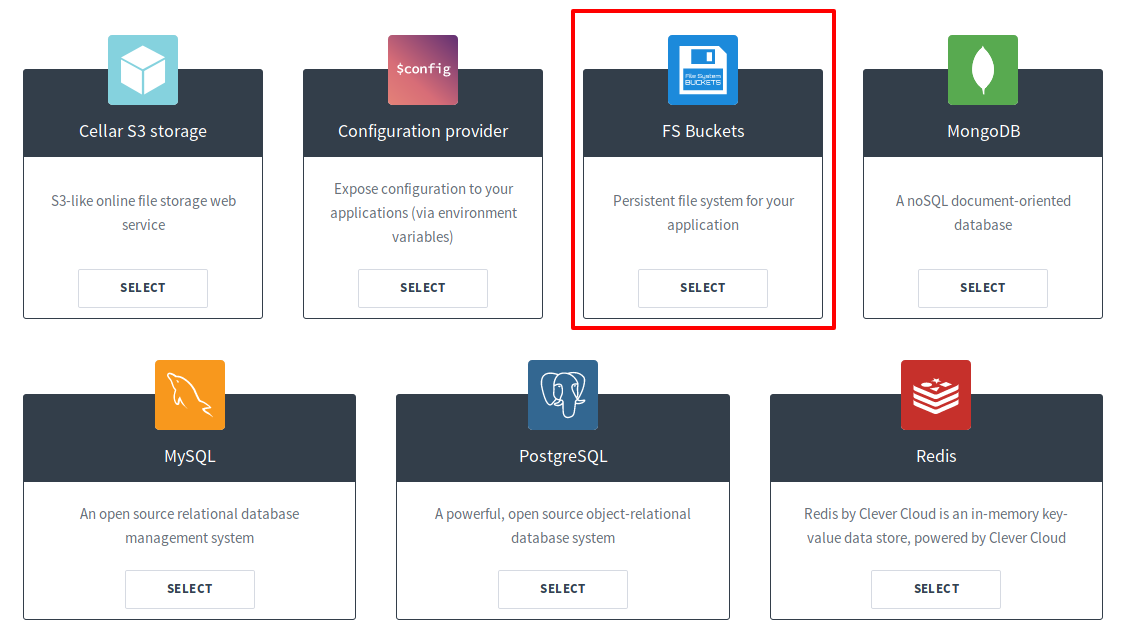
Then, go back in your application settings, go to "Service dependencies" item, and link your addon to your app.
The last step takes place in "Environment variables". You should see a `BUCKET_HOST` variable on the second aprt of the page. Now, create a new variable `CC_FS_BUCKET` with this value `content:`.
## 🚀 Let's push!
If your create your Clever Cloud application from a GitHub repository, you only have to `git push` your code to GitHub, and Clever Cloud will automatically deploy your code!
If not, you have to follow this documentation to add Clever Cloud remote to your git configuration. Then you will be able to push to Clever Cloud!
Thanks for reading!
enjoy();
---
# Comment je suis devenu développeur ?
URL: https://blog.welcomattic.com/blog/2014-11-26-comment-je-suis-devenu-developpeur/
Date: 2014-11-26
On va commencer à répondre à cette question par élimination : non, je n'ai pas fait d'école d'ingénieur, non je n'ai pas fait d'école privée d'informatique (SUPINFO, EPITECH, 42 etc ...), non, je n'ai fait aucun stage en Californie.
En fait j'ai juste été infecté par un virus quand j'étais petit. Ce virus c'est mon grand-père qui me l'a transmis. À l'époque (en 1996-97), mon grand-père avait un ordinateur, qui tournait sous Windows 95 (ultra récent !). Il s'en servait principalement pour maquetter (sur Designer 3.5) des plans 2D d'une maison qu'il retapait. Moi, qui devait avoir 4-5 ans, je le regardais faire les yeux écarquillés en voyant que l'on pouvait dessiner à l'infini sans avoir du feutre partout sur les doigts.
Un jour alors que mon grand-père était au téléphone dans son bureau, je lui demande si je peux dessiner sur l'ordinateur. Il acquiesce , et me dit que l'on enregistrera mon œuvre sur une disquette ensuite, mais surtout que je l'attende pour faire ça. D'après ce qu'il m'a raconté, il est revenu 15 minutes plus tard et j'avais enregistré mon fichier sur une disquette tout seul "comme un grand". À force de le regarder j'avais mémorisé les actions sans même savoir lire.
Ok, vous me direz, c'est bien mais quel rapport avec le métier de développeur ? Je dirais que c'est la curiosité. Après cette anecdote sur Windows 95, on a eu Windows 98, et Internet ! C'est à cette époque que j'ai commencé à jouer avec Photoshop 2.0. En fait plus le temps passait, plus j'allais explorer ce que l'on pouvait faire avec un ordinateur. Et depuis ce temps là je n'ai jamais arrêté !
Aujourd'hui mon grand-père m'appelle de temps en temps pour que je le dépanne car il ne retrouve pas cette pièce jointe qu'il a enregistré la veille ^^'
Pour en revenir à ce que j'ai fait comme études pour devenir développeur, j'ai un Bac STG GSI (Gestion des Systèmes d'Information), un BTS Info Gestion option Développeur d'Applications, et enfin un niveau Licence de Chef de Projet Multimédia.
Mais ces diplômes ne se suffisent pas à eux même, et ce serait identique si j'avais 4 masters et 2 doctorats de +. L'important c'est d'aimer ce que l'on fait, d'être curieux et d'être en veille permanente. Pratiquer au quotidien et pas seulement écrire des lignes de code. Il est important aussi d'expérimenter des systèmes, des architectures, des manières de faire les choses. Pour trouver de l'inspiration, je passe du temps à dériver sur GitHub de repo en repo au lieu de procrastiner sur Facebook, et je cherche à voir ce que l'on peut faire avec différents langages, ça améliore ma créativité ;)
Car oui, un développeur peut et DOIT être créatif ! Si ce n'était pas le cas nous aurions encore des logiciels à la MicroApplication, avec des interfaces immondes, aucune UI/UX pensée, et des fonctionnalités qui ne correspondent pas aux besoins des utilisateurs.
Voilà, selon moi, comment on peut devenir développeur. Ce n'est évidement pas le seul moyen, mais c'en est un, j'en suis la preuve. Ne vous faites pas enfermer par tel dictat de telle école, ni par un système universitaire majoritairement en retard sur son temps au niveau numérique. Restez libre de découvrir tout ce qu'offre le métier de développeur au sens large.
---
# [Talk] [API Platform Con 2026] - Des APIs sécurisées sans perdre la tête
URL: https://blog.welcomattic.com/talks/2026-09-17-des-apis-securisees-sans-perdre-la-tete/
Date: 2026-09-17
[💬 Slides](https://welcomattic.github.io/api-secured-the-modern-way/) · [🧪 Démo](https://github.com/welcoMattic/api-secured-the-modern-way)
Sécuriser une API s'est largement standardisé : OAuth2, OIDC, JWT et rate limiting couvrent l'essentiel des besoins.
Et des outils comme Keycloak, ou les nouveautés de Symfony, rendent leur mise en œuvre bien plus simple qu'il n'y paraît.
Côté fournisseur d'API, on voit comment renforcer concrètement la sécurité de son application.
Côté consommateur, comment dialoguer sereinement avec une API tierce.
Autorisation, authentification, rate limiting, API Gateway : un tour complet, sans y perdre la tête !
---
# [Talk] [ConFoo 2026] - APIs secured, the modern way
URL: https://blog.welcomattic.com/talks/2026-02-27-api-secured-the-modern-way/
Date: 2026-02-27
[💬 Slides](https://speakerdeck.com/welcomattic/api-secured-the-modern-way)
Securing APIs has become more standardized with modern solutions like OAuth2, OIDC, JWT and rate limiting.
Now, tools like Keycloak and Symfony's new features simplify implementing these protocols.
As an API developer, you’ll learn to enhance your API's security.
As an API consumer, you’ll discover how to interact securely with external APIs.
Join us to master secure API practices, without the complexity!
---
# [Talk] [ConFoo 2026] - Unveil Symfony AI
URL: https://blog.welcomattic.com/talks/2026-02-25-unveil-symfony-ai/
Date: 2026-02-25
[💬 Slides](https://speakerdeck.com/welcomattic/unveil-symfony-ai)
July 2025, the Symfony AI was launched as an initiative, just like Symfony UX, to help developers integrate AI into their apps with ready-to-use components and bundles.
In this talk, let's discover Symfony AI's origins, explore its components, and learn how to use them with any AI platform.
We'll also cover how to get started using it in your PHP apps and contribute to the project!
---
# [Talk] [Message à caractère informatique] - #144 Grâce au Pulsar multi nucléaire, Franken prouve que PHP est bien vivant !
URL: https://blog.welcomattic.com/talks/2025-10-10-podcast-grace-au-pulsar-multi-nucleaire-franken-prouve-que-php-est-bien-vivant/
Date: 2025-10-10
J'ai été invité à participer à deux épisodes du podcast [Message à caractère informatique](https://www.clever.cloud/podcast/) de Clever Cloud. Écoute-les directement ci-dessous, ou regarde la version vidéo.
## Épisode 144 : Grâce au Pulsar multi nucléaire, Franken prouve que PHP est bien vivant !
{{< youtube zs4huFbJQYI >}}
[🎙️ Écouter l'épisode 144 sur clever.cloud](https://www.clever.cloud/podcast/grace-au-pulsar-multi-nucleaire-franken-prouve-que-php-est-bien-vivant/)
## Épisode 145 : Java de base ouverte sur Symfony de logs en couleurs
{{< youtube OtcIMve6lcY >}}
[🎙️ Écouter l'épisode 145 sur clever.cloud](https://www.clever.cloud/podcast/java-de-base-ouverte-sur-symfony-de-logs-en-couleurs/)
---
# [Talk] [API Platform Con 2025] - Mercure, SSE, API Platform et un LLM élèvent un chat(bot)
URL: https://blog.welcomattic.com/talks/2025-09-18-mercure-sse-api-platform-et-un-llm-elevent-un-chat-bot/
Date: 2025-09-18
{{< youtube bvM82QfgVBo >}}
[💬 Slides](https://welcomattic.github.io/slides-real-time-ai-chatbot-with-mercure)
Construire un chat temps réel avec Mercure, c'est le cas d'exemple basique, mais parlant. Bien.
Mais à l'ère de l'IA, voyons ensemble comment intégrer un LLM dans un chatbot mettant en scène un client JS, une API PHP et Mercure ! Notre challenge sera de faire communiquer les différentes briques à travers Mercure uniquement, pour un maximum de performance et de fluidité!
Symfony et API Platform sont-ils prêts à affronter l'ère de l'IA ?
Est-il possible de recevoir des SSE via PHP de manière optimale et performante ?
Comment interagir efficacement avec un LLM en PHP ?
Venez le découvrir !
PS : nous prendrons le temps de démystifier tous les buzzwords utilisés dans ce texte 😁
---
# [Talk] [SyliusDays 2025] - Translate the UIs of your Sylius applications efficiently
URL: https://blog.welcomattic.com/talks/2025-05-22-translate-the-uis-of-your-sylius-applications-efficiently/
Date: 2025-05-22
[💬 Slides](https://welcomattic.github.io/sylius-ui-translation-slides/#/1)
Leverage Symfony's Translation component to efficiently translate the UIs of your Sylius applications.
This talk will cover best practices, tips, and tricks for managing translations in Sylius, ensuring your application is accessible to a global audience.
From translation keys extractions to SaaS tools used to translate your static texts, this talk will cover everything you need to know to efficiently translate the UIs of your Sylius applications.
---
# [Talk] [SymfonyLive 2025] - L'année des agents GenAI
URL: https://blog.welcomattic.com/talks/2025-03-27-the-year-of-genai-agents/
Date: 2025-03-27
[💬 Slides (Speaker Deck)](https://speakerdeck.com/welcomattic/2025-lannee-des-agents-genia) · [Gamma](https://gamma.app/docs/2025-Lannee-des-Agents-GenAI-ulbl1uomqqurvgz)
Lightning talk de 7 minutes présenté lors du SymfonyLive Paris 2025.
---
# [Talk] [SymfonyLive Paris 2023] - Au moins 4 façons de définir un DateTime avec un Time réinitialisé (Lightning Talk)
URL: https://blog.welcomattic.com/talks/2023-03-23-au-moins-4-facons-de-definir-un-date-time-avec-un-time-reinitialise/
Date: 2023-03-23
[💬 Slides](https://welcomattic.github.io/lt-datetime-sflive-2023)
Lorsque nous créons des objets DateTime à partir d’une chaine de caractères comme « 2023–03–23 », à l’exécution PHP va définir les emplacements « heures », « minutes » et « secondes » aux valeurs instantannées (c’est à dire à l’heure de l’exécution). Or cette heure arbitraire n’est parfois pas ce que nous voulons. Voyons donc comment réinitialiser ces emplacements de temps facilement !
---
# [Talk] [SymfonyCon Disneyland Paris 2022] - Painless authentication with Access Tokens
URL: https://blog.welcomattic.com/talks/2022-11-17-painless-authentication-with-access-token/
Date: 2022-11-17
[💬 Slides](https://speakerdeck.com/welcomattic/painless-authentication-with-access-tokens)
Via some simple but real scenarios, we will discover the power of the new AccessToken Authenticator shipped in Symfony 6.2. For example, we are developing a SaaS product, which exposes a private API. Our users can register many applications into their accounts, for each one we will generate an API Token that users must inject in their requests. Now, with a pinch of YAML and a dash of PHP, we will be able to authenticate users from their API Token. In this talk, I will show you how it also works with JWT and some other exotic tokens!
---
# [Talk] [SymfonyWorld Online 2020] - Internationalize your Symfony application
URL: https://blog.welcomattic.com/talks/2020-12-04-symfony-world-2020-internationalize-your-symfony-application/
Date: 2020-12-04
[💬 Slides](https://docs.google.com/presentation/d/1Zz5Oxa-6jedobK4jOhuQ9ggTyVTtGcEP3Un_y0LdBoM/)
Translating an application is a big step while you develop an international project. Translation process of an application can be very tough. It can remain laborious even after the first release. So, we have a new type of workmate: dear developers, product owners, designers, let me introduce translators with whom we will have to work efficiently! Together, we will have to make sure that the translations stay up to date on production. How? This is exactly what we will be talking about in this conference. Tools like php-translation bundle, Loco or Transifex will be very useful to your team. We will plug them in Symfony to create an efficient workflow. We will also define responsibilities for developers, translators and designers. Everything to ease the translation process from development environment to production without any pain! At the end of this talk, you will be looking forward to implementing these amazing solutions!
---
# [Talk] [SymfonyLive Paris 2019] - Des images au cordeau pour vos applications Symfony
URL: https://blog.welcomattic.com/talks/2019-03-29-symfony-live-paris-2019-des-images-au-cordeau-pour-vos-applications-symfony/
Date: 2019-03-29
[📺 Vidéo](https://symfonycasts.com/screencast/paris2019/des-images-au-cordeau-pour-vos-applications-symfony)
|
[💬 Slides](https://slides.com/welcomattic/des-images-au-cordeau-pour-vos-applications-symfony/)
Le responsive est une pratique largement répandue dans nos projets depuis quelques années maintenant.
De nombreuses techniques CSS permettent d'adapter les layouts de nos sites web à différentes tailles de terminaux.
Mais lorsqu'il s'agit d'adapter les images, les techniques sont souvent moins connues, et parfois perçues comme expérimentales.
Nous listerons ensemble quels sont les standards actuels permettant de charger la bonne image à la bonne taille et au bon format pour le bon terminal.
Puis, nous verrons comment implémenter ces standards au sein d'une application Symfony, quels outils utiliser et comment tirer parti de Twig pour nous faciliter le travail !
---
# [Talk] [PHP Tour Montpellier 2018] - Traduire efficacement une application Symfony
URL: https://blog.welcomattic.com/talks/2018-05-18-phptour-montpellier-traduire-efficacement-une-application-symfony/
Date: 2018-05-18
{{< youtube XdG5BZnJXFk >}}
[💬 Slides](https://welcomattic.github.io/traduire-efficacement-une-app-symfony/phptour-2018/index.html#/)
La traduction d'une application est une étape primordiale dans un projet international.
Mais sa mise en place est souvent douloureuse, et ça le reste tout au long de la vie de l'application.
Un nouveau type d'intervenant entre en jeu en plus des développeurs, chefs de projets, designers, voici maintenant les traducteurs.
Comment faire travailler toutes ces personnes efficacement, et garder l'intégrité des traductions de l'application ?
C'est ce que je vous propose d'aborder dans cette conférence.
Nous verrons ensemble quels outils externes utiliser pour faciliter la traduction aussi bien pour les développeurs, que les traducteurs, mais aussi pour les intervenants en qualité qui sont chargés de vérifier tout ce travail.
Nous verrons également comment brancher ces outils au sein de Symfony pour bénéficier d'un workflow de traduction cohérent et simple d'utilisation d'un environnement local à la production.
À la fin de la conférence vous n'aurez qu'une envie, mettre à jour vos projets avec ces outils pour enfin vous épargner de longues journées de mise à jour de traductions !
---
# [Talk] [SymfonyLive Paris 2018] - Traduire efficacement une application Symfony
URL: https://blog.welcomattic.com/talks/2018-03-30-symfony-live-paris-2019-traduire-efficacement-une-application-symfony/
Date: 2018-03-30
{{< youtube zP6vbkc-GJY >}}
[💬 Slides](https://welcomattic.github.io/traduire-efficacement-une-app-symfony/symfony-live-paris-2018/index.html#/)
La traduction d'une application est une étape primordiale dans un projet international.
Comment faire travailler toutes ces personnes efficacement, et garder l'intégrité des traductions de l'application ?
C'est ce que je vous propose d'aborder dans cette conférence. Nous verrons ensemble quels outils externes utiliser pour faciliter la traduction aussi bien pour les développeurs, que les traducteurs, mais aussi pour les intervenants en qualité qui sont chargés de vérifier tout ce travail.
Nous verrons également comment brancher ces outils au sein de Symfony pour bénéficier d'un workflow de traduction cohérent et simple d'utilisation d'un environnement local à la production.
À la fin de la conférence vous n'aurez qu'une envie, mettre à jour vos projets avec ces outils pour enfin vous épargner de longues journées de mise à jour de traductions !